AI SDLC: AGENTS.md Files Coding Agents Actually Follow - Five Rules and One Rework Metric
We rewrote one AGENTS.md for coding agents and measured it: agent PR rework fell from 41% to 17%. The five rule types that worked, and the one that did not.
Every coding agent we use - Copilot coding agent, Claude Code, Codex - reads an instruction file from the repository root before it touches anything. Ours was 900 words of prose that nobody had measured. Agent PRs came back needing changes 41% of the time, and when we read the review comments, most of them asked for something the file already said.
So we rewrote the file around one question: can a reviewer check this rule mechanically? Six weeks later the rework rate on agent PRs was 17%. This post is what we changed, what did not move, and how to measure it in your own repo.
The metric: rework rate
Rework rate = agent PRs where a reviewer requested a change that the instruction file already covered, divided by all agent PRs. It is cheap to collect: we label such review comments agent-rework and a weekly script counts them.
We measured 212 agent PRs in the six weeks before the rewrite and 240 after, same repository, same four reviewers. Nothing else about the pipeline described in the end-to-end Copilot agents post changed in that window.
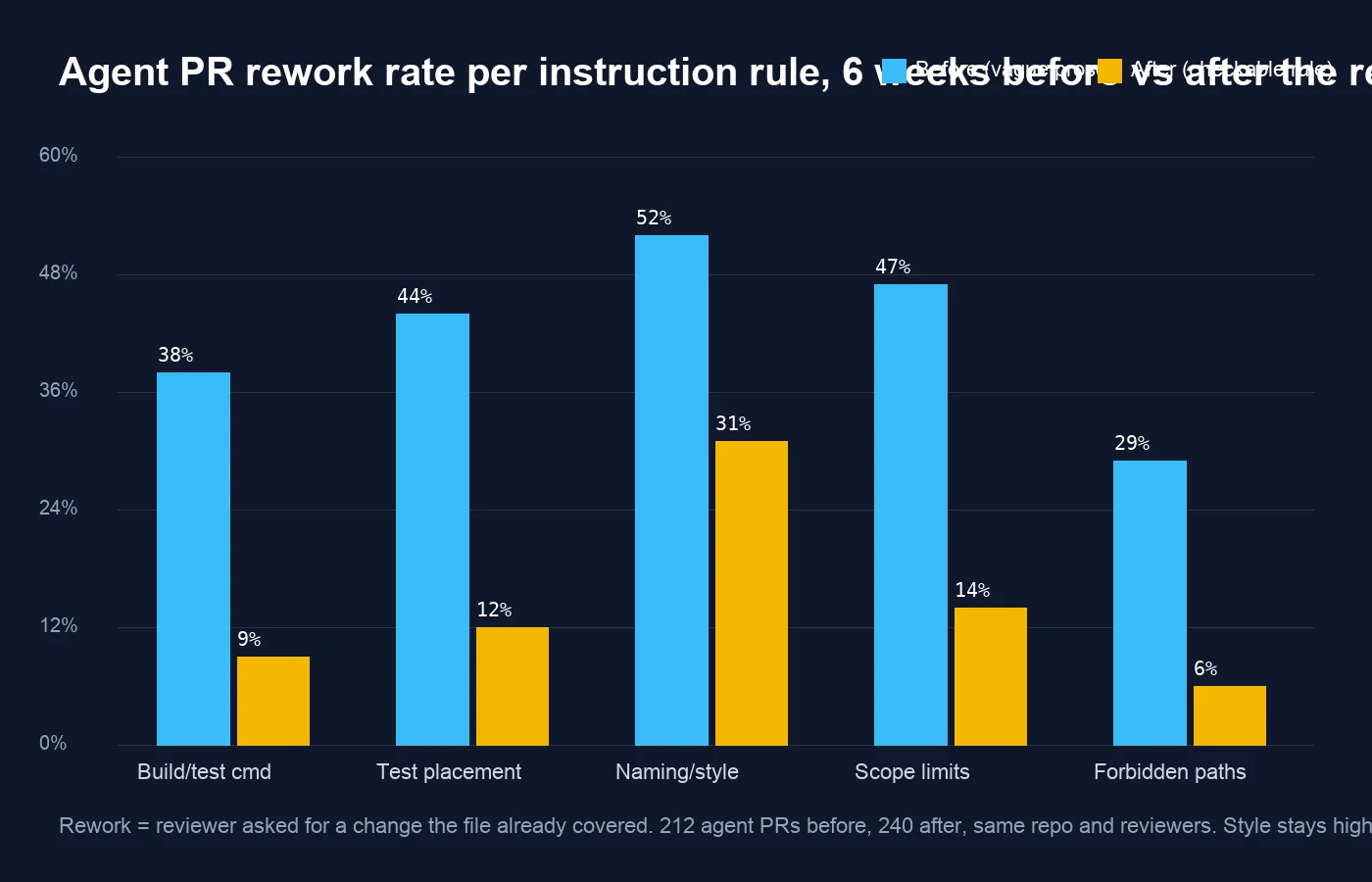 Rework rate per rule category. Four of the five categories dropped by two thirds or more; naming and style barely moved.
The five rule types
1. The exact build and test command
Before: “Make sure the solution builds and tests pass.”
After:
1
2
3
4
5
## Build and test
Run exactly this before opening a PR. If it fails, fix it; do not skip tests.

    dotnet build Blog.sln -warnaserror
    dotnet test Blog.sln --no-build --filter "Category!=Integration"
The agent cannot guess that we treat warnings as errors or that integration tests need a database it does not have. Rework from “build has warnings” and “you ran the integration tests and they failed” went from 38% to 9%.
2. Where tests go, by example
Before: “Add tests for new code.”
After:
1
2
3
4
## Tests
- Unit tests live in tests/<Project>.Tests/, mirroring the source folder.
  src/Blog.Core/Posts/PostParser.cs -> tests/Blog.Core.Tests/Posts/PostParserTests.cs
- One test class per source class. Use xUnit and FluentAssertions; no NUnit, no MSTest.
The source-to-test path example did more than the sentence around it. Agents pattern-match on examples; they skim prose. 44% to 12%.
3. Scope limits as a numbered list
Before: “Keep changes focused.”
After:
1
2
3
4
5
## Scope
1. Change only the files the issue names plus their tests.
2. Do not refactor code you did not need to touch.
3. If the fix needs a change outside that set, stop and leave a comment on the issue instead.
4. Never add a NuGet package or change a lockfile.
Rule 3 matters most. An agent that hits a wall will widen the change to get around it unless it has been given a legitimate way to stop. The handoff model in where coding agents fit in the lifecycle depends on that stop being available. 47% to 14%.
4. Forbidden paths, as a list of globs
1
2
3
4
5
## Never edit
- .github/**
- docs/decisions/**
- **/*.lock, **/packages.lock.json
- infra/**  (owned by platform; open an issue instead)
Globs are unambiguous and the agent treats them as hard constraints. This category also feeds the review agent described in the code-review agent workflow post, which rejects a PR touching these paths before a human sees it. 29% to 6%.
5. Naming and style - the one that did not move
Before and after, this section listed our conventions: Async suffix, no var for non-obvious types, file-scoped namespaces, and so on. It went from 52% to 31% - still the highest rework category by a distance.
The reason, once we looked, is simple: the agent copies the style of the code around its change, not the style in the file. In the parts of the repo that already follow the conventions, style rework is near zero. In the legacy folders, the agent faithfully reproduces the legacy style. The instruction file cannot override what the surrounding code teaches.
What actually helped was moving the enforceable subset into .editorconfig with severity error, so rule 1 (build with -warnaserror) catches it. Prose about style is the weakest tool available; the compiler is the strongest.
The shape of a rule that works
Across the four categories that moved, the rules that worked share three properties:
- A command or a path, not an adjective. “Focused” and “clean” cannot be checked.
dotnet test --filterandtests/<Project>.Tests/can. - An example beside the rule. One source-to-test path mapping did more than a paragraph.
- An exit. Every constraint says what to do when it cannot be met: stop, comment, open an issue. Without an exit the agent improvises.
How to measure yours
- Add an
agent-reworklabel and ask reviewers to apply it to any comment that the instruction file already covers. Two weeks is enough to get a baseline. - Group the comments by which section of the file they relate to. The groups with the highest counts are the sections to rewrite first.
- Rewrite one section at a time using the three properties above. Changing all of them at once tells you nothing about which rewrite worked.
- Count again after the same number of PRs, not the same number of weeks.
The file is now 340 words, shorter than the one it replaced, and it is reviewed like code: a change to it needs a PR and a reason. The next experiment is splitting it by folder - a smaller, more specific file in src/Blog.Legacy/ to see whether local instructions can beat the surrounding code on style, the one place the root file lost.