Azure OpenAI Function Calling in .NET: Let the Model Call Your C# Methods Safely
Wire Azure OpenAI tool calls to real C# methods: define JSON schemas, run the tool loop, validate arguments, and keep the model from calling anything dangerous.
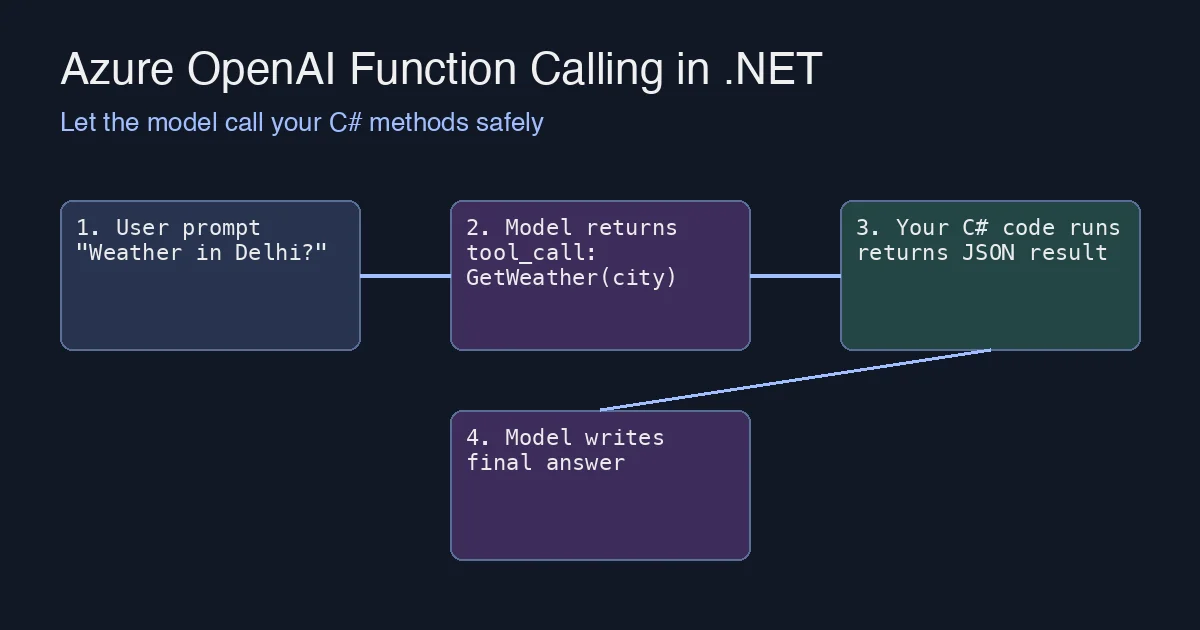
A chat model on its own can only talk. Function calling (Azure OpenAI calls them tools) is what turns it into something that can look up an order, query a database, or file a ticket. The model never executes code itself: it returns a structured request saying “call GetWeather with {"city":"Delhi"}”, your application runs the method, and you hand the result back so the model can finish its answer.
This post walks through the full loop in .NET with the Azure.AI.OpenAI SDK, plus the parts that bite in production: argument validation, tool loops that never terminate, and deciding which methods the model is allowed to touch at all.
The four-step loop
- You send the user’s message and a list of tool definitions (name, description, JSON schema for the arguments).
- The model replies with
finish_reason: tool_callsand one or more tool calls instead of text. - Your code executes each call and appends a
toolmessage containing the JSON result. - You call the model again with the extended history; it now writes the final answer (or asks for more tools).
Steps 2-4 may repeat, which is why you need a loop with a cap.
Defining a tool
1
2
3
4
5
6
7
8
9
10
11
12
13
14
15
16
17
18
19
20
21
22
23
24
25
26
27
using Azure;
using Azure.AI.OpenAI;
using OpenAI.Chat;

var client = new AzureOpenAIClient(
    new Uri(Environment.GetEnvironmentVariable("AZURE_OPENAI_ENDPOINT")!),
    new DefaultAzureCredential());

ChatClient chat = client.GetChatClient("gpt-4o");

ChatTool getWeatherTool = ChatTool.CreateFunctionTool(
    functionName: "GetWeather",
    functionDescription: "Get the current weather for a city.",
    functionParameters: BinaryData.FromString("""
    {
      "type": "object",
      "properties": {
        "city": { "type": "string", "description": "City name, e.g. Delhi" },
        "unit": { "type": "string", "enum": ["celsius", "fahrenheit"] }
      },
      "required": ["city"],
      "additionalProperties": false
    }
    """));

var options = new ChatCompletionOptions();
options.Tools.Add(getWeatherTool);
The functionDescription matters more than people expect: it is the only thing the model reads to decide when to call your tool. Write it like documentation for a junior developer, not a one-word label.
Running the loop
1
2
3
4
5
6
7
8
9
10
11
12
13
14
15
16
17
18
19
20
21
22
23
24
25
26
var messages = new List<ChatMessage>
{
    new SystemChatMessage("You are a helpful assistant. Use tools when they help."),
    new UserChatMessage("What's the weather in Delhi right now?")
};

const int maxRounds = 5;

for (int round = 0; round < maxRounds; round++)
{
    ChatCompletion completion = await chat.CompleteChatAsync(messages, options);

    if (completion.FinishReason != ChatFinishReason.ToolCalls)
    {
        Console.WriteLine(completion.Content[0].Text);
        break;
    }

    messages.Add(new AssistantChatMessage(completion));

    foreach (ChatToolCall call in completion.ToolCalls)
    {
        string result = await ToolDispatcher.InvokeAsync(call.FunctionName, call.FunctionArguments);
        messages.Add(new ToolChatMessage(call.Id, result));
    }
}
Two details are easy to miss:
- The assistant message containing the tool calls must be added to the history before the tool results, otherwise the API rejects the request with a 400 about an orphaned
toolmessage. - Every
ToolChatMessagemust echo thecall.Idit answers. If the model asked for two tools, return two results.
Dispatching safely
Do not reflect over your whole assembly and let the model call whatever it names. Keep an explicit allow-list and deserialize arguments into a typed record so bad input fails before it reaches business logic:
1
2
3
4
5
6
7
8
9
10
11
12
13
14
15
16
17
18
19
20
21
22
23
24
25
26
27
28
29
30
31
32
33
34
35
public static class ToolDispatcher
{
    private record WeatherArgs(string City, string? Unit);

    public static async Task<string> InvokeAsync(string name, BinaryData arguments)
    {
        try
        {
            return name switch
            {
                "GetWeather" => await GetWeatherAsync(
                    JsonSerializer.Deserialize<WeatherArgs>(arguments,
                        new JsonSerializerOptions { PropertyNameCaseInsensitive = true })
                    ?? throw new ArgumentException("missing arguments")),
                _ => JsonSerializer.Serialize(new { error = $"Unknown tool '{name}'" })
            };
        }
        catch (Exception ex)
        {
            // Return the error to the model instead of throwing: it will usually
            // apologise or retry with corrected arguments.
            return JsonSerializer.Serialize(new { error = ex.Message });
        }
    }

    private static async Task<string> GetWeatherAsync(WeatherArgs args)
    {
        if (string.IsNullOrWhiteSpace(args.City) || args.City.Length > 100)
            throw new ArgumentException("city is required and must be under 100 characters");

        // Call your real weather service here.
        await Task.Delay(10);
        return JsonSerializer.Serialize(new { city = args.City, tempC = 31, condition = "Hazy" });
    }
}
Returning errors as JSON to the model (rather than crashing the request) gives noticeably better UX: the model explains what went wrong in plain language, and in many cases it re-issues the call with fixed arguments.
Production checklist
- Cap the rounds. Without
maxRoundsa confused model can ping-pong tool calls forever and run up your token bill. - Treat arguments as untrusted input. They come from a model that was itself reading untrusted user text. Validate lengths, enums and IDs exactly as you would for a public API.
- Never expose write operations without a confirmation step. Read-only tools can run automatically; for
CancelOrderorSendEmail, have the model propose the call and let the user confirm in the UI. - Log every tool call with the call ID, the arguments and the duration. When a user reports a wrong answer, this log is how you find out whether the model or the tool was at fault.
- Set
additionalProperties: falsein your schemas and considerstrict: true(structured outputs) so the argument JSON always matches your record type.
Summary
Function calling is a protocol, not magic: the model emits a request, you execute it, you return the result, and the model continues. Keep the dispatcher on an explicit allow-list, validate arguments like any other external input, cap the loop, and require human confirmation for anything that changes state. With those guardrails, letting the model call into your .NET code is safe, and it is where most of the practical value of Azure OpenAI lives.