Structured Outputs with Azure OpenAI in .NET: Stop Parsing Free Text
How to use Azure OpenAI structured outputs (JSON schema mode) from C# to get responses that always match a typed record, with pitfalls, schema rules and a working sample.
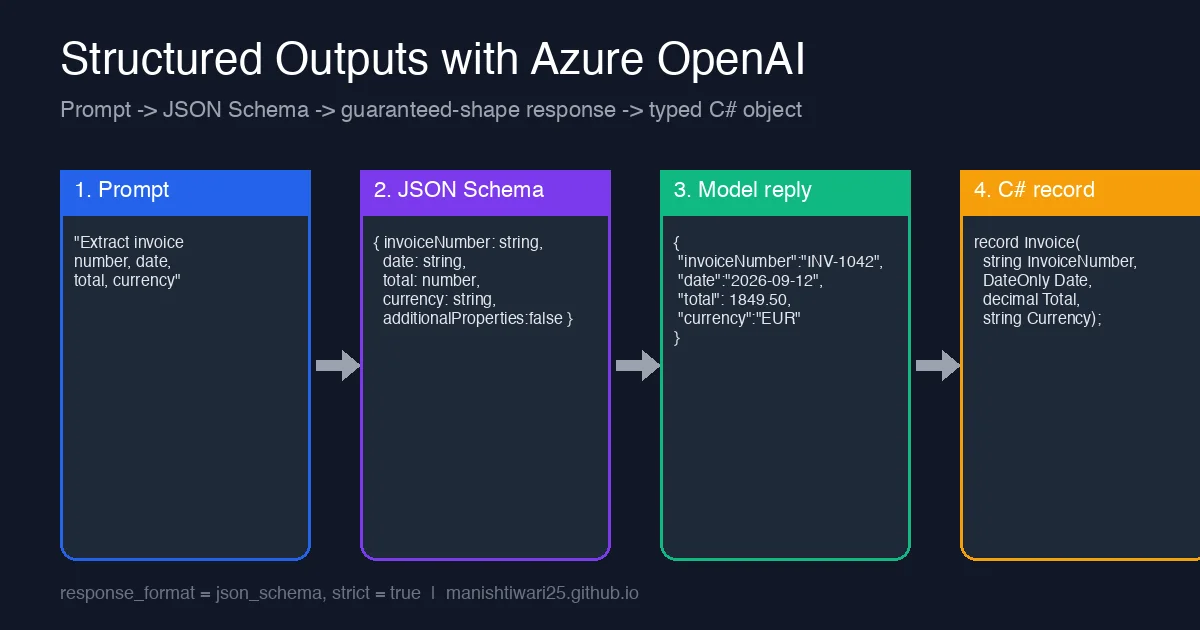
Most production LLM code does not end with a chat bubble. It ends with a database row, a queue message or a call to another API. That means the model’s answer has to be parsed, and anyone who has shipped a “return JSON only” prompt knows how that goes: a stray sentence before the JSON, a trailing markdown fence, a field renamed from total to totalAmount on Tuesday.
Azure OpenAI’s structured outputs feature fixes this class of bugs. You hand the service a JSON Schema, set strict: true, and the model is constrained at decode time to produce output that matches the schema. No regex clean-up, no retry loops for malformed JSON. This post shows how to use it from .NET and the rules you must follow to make it work.
Why “JSON mode” was not enough
The older response_format: { type: "json_object" } only guaranteed that the reply was valid JSON. It did not guarantee any shape, so you still had to validate every field and handle missing or extra keys. Structured outputs (type: "json_schema") guarantee the reply conforms to your schema: required keys present, no unknown keys, correct primitive types and enum values.
| JSON mode | Structured outputs | |
|---|---|---|
| Valid JSON | Yes | Yes |
| Keys and types match your model | No | Yes (strict) |
| Enum values constrained | No | Yes |
| Needs a schema in the request | No | Yes |
| Model support | Most chat models | gpt-4o 2024-08-06+, gpt-4o-mini, gpt-4.1, o-series |
Step 1: Define the C# type
Start from the type you actually want in your application. Keep it flat where possible; nested objects are fine but every one of them must follow the strict-schema rules below.
1
2
3
4
5
6
7
8
public record Invoice(
    string InvoiceNumber,
    string Date,          // ISO 8601, parse to DateOnly after
    decimal Total,
    string Currency,
    LineItem[] Items);

public record LineItem(string Description, int Quantity, decimal UnitPrice);
Note that Date is a string. JSON Schema has no date type that the strict mode understands, so let the model return ISO text and convert it yourself.
Step 2: Build the schema
You can hand-write the schema or generate it. Whichever you choose, strict mode enforces these rules and rejects the request with a 400 if you break them:
- Every object needs
"additionalProperties": false. - Every property must be listed in
required. Optional fields are expressed as a union withnull("type": ["string", "null"]), not by leaving them out ofrequired. - No
format,minimum,maxLength,patternor other validation keywords; only types, enums,$refand nesting. - Maximum 100 properties and 5 levels of nesting per schema.
1
2
3
4
5
6
7
8
9
10
11
12
13
14
15
16
17
18
19
20
21
22
23
24
{
  "type": "object",
  "additionalProperties": false,
  "required": ["invoiceNumber", "date", "total", "currency", "items"],
  "properties": {
    "invoiceNumber": { "type": "string" },
    "date": { "type": "string" },
    "total": { "type": "number" },
    "currency": { "type": "string", "enum": ["USD", "EUR", "GBP", "INR"] },
    "items": {
      "type": "array",
      "items": {
        "type": "object",
        "additionalProperties": false,
        "required": ["description", "quantity", "unitPrice"],
        "properties": {
          "description": { "type": "string" },
          "quantity": { "type": "integer" },
          "unitPrice": { "type": "number" }
        }
      }
    }
  }
}
The enum on currency is the cheapest win here: instead of validating after the fact, the model simply cannot answer "Euro".
Step 3: Call Azure OpenAI from C#
Using the Azure.AI.OpenAI package (2.x) with the underlying OpenAI client library:
1
2
3
4
5
6
7
8
9
10
11
12
13
14
15
16
17
18
19
20
21
22
23
24
25
26
27
28
using Azure.AI.OpenAI;
using Azure.Identity;
using OpenAI.Chat;
using System.Text.Json;

var client = new AzureOpenAIClient(
    new Uri("https://<your-resource>.openai.azure.com/"),
    new DefaultAzureCredential());

ChatClient chat = client.GetChatClient("gpt-4o"); // deployment name

var options = new ChatCompletionOptions
{
    ResponseFormat = ChatResponseFormat.CreateJsonSchemaFormat(
        jsonSchemaFormatName: "invoice",
        jsonSchema: BinaryData.FromString(File.ReadAllText("invoice.schema.json")),
        jsonSchemaIsStrict: true)
};

ChatCompletion completion = await chat.CompleteChatAsync(
[
    new SystemChatMessage("Extract the invoice fields from the user's text."),
    new UserChatMessage(rawInvoiceText)
], options);

var json = completion.Content[0].Text;
var invoice = JsonSerializer.Deserialize<Invoice>(json,
    new JsonSerializerOptions { PropertyNameCaseInsensitive = true })!;
Because the shape is guaranteed, Deserialize<Invoice> is the whole parsing story. Use DefaultAzureCredential rather than an API key so the same code runs with a developer login locally and a managed identity in Azure.
Step 4: Handle the two cases that are not schema errors
Structured outputs guarantee shape, not success. Two situations still need code:
- Refusals. If the content filter or the model declines, the reply carries a
refusalmessage instead of content. Checkcompletion.Refusal(orFinishReason) before deserializing. - Truncation. If
max_tokensis hit, the JSON is cut off and will not parse. Checkcompletion.FinishReason == ChatFinishReason.Lengthand either raise the limit or shrink the schema.
1
2
3
4
if (completion.FinishReason == ChatFinishReason.Length)
    throw new InvalidOperationException("Response truncated; increase MaxOutputTokenCount.");
if (!string.IsNullOrEmpty(completion.Refusal))
    throw new InvalidOperationException($"Model refused: {completion.Refusal}");
Pitfalls we hit in practice
- Casing. The model returns the property names exactly as in the schema. If your schema is camelCase and your C# is PascalCase, set
PropertyNameCaseInsensitiveor useJsonPropertyName. - First-call latency. The first request with a new schema is slower because the service compiles the schema into a grammar. Subsequent calls with the same schema are cached, so do not generate a fresh schema per request.
- API version. Structured outputs need API version
2024-08-01-previewor later; on older versions thejson_schemaformat is silently ignored and you are back to free text. - Recursion. Self-referencing schemas via
$refare supported, but the 5-level nesting limit still applies to the instance, so deep trees fail at runtime rather than at request time.
When to use it
Use structured outputs whenever the answer is consumed by code: extraction, classification with a fixed label set, routing decisions, tool arguments. Skip it for chat UIs, summaries and anything a human reads directly, where forcing a schema just makes the answer worse.
The payoff is a class of bugs that simply disappears. In our invoice pipeline, moving from “return JSON only” prompts to a strict schema removed the retry-on-parse-failure path entirely and the malformed-response rate went from a few percent to zero.