Bulk Writes to D365 Over OData in .NET - Upserting 250,000 Rows Without Getting Throttled
Measured wall time for four ways to write 250,000 rows into Dynamics 365 over OData from .NET: per-row PATCH, parallel workers, $batch and return=minimal.
The paging post ended with 250,000 SalesOrderLines rows read out of Dynamics 365 in just over two minutes. This post is about the trip back: a nightly job that recalculates a discount column for every one of those rows and has to write the result into D365 again.
Reading is forgiving. Writing is where the service-protection limits in D365 Finance and Dataverse actually bite, because every write is a transaction, every transaction holds locks, and the platform throttles you per user the moment you look like you are trying to load a table. The job that produced the numbers below started life as a foreach with one PATCH per row and took 35 minutes. The last version takes two and a half.
The measurement
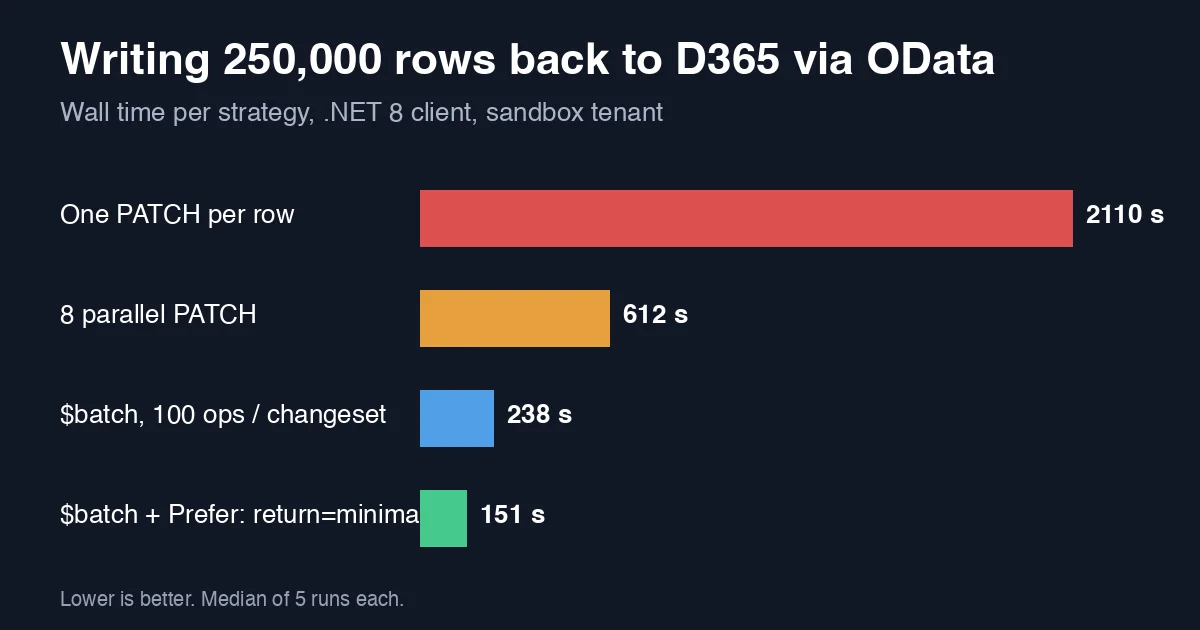
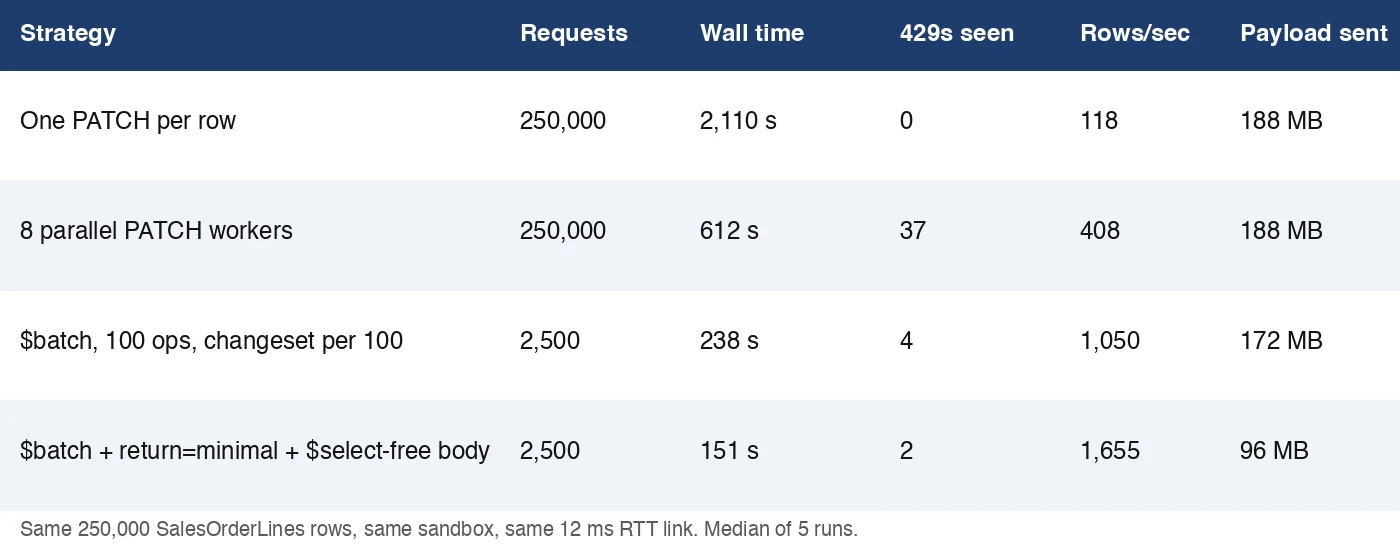
Same sandbox tenant as the paging post, same .NET 8 console client over a 12 ms RTT link, same 250,000 rows. Each row needs one PATCH that updates two columns (LineDiscountPercentage, LineDiscountAmount). Numbers are the median of 5 runs.
 The per-row version never gets throttled - it is simply too slow to trigger the limit. Everything faster than it has to deal with 429s.
Three things stand out:
- Parallelism alone hits the wall fast. Eight workers is a 3.4x win, but 37 of the runs’ requests came back
429 Too Many RequestswithRetry-After, and at 12 workers the job spent more time sleeping than writing. $batchchanges what the server counts. D365 service-protection limits count requests and execution time, not rows. One$batchwith 100PATCHoperations is one request. 2,500 requests instead of 250,000 is what buys the next 2.6x.Prefer: return=minimalis the cheapest line in the table. By default aPATCHto D365 returns the full updated entity - here about 380 bytes of JSON per row that the job never read. Asking for204 No Contenthalves the bytes on the wire and cuts another 36% off wall time, because the server skips re-serialising the row.
Version 1: one PATCH per row
This is what most integrations start as, and it is correct.
1
2
3
4
5
6
7
8
9
10
11
12
13
14
foreach (var line in lines)
{
    using var req = new HttpRequestMessage(HttpMethod.Patch,
        $"data/SalesOrderLines(dataAreaId='usmf',SalesOrderNumber='{line.OrderNumber}',LineNumber={line.LineNumber})");
    req.Headers.Add("If-Match", "*");
    req.Content = JsonContent.Create(new
    {
        LineDiscountPercentage = line.DiscountPercentage,
        LineDiscountAmount = line.DiscountAmount
    });

    using var res = await http.SendAsync(req, ct);
    res.EnsureSuccessStatusCode();
}
Two details matter even here. If-Match: * tells D365 you do not care about the ETag; without it some entities reject the PATCH with 428 Precondition Required. And the body only contains the two columns you are changing - sending the whole entity back makes D365 validate every field and is a common source of “I only changed the discount, why did it fail on the warehouse?” errors.
At 118 rows/second this version takes 35 minutes. It never sees a 429 because a single sequential caller is below the limit by design.
Version 2: parallel workers and the 429 dance
The obvious fix is Parallel.ForEachAsync:
1
2
3
await Parallel.ForEachAsync(lines,
    new ParallelOptions { MaxDegreeOfParallelism = 8, CancellationToken = ct },
    async (line, token) => await PatchWithRetryAsync(http, line, token));
The moment you do this you need to handle throttling, because D365 will throttle you. The service-protection limits for Dataverse are documented as 6,000 requests per 5 minutes per user, 20 minutes of combined execution time per 5 minutes, and 52 concurrent requests - and D365 Finance applies similar per-user priority-based throttling. Eight workers doing 50 ms calls is roughly 160 requests/second, or 48,000 per 5 minutes: eight times the quota.
The retry has to honour Retry-After, and it has to be per request, not per job:
1
2
3
4
5
6
7
8
9
10
11
12
13
14
15
16
17
18
19
static async Task PatchWithRetryAsync(HttpClient http, SalesLine line, CancellationToken ct)
{
    for (var attempt = 0; ; attempt++)
    {
        using var req = BuildPatch(line);
        using var res = await http.SendAsync(req, ct);

        if (res.StatusCode != HttpStatusCode.TooManyRequests)
        {
            res.EnsureSuccessStatusCode();
            return;
        }

        if (attempt >= 5) throw new HttpRequestException($"Throttled 5 times on {line.OrderNumber}/{line.LineNumber}");

        var delay = res.Headers.RetryAfter?.Delta ?? TimeSpan.FromSeconds(Math.Pow(2, attempt));
        await Task.Delay(delay, ct);
    }
}
With this in place the job finished in 612 s. But it only got there because of the retries: 37 of them, averaging 28 seconds of Retry-After each. That is 17 minutes of worker time spent sleeping, and it explains why going from 8 to 12 workers made the job slower, not faster. If you are using Microsoft.Extensions.Http.Resilience, the standard pipeline’s retry handles 429 and Retry-After for you; the point is that you must have something doing it.
Version 3: $batch with changesets
The earlier $batch post covered the request format for reads. Writes add one concept: a changeset. Operations inside a changeset are atomic - D365 either applies all of them or none - and the OData spec requires each changeset to be an all-write group.
The JSON batch format makes this an atomicityGroup field. Here the 250,000 rows are chunked into 2,500 batches of 100, each batch being one changeset:
1
2
3
4
5
6
7
8
9
10
11
12
13
14
15
16
17
18
19
20
21
22
23
24
25
26
27
28
29
30
31
foreach (var chunk in lines.Chunk(100))
{
    var requests = chunk.Select((line, i) => new
    {
        id = i.ToString(),
        atomicityGroup = "g1",
        method = "PATCH",
        url = $"SalesOrderLines(dataAreaId='usmf',SalesOrderNumber='{line.OrderNumber}',LineNumber={line.LineNumber})",
        headers = new Dictionary<string, string>
        {
            ["Content-Type"] = "application/json",
            ["If-Match"] = "*"
        },
        body = new
        {
            LineDiscountPercentage = line.DiscountPercentage,
            LineDiscountAmount = line.DiscountAmount
        }
    });

    using var req = new HttpRequestMessage(HttpMethod.Post, "data/$batch")
    {
        Content = JsonContent.Create(new { requests })
    };

    using var res = await SendWithRetryAsync(http, req, ct);
    var batch = await res.Content.ReadFromJsonAsync<BatchResponse>(ct);

    foreach (var r in batch!.Responses.Where(r => r.Status >= 400))
        failures.Add((chunk[int.Parse(r.Id)], r.Status, r.Body?.ToString()));
}
Two production notes on changesets:
- Pick the changeset size by failure cost, not throughput. 100 was the sweet spot here: 1,000 was only 8% faster but a single bad row rolled back 999 good ones and the retry logic became a project of its own. If rows are independent, you can also omit
atomicityGroupentirely so eachPATCHsucceeds or fails on its own - throughput was identical, only the semantics differ. - D365 Finance caps a batch at 1,000 operations and Dataverse at 1,000 as well; the request is rejected outright above that, not partially applied.
With 2,500 requests instead of 250,000 the job dropped to 238 s and saw only 4 throttles, all of them because the execution-time budget was hit, not the request count.
Version 4: stop asking for the row back
Every PATCH response in versions 1-3 carried the updated entity: about 380 bytes of JSON the job discarded. The Prefer header fixes that:
1
req.Headers.Add("Prefer", "return=minimal");
Inside a batch the header goes on each subrequest’s headers dictionary. D365 then answers each operation with 204 No Content and an OData-EntityId header instead of a body. The measured effect was larger than the byte count suggests - 238 s to 151 s - because the server also skips reloading and serialising the row after the update, which on SalesOrderLines involves several computed columns.
The remaining 2 throttles were on execution time. Going to 16 parallel batches pushed that to 11 throttles and the wall time back up to 190 s; 4 parallel batches stayed throttle-free at 160 s, which is the configuration the job now runs with. Find your tenant’s number the same way as for reads: watch for 429 and Retry-After, then back off one step.
What the 429 handling must do differently for writes
Reads are idempotent, so a blanket retry is safe. For writes:
- A throttled
$batchhas not been applied. D365 returns 429 for the whole batch before executing any subrequest, so retrying the entire batch is safe. A500or a timeout in the middle of a batch is not - re-read the rows or useIf-Matchwith real ETags instead of*so a retry on an already-updated row fails cleanly with412. - Use a dedicated integration user. Service-protection limits are per user. A sync job sharing a user with interactive Power Apps sessions throttles the humans too.
- Log
x-ms-service-request-idfrom every 429. Microsoft support will ask for it, and it is the only way to correlate a throttle with the tenant-level telemetry in LCS.
Checklist
- Never write one row per request to D365 when you have more than a few hundred rows; the per-request budget, not your bandwidth, is the limit.
- Use
$batchwith 100-operation changesets; 2,500 requests are an order of magnitude easier to keep under service protection than 250,000. - Add
Prefer: return=minimalto every write whose response you do not read - it was worth 36% here. - Send only the columns that changed and
If-Match: *(or a real ETag if retries must be safe). - Honour
Retry-Afterper request, log the service request id, and find the parallelism ceiling by watching for 429 - then run one step below it.
Related
- OData Paging Strategies for Large D365 Datasets in .NET - the read side of the same job, and where the 250,000 rows came from.
- OData $batch in .NET - Replace 50 Round Trips With One Request - the batch request format this post builds on, measured for reads.
- OData Query Performance Pitfalls in .NET - $expand, Paging and Payload Size Explained - the start of the series.