Embeddings and Cosine Similarity: How a Program Tells That Two Sentences Mean the Same Thing
Beginner tutorial: call an embeddings API, turn two sentences into vectors, and compute cosine similarity by hand with a tiny numeric example you can run.
TL;DR
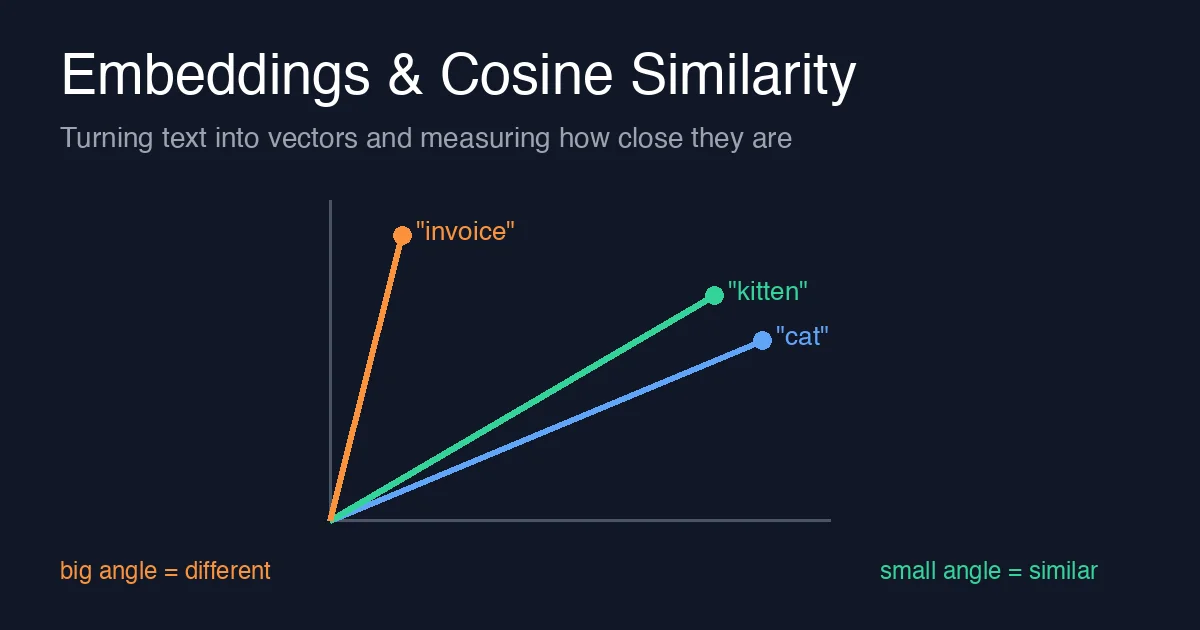
An embedding is a list of numbers that a model produces for a piece of text, built so that texts with similar meaning get lists that point in a similar direction. Cosine similarity is the one-line formula that measures how similar two such lists are: 1.0 means “same direction”, 0.0 means “unrelated”, -1.0 means “opposite”. This post calls an embeddings API once, then computes cosine similarity by hand on two three-number vectors so you can see exactly what the formula does before you trust a library to do it for you.
The problem: computers compare characters, you compare meaning
If you ask a database whether "How do I reset my password?" matches "I forgot my login", the answer is no: they share almost no words. A human sees they are the same question. In Grounding a Model with Your Own Documents we used keyword matching to pick which chunk of text to show the model and promised that embeddings were the upgrade. This is that upgrade, explained from zero.
The idea has two halves:
- Turn each text into a vector, a fixed-length list of numbers, using an embeddings model.
- Compare two vectors with cosine similarity, which is just arithmetic you learned in school.
Step 1: call an embeddings API
An embeddings call looks like any other model call from Calling a Language Model from Code: an HTTP POST with your text, and a JSON reply. The difference is that the reply is not words, it is numbers. The example below uses the OpenAI-compatible shape that Azure OpenAI, OpenAI and many local servers all accept.
1
2
3
4
5
6
7
8
9
10
11
12
13
14
15
16
17
18
19
20
21
22
import os
import requests

ENDPOINT = os.environ["EMBEDDINGS_URL"]   # e.g. https://.../openai/deployments/text-embedding-3-small/embeddings?api-version=2024-02-01
API_KEY = os.environ["API_KEY"]

def embed(text: str) -> list[float]:
    response = requests.post(
        ENDPOINT,
        headers={"api-key": API_KEY, "Content-Type": "application/json"},
        json={"input": text},
        timeout=20,
    )
    response.raise_for_status()
    return response.json()["data"][0]["embedding"]

v1 = embed("How do I reset my password?")
v2 = embed("I forgot my login")
v3 = embed("Quarterly invoice for October")

print(len(v1))      # 1536 for text-embedding-3-small
print(v1[:5])       # e.g. [0.0123, -0.0456, 0.0078, ...]
Three things to notice:
- Every text, short or long, comes back as a vector of the same length (1536 numbers for this model). That is what makes them comparable.
- The individual numbers mean nothing on their own. You never read them; you only compare vectors with each other.
- The call can fail like any other API call, so the retry and timeout habits from Retries, Timeouts and Rate Limits apply here too.
Step 2: cosine similarity, by hand
Picture each vector as an arrow from the origin. Two arrows pointing the same way have a small angle between them; two unrelated arrows have a large one. Cosine similarity is the cosine of that angle, and you can compute it without any trigonometry:
1
cosine(A, B) = (A · B) / (|A| × |B|)
A · Bis the dot product: multiply the numbers position by position, then add them up.|A|is the length of A: square every number, add them, take the square root.
Real embeddings have 1536 numbers, which is too many to follow by eye, so here is the same calculation on two three-number vectors. Nothing changes except the length of the lists.
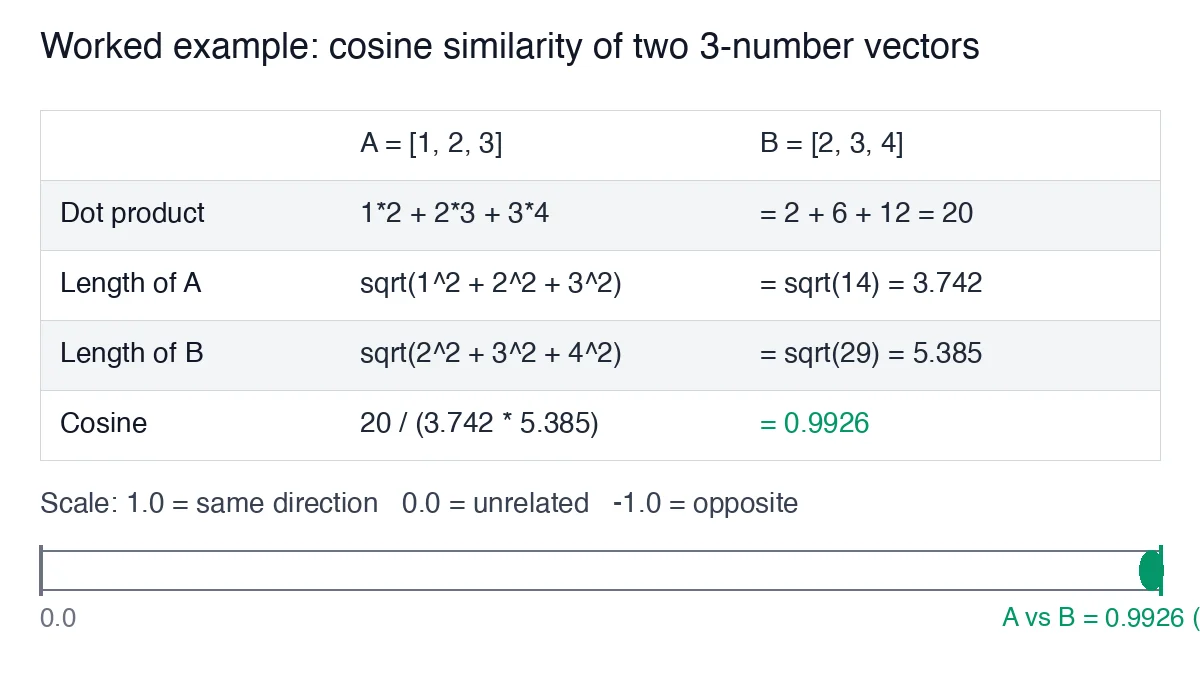
Step by step with A = [1, 2, 3] and B = [2, 3, 4]:
| Step | Calculation | Result |
|---|---|---|
| Dot product | 1×2 + 2×3 + 3×4 | 2 + 6 + 12 = 20 |
| Length of A | √(1² + 2² + 3²) | √14 = 3.742 |
| Length of B | √(2² + 3² + 4²) | √29 = 5.385 |
| Cosine | 20 ÷ (3.742 × 5.385) | 0.9926 |
0.9926 is close to 1.0, so A and B point in nearly the same direction. Now try C = [3, 0, 0] against A: the dot product is 3, the lengths are 3.742 and 3, and the cosine is 3 ÷ 11.225 = 0.267. Different direction, low score. That is the whole trick.
Here is the same arithmetic as code you can run with no API key at all:
1
2
3
4
5
6
7
8
9
10
import math

def cosine(a: list[float], b: list[float]) -> float:
    dot = sum(x * y for x, y in zip(a, b))
    length_a = math.sqrt(sum(x * x for x in a))
    length_b = math.sqrt(sum(x * x for x in b))
    return dot / (length_a * length_b)

print(round(cosine([1, 2, 3], [2, 3, 4]), 4))   # 0.9926
print(round(cosine([1, 2, 3], [3, 0, 0]), 4))   # 0.2673
Run it, change a number, and watch the score move. Once it matches the table above, you understand everything a vector database does when it “finds similar documents”.
Step 3: put the two halves together
Feed the real vectors from Step 1 into the function from Step 2:
1
2
print(round(cosine(v1, v2), 3))   # password reset vs forgot login  -> high, e.g. 0.6-0.8
print(round(cosine(v1, v3), 3))   # password reset vs invoice       -> low,  e.g. 0.1-0.2
The exact numbers depend on the model, but the ordering is what you use: the sentence about forgotten logins scores far higher than the one about invoices, even though it shares no words with the question. To build the retrieval step of a RAG system, you embed every chunk of your documents once, store the vectors, embed the user’s question at query time, and keep the few chunks with the highest cosine score.
Three things beginners get wrong
- Comparing embeddings from different models. A vector from model X and a vector from model Y live in different spaces. Always embed the query with the same model you used for the documents.
- Treating the score as a percentage.
0.7does not mean “70% the same”. Scores from real models cluster in a narrow band, so pick a threshold by looking at your own data, not by guessing. - Re-embedding on every request. Embedding costs money and time. Store document vectors once and only embed the new question. Changing the embedding model means re-embedding everything.
Where to go next
You can now explain what an embedding is, call an API to get one, and compute similarity by hand. The production version of this post, with batching, caching and a search over hundreds of documents in C#, is Azure OpenAI Embeddings in .NET: Semantic Search Without a Vector Database. When you want to know whether your retrieval is actually finding the right chunks, the follow-up post on evaluating a RAG retriever with a golden set shows how to measure it.