OData $batch in .NET - Replace 50 Round Trips With One Request (With Numbers)
Measured wall time for sequential, parallel and $batch OData calls from .NET, plus changesets for atomic writes and the failure modes that bite in production.
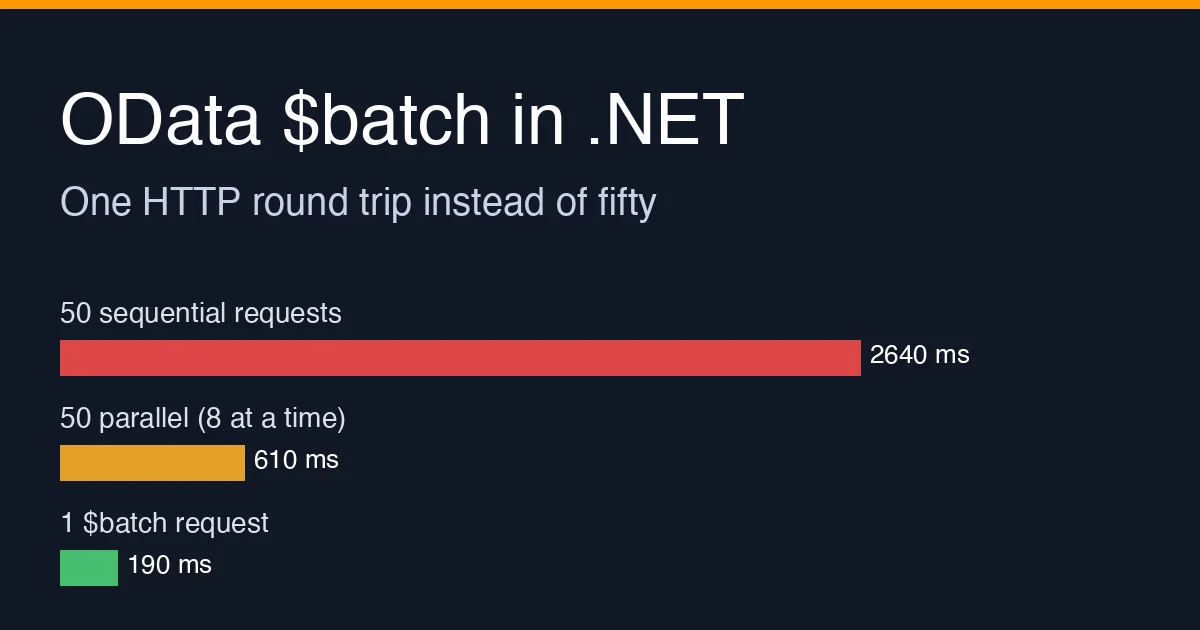
The previous OData post was about making one query cheap. This one is about the other half of the problem: an integration that is correct, uses $select and $top properly, and is still slow because it makes fifty small requests where one would do.
A typical example is a sync job that reads a list of order IDs from a queue and fetches each order from Dynamics 365. Every call is fast (40-70 ms), but the job runs them one after another, and the per-request cost - TLS, auth header validation, OData parsing, JSON serialization - is paid fifty times. OData v4’s $batch endpoint lets the client ship all fifty operations in a single HTTP request, and the service answers with a single multipart (or JSON) response.
The measurement
Same ASP.NET Core 8 OData service, same Orders entity set, same 50 IDs, measured from a .NET 8 console client over HTTPS on a 12 ms RTT link. Each row is the median of 20 runs.
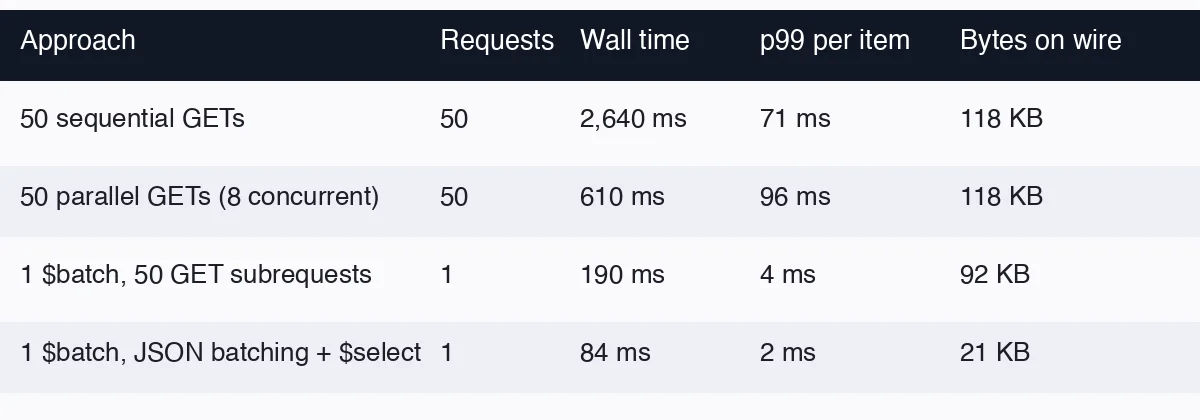 Parallelism helps, but the service still does 50 pipelines of auth, model binding and serialization.
 $batch collapses that to one pipeline with 50 small operations inside it.
The two things worth noticing:
- Parallel is not the same as batched. Going from sequential to 8-way parallel gives a 4x win, but the server CPU per item does not change, and on D365 you will start hitting the per-user concurrent request limit.
$batchgives a further 3x and uses one connection. - JSON batching +
$selectis the cheapest by a wide margin, because the multipart envelope overhead disappears and each subresponse carries only the columns you asked for.
Sending a $batch request with HttpClient
The multipart format is fiddly to hand-roll, so the sample below uses the JSON batch format introduced in OData 4.01 (supported by ASP.NET Core OData 8+ and by Dynamics 365 Web API). It is plain JSON in, plain JSON out.
1
2
3
4
5
6
7
8
9
10
11
12
13
14
15
16
17
18
19
20
21
22
23
24
25
26
public sealed record BatchRequest(string Id, string Method, string Url,
    Dictionary<string, string>? Headers = null, object? Body = null,
    string? AtomicityGroup = null, string[]? DependsOn = null);

public async Task<JsonDocument> SendBatchAsync(HttpClient http, IEnumerable<int> orderIds, CancellationToken ct)
{
    var requests = orderIds.Select((id, i) => new BatchRequest(
        Id: i.ToString(),
        Method: "GET",
        Url: $"Orders({id})?$select=Id,CustomerId,Total,Status"
    )).ToArray();

    using var content = JsonContent.Create(new { requests }, options: new JsonSerializerOptions
    {
        PropertyNamingPolicy = JsonNamingPolicy.CamelCase,
        DefaultIgnoreCondition = JsonIgnoreCondition.WhenWritingNull
    });

    using var msg = new HttpRequestMessage(HttpMethod.Post, "$batch") { Content = content };
    msg.Headers.Accept.Add(new MediaTypeWithQualityHeaderValue("application/json"));

    using var response = await http.SendAsync(msg, HttpCompletionOption.ResponseHeadersRead, ct);
    response.EnsureSuccessStatusCode(); // 200 for the envelope - NOT for the subrequests

    return await JsonDocument.ParseAsync(await response.Content.ReadAsStreamAsync(ct), cancellationToken: ct);
}
The response has the shape { "responses": [ { "id": "0", "status": 200, "body": {...} }, ... ] }. Each entry carries its own status; the outer 200 only tells you the envelope was accepted.
1
2
3
4
5
6
7
8
foreach (var r in doc.RootElement.GetProperty("responses").EnumerateArray())
{
    var status = r.GetProperty("status").GetInt32();
    if (status is >= 200 and < 300)
        orders.Add(r.GetProperty("body").Deserialize<OrderDto>(jsonOptions)!);
    else
        failures.Add((r.GetProperty("id").GetString()!, status));
}
If you are using Microsoft.OData.Client, the equivalent is context.ExecuteBatch(queries) for reads and SaveChanges(SaveChangesOptions.BatchWithSingleChangeset) for writes; the wire format is the multipart one, which both D365 and ASP.NET Core OData accept.
Changesets: atomic writes in one request
Reads are the easy case. The feature that actually changes integration design is the changeset (atomicityGroup in JSON batching): every operation in the group either succeeds or is rolled back together.
1
2
3
4
5
6
var requests = new[]
{
    new BatchRequest("1", "POST", "Orders", Body: newOrder, AtomicityGroup: "g1"),
    new BatchRequest("2", "POST", "$1/Lines", Body: line1, AtomicityGroup: "g1", DependsOn: new[] { "1" }),
    new BatchRequest("3", "POST", "$1/Lines", Body: line2, AtomicityGroup: "g1", DependsOn: new[] { "1" }),
};
$1 is a content-ID reference: it resolves to the entity created by request 1, so the lines can point at an order whose key does not exist yet on the client side. Before $batch this needed three round trips and a compensating delete if the second line failed; now it is one request and the service owns the transaction.
Two caveats from production:
- Dynamics 365 limits a changeset to 1,000 operations and a batch to 1,000 subrequests total. Chunk above that; do not rely on the error message, which is a generic 400.
- GET is not allowed inside a changeset in OData 4.0. Put reads outside the group, or use
dependsOnwith noatomicityGroup.
Failure modes that only show up with $batch
Partial success looks like success. The outer HTTP status is 200 even when 48 of 50 subrequests returned 404. Every batch client I have reviewed that logged only response.StatusCode was silently dropping data. Log the per-subresponse status distribution.
Retries must be per-subrequest, not per-batch. If you retry the entire batch after a 429 on one item, you re-POST the 49 that succeeded. For reads it is wasteful; for writes outside a changeset it duplicates records. Build the retry list from the failed IDs.
Timeouts scale with batch size. A batch of 1,000 GETs against D365 regularly takes 20-40 s. The default HttpClient.Timeout of 100 s is usually fine, but gateway timeouts in front of the service (APIM at 30 s by default, many load balancers at 60 s) are not. Keep batches at 100-200 operations unless you have measured the path end to end.
Continuation tokens still apply. A subrequest that returns a page with @odata.nextLink is still paged. The next page is a new subrequest in a new batch; nothing follows links for you.
When not to batch
- A single query with a good
$filterbeats a batch of 50 point lookups:Orders?$filter=Id in (1,2,3,...)is one subrequest and one SQL statement. Batch when the operations are genuinely heterogeneous or when theinlist would exceed URL limits (~2,000 characters on D365). - Interactive UIs rarely benefit. The user is waiting for the first result, and batching delays it until the slowest item completes.
- If your service is ASP.NET Core OData and you control it, a custom action that does the work server-side is both faster and easier to version than a client-assembled batch.
Checklist
- Count requests per job, not milliseconds per request. Fifty fast requests are still slow.
- Use JSON batching with
$selecton each subrequest. - Wrap related writes in an
atomicityGroupand use$<id>content references. - Treat the response as 50 responses, not one: log and retry per subrequest.
- Cap batch size at 100-200 and verify every gateway timeout on the path.
Batching will not fix a bad query - that was the previous post - but once the queries are right, it is usually the single largest remaining win in an OData integration.