OData Client- Dotnet 8 and C#
An overview of Microsoft's OData Client library for C#: generating a typed client, querying services, and its pros and cons compared to other approaches.

OData Client, a library provided by Microsoft for accessing OData services, offers several advantages and disadvantages compared to other methods of connecting to OData APIs. Here’s a comprehensive overview:
Which OData client library is this? This post covers Microsoft’s OData Connected Service /
Microsoft.OData.Client, which generates a typedDefaultContainerfrom the service$metadata. If you want a lightweight, metadata-free fluent API instead, read the sibling post on Simple.OData.Client - it uses the same TripPin sample service, so the two walkthroughs are directly comparable. Latency numbers for both (plus rawHttpClient) are in the OData client benchmark.
How to integrate in c#
This is copied from the Microsoft Learn
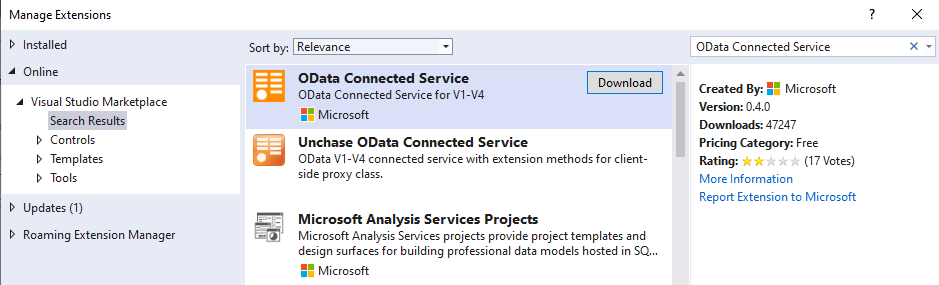
Download and install the OData Connected Service
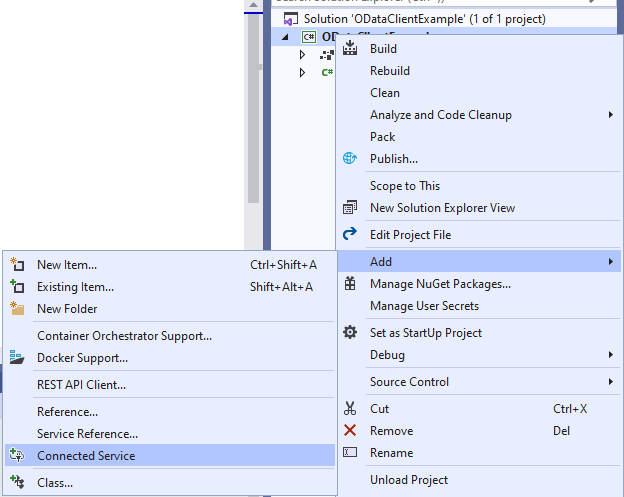
After Installing, Right click on the Project in Solution Explorer and click on Add and then Connected Service, In Connected Service, select OData Connected Service
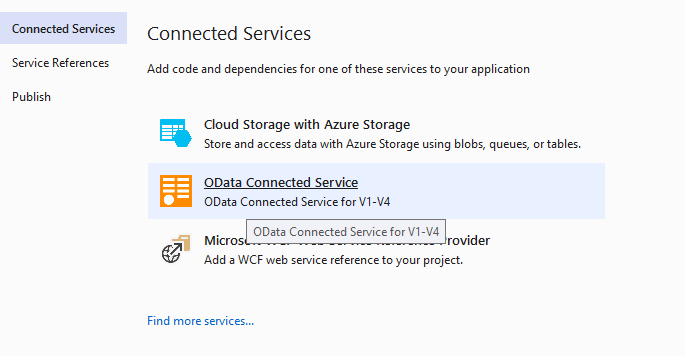
To initiate the connection, OData Connected Service prompts a wizard that allows us to specify the target service’s configuration. In the provided “Service Name” field, enter
TripPinServiceas the designated name for the service. In theAddressfield, enter the URL of the service’s metadata endpoint, in this instance, using the following format: https://services.odata.org/V4/TripPinServiceRW/$metadata (Note the presence of the ‘$metadata’ route within the URL). Next, select a name for the file that will be generated. For this example, let’s retain the default option,Reference. The advanced settings offer customization options, such as defining a custom namespace, hiding generated classes from external assemblies, and more. However, for now, we’ll keep the default settings. To complete the configuration and generate the client code, click theFinishbutton.After successful completion, you should see a Connected Services section under your project in the Solution Explorer. Below this section, you will see a folder for the
TripPinServicewhich contains the generatedReference.csfile containing the generated C# client code.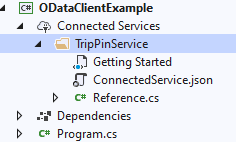
Now in your
Program.csfile add following
1
2
3
4
5
6
7
8
9

public static void Main(string[] s)
{
    var baseUrl = "https://services.odata.org/V4/(S(y5tuj04bxbfsxzimbxbnauqg))/TripPinServiceRW/";

     var context = new DefaultContainer(new Uri(_baseUrl));
    var all = context.People.ToList();
}
you can get the code here. The same People query written against Simple.OData.Client (no generated Reference.cs, hand-written People model instead) is in the Simple OData Client post.
Advantages of OData Client
OData Client simplifies OData operations by abstracting away the underlying HTTP requests and responses. It handles query parsing, error handling, and metadata processing, making it easier for developers to focus on data manipulation rather than low-level HTTP details.
OData Client leverages OData metadata to automatically generate C# classes that represent the data model. This eliminates the need to manually map data from the JSON or XML format to custom classes, reducing development time and potential errors.
OData Client can optimize HTTP requests and responses, leading to better performance compared to manually constructing HTTP requests. This is particularly beneficial for high-traffic applications and large data transfers.
OData Client is tightly integrated with .NET frameworks, making it easier to integrate OData services into .NET applications. It supports asynchronous programming and various .NET data-binding libraries.
OData Client has a strong community of developers who actively contribute to its development and provide support. This ensures that issues are addressed promptly and that the library remains compatible with new OData features.
Disadvantages of OData Client:
OData Client relies on the availability of OData metadata from the server-side OData service. If the service doesn’t provide comprehensive or accurate metadata, OData Client may not function correctly or may introduce limitations.
While OData Client simplifies many aspects of OData development, it introduces additional complexity compared to using the HttpClient directly. This complexity may be a deterrent for developers who prefer a more lightweight approach.
In some cases, the additional abstraction layer provided by the OData Client may introduce overhead compared to manually constructing HTTP requests. This overhead may be noticeable in scenarios with low latency requirements.
OData Client requires some understanding of OData concepts and the underlying HTTP protocol. Developers new to OData may need to invest time in learning the library before effectively utilizing its features.
OData Client is a proprietary library from Microsoft, which may limit flexibility and options for integrating with OData services from other vendors.
Conclusion
In summary, OData Client is a valuable tool for developers who want to simplify OData development and leverage its capabilities efficiently. However, it’s crucial to weigh the advantages and disadvantages against the specific needs of the project and the developer’s expertise. For simpler OData interactions, using the HttpClient directly may be sufficient, while for more complex scenarios, OData Client offers a robust and feature-rich solution.
Other
If you want to explore your OData metadata, you can visit an open-source project created by me. By using this tool you can get the data types, enum values, and other useful information.