Enterprise AI: Canary Deploys and Automatic Rollback for LLM Model Versions and Prompt Changes
Ship a new Azure OpenAI model version or prompt safely: shadow traffic, weighted canary in APIM, golden-set quality scoring, automatic rollback on regression.
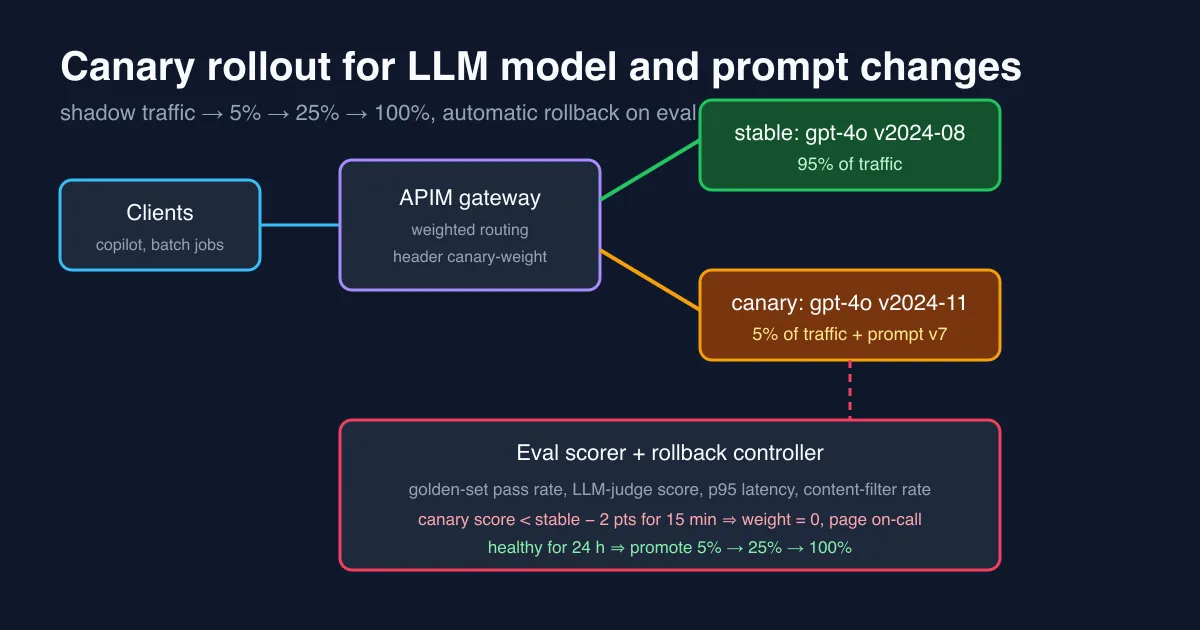
A model version bump is a deploy. So is a prompt change. Most enterprise teams treat the first with a change ticket and the second with a git push to a config repo at 4 pm on Friday, and then spend the weekend working out why the copilot started answering in Markdown tables instead of the JSON the frontend parses. The failure modes are the same as any other production change: the new thing behaves differently for a subset of inputs, nobody notices until users complain, and rolling back takes longer than it should because “the old prompt” is three commits away. This post describes the rollout pattern we settled on for Azure OpenAI: shadow traffic, a weighted canary in Azure API Management, a quality score computed continuously from the canary’s real answers, and a controller that sets the canary weight to zero when the score regresses. It builds on the observability and governance setup from earlier posts; if you already have those, the canary is mostly configuration.
Why LLM changes need a canary more than code changes do
With ordinary code, a unit test suite that passes gives you reasonable confidence. With a model or prompt change, the offline prompt tests and a golden set catch the obvious regressions, but three things only show up on real traffic:
- Distribution shift. Your golden set is 200 examples; production is 40,000 prompts a day with a long tail the golden set never saw. A new model version that is better on average and worse on the 2 percent of prompts containing tables is a regression you cannot see offline.
- Format drift. Newer model versions are frequently “better” at ignoring over-specific formatting instructions. If downstream code parses the output, a version bump is an API change.
- Latency and cost. Token counts and p95 latency differ per version. A 20 percent latency increase does not fail any test and does break your SLO.
The canary pattern turns all three into a measured decision instead of a bet.
The four stages
Stage 0: make versions explicit
Nothing below works if “the current prompt” lives in a string constant. Two rules:
- Pin model versions. Create a separate Azure OpenAI deployment per model version (
gpt-4o-2024-08andgpt-4o-2024-11as deployment names) and set the deployment’s version upgrade policy to No auto-upgrade. The default auto-upgrade when expired policy means Microsoft can change your model under you outside any canary. - Version prompts like code. Store prompts as files (
prompts/summarise/v7.yaml) with the model deployment they were tested against, and load them by version at runtime. The request to Azure OpenAI then carries a(deployment, promptVersion)pair, and that pair is what you canary.
1
2
3
4
5
6
public sealed record ModelVariant(string Deployment, string PromptVersion);

public interface IVariantSelector
{
    ModelVariant Select(string tenantId, string requestId);
}
Stage 1: shadow traffic
Before any user sees the new variant, mirror a sample of real requests to it and discard the answer. In .NET this is a fire-and-forget decorator around the client that runs the canary call with a small sampling rate and writes the result to the same telemetry pipeline as production, tagged shadow=true:
1
2
3
4
5
6
7
8
9
10
11
12
13
14
15
16
17
18
public async Task<Completion> CompleteAsync(Request req, CancellationToken ct)
{
    var primary = await _stable.CompleteAsync(req, ct);

    if (_sampler.ShouldShadow(req))             // e.g. 2% of requests
    {
        _ = Task.Run(async () =>
        {
            using var activity = Telemetry.Source.StartActivity("llm.shadow");
            activity?.SetTag("llm.deployment", _canary.Deployment);
            activity?.SetTag("llm.prompt_version", _canary.PromptVersion);
            activity?.SetTag("llm.shadow", true);
            try { await _canary.CompleteAsync(req, CancellationToken.None); }
            catch (Exception ex) { activity?.SetStatus(ActivityStatusCode.Error, ex.Message); }
        });
    }
    return primary;
}
Shadow traffic answers the cheap questions first: does the canary error, how do token counts and latency compare, how often does the output fail JSON parsing. It costs the shadow percentage of your bill and nothing in user risk. Run it for a day on anything that changes the model version.
Stage 2: weighted canary in APIM
Once shadow looks sane, send real users to it. We do the split in Azure API Management because it already fronts Azure OpenAI for quotas and routing; the weight is a named value the controller can change without a redeploy:
1
2
3
4
5
6
7
8
9
10
11
12
13
14
<inbound>
  <set-variable name="roll" value="@(new Random().Next(0, 100))" />
  <set-variable name="canaryWeight" value="" />
  <choose>
    <when condition="@(int.Parse((string)context.Variables["roll"]) < int.Parse((string)context.Variables["canaryWeight"]))">
      <set-backend-service backend-id="aoai-canary" />
      <set-header name="x-llm-variant" exists-action="override"><value>canary</value></set-header>
    </when>
    <otherwise>
      <set-backend-service backend-id="aoai-stable" />
      <set-header name="x-llm-variant" exists-action="override"><value>stable</value></set-header>
    </otherwise>
  </choose>
</inbound>
Two details matter here. First, stick a user to a variant when the feature has conversational memory, otherwise a chat flips between two prompts mid-conversation; hash the session id instead of using Random. Second, the x-llm-variant header is echoed into your traces and into the response so that the application can log which variant produced each answer. Without that, you cannot score.
Stage 3: score the canary continuously
The quality score is the part teams skip, and it is the part that makes the rollback automatic rather than “someone looked at a dashboard”. We compute four signals per variant over a sliding 15-minute window:
| Signal | Source | Rollback threshold |
|---|---|---|
| Golden-set pass rate | Scheduled job replays the golden set through each variant every 30 min | canary below stable by more than 2 points |
| LLM-judge score on sampled live answers | 5% of live canary answers scored 1–5 by a judge prompt on a cheap model | canary mean below stable by more than 0.3 |
| Structural failures | JSON parse errors, schema validation failures, refusals, content-filter hits | canary rate above 2× stable |
| p95 latency and tokens per request | OpenTelemetry metrics tagged llm.variant | canary p95 above SLO or above stable by 25% |
The judge scoring runs out of band on the logged (prompt, answer) pairs, so it adds no latency. In KQL the comparison is a single query the controller runs every minute:
LlmJudgeScores
| where TimeGenerated > ago(15m)
| summarize score = avg(Score), n = count() by Variant
| evaluate pivot(Variant, avg(score))
| extend delta = canary - stable
Stage 4: the rollback controller
The controller is a small timer-triggered Azure Function. Every minute it evaluates the thresholds above; if any one breaches for the full window and the canary has at least 200 scored samples (so a quiet night does not roll you back on noise), it sets the APIM named value canary-weight to 0, posts to the on-call channel with the breaching signal and a link to the sample answers, and records the rollback as a deployment event in Application Insights.
1
2
3
4
5
6
7
if (breach is not null && canary.SampleCount >= 200)
{
    await _apim.SetNamedValueAsync("canary-weight", "0", ct);
    await _alerts.PageAsync($"LLM canary rolled back: {breach.Signal} " +
                            $"canary={breach.CanaryValue:F1} stable={breach.StableValue:F1}", ct);
    _telemetry.TrackEvent("LlmCanaryRollback", breach.ToDictionary());
}
Promotion is the mirror image but deliberately manual at each step: 24 healthy hours at 5 percent earns a human-approved bump to 25 percent, another 24 hours earns 100 percent, and the old deployment stays warm for a week as the rollback target. Rollback is automatic because it is cheap to be wrong about; promotion is manual because nobody has ever been paged for promoting too slowly.
What it looked like on a real rollout
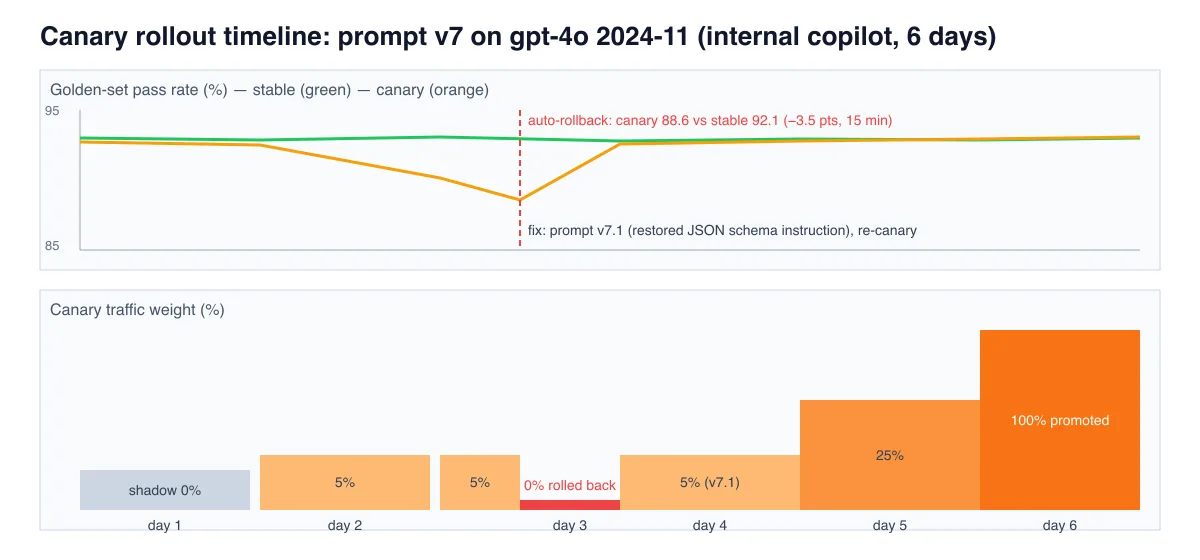
The chart above is the rollout of prompt v7 together with the gpt-4o 2024-11 version for an internal summarisation copilot. Shadow traffic on day 1 showed a 9 percent token reduction and nothing alarming. At 5 percent on day 3 the golden-set pass rate on the canary slid from 91.8 to 88.6 while stable held 92.1; the controller rolled back after the 15-minute window at 14:12, and the sampled answers showed the cause within ten minutes: the new model version was dropping a JSON schema instruction we had moved to the end of the system prompt, and about one in twelve answers came back as prose. Nobody outside the team noticed; the blast radius was 5 percent of traffic for 15 minutes. Prompt v7.1 moved the schema instruction back to the top, re-ran through shadow and 5 percent, and was at 100 percent by day 6. The same change pushed directly would have affected every user for however long it took someone to open a ticket.
Checklist
- Pin model versions to deployments; disable auto-upgrade.
- Version prompts as files; log
(deployment, promptVersion)on every request. - Shadow for a day before any user sees the canary.
- Split in the gateway with a weight you can change without a deploy; sticky per session.
- Score four signals per variant: golden set, judge score, structural failures, latency.
- Roll back automatically on a sustained breach with a minimum sample size; promote manually.
- Keep the previous deployment warm for a week.
Related posts
- Enterprise AI: Six Governance Controls Before Azure OpenAI Goes to Production in a Regulated Org
- Enterprise AI: LLM Observability with OpenTelemetry in .NET
- Enterprise AI: Cost and Latency SLOs for LLM Features in Production
- Enterprise AI: Model Routing for Azure OpenAI with Azure API Management
- Testing LLM prompts in .NET