Profiling One Slow ASP.NET Core Endpoint with dotnet-counters and dotnet-trace
Profiling a 214 ms p99 ASP.NET Core endpoint with dotnet-counters and dotnet-trace: 2.9 MB allocated per request, one GroupBy to blame, p99 down to 38 ms.
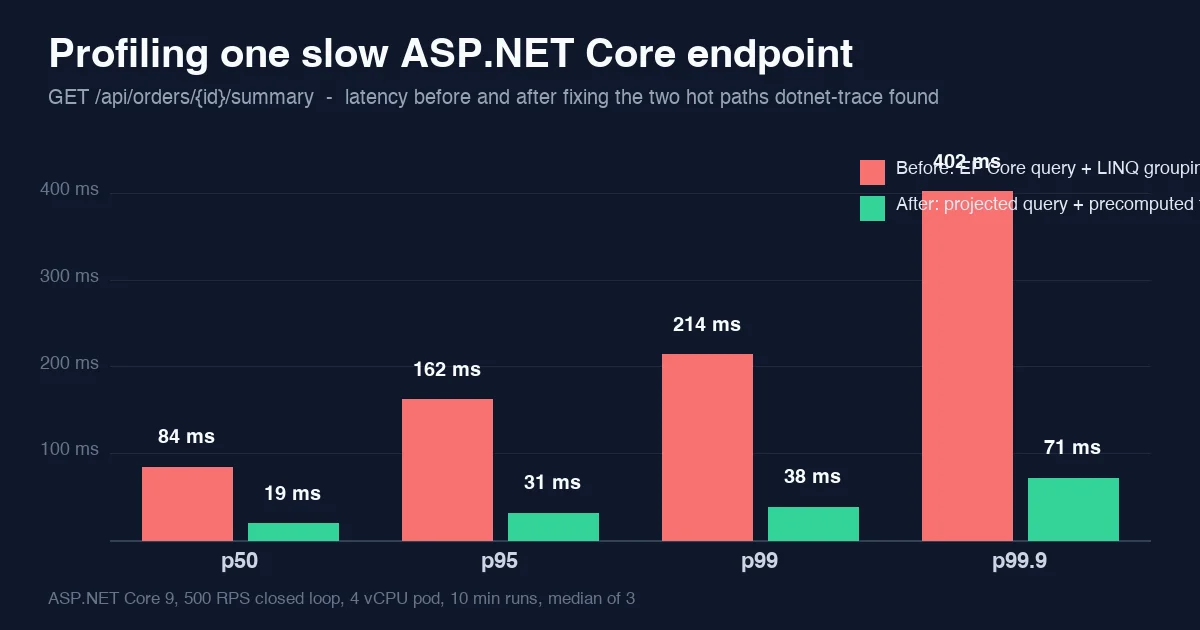
The order-summary endpoint had been “a bit slow” for months. Nobody owned it, every dashboard said the database was fine, and the usual answer was to add a replica. This post walks through the forty minutes it took to find out why with the two tools that ship with the .NET SDK, and what the numbers looked like before and after. No new library, no rewrite: two queries and one loop changed.
If you have not used dotnet-counters or dotnet-trace on a running service before, the point of the post is the order of operations: counters first to decide what kind of problem it is, trace second to find where, and a load test on both sides so the fix is a number rather than a feeling.
The endpoint and the baseline
GET /api/orders/{id}/summary returns totals per product category for one customer order: roughly 1,800 order lines per request on the accounts that complained. ASP.NET Core 9, EF Core 9 on PostgreSQL via Npgsql, one 4 vCPU / 8 GB pod (AKS, Standard_D4s_v5), k6 at a closed-loop 500 requests per second from a separate node, 10 minute runs after a 2 minute warm-up, median of three runs.
| Percentile | Before | After |
|---|---|---|
| p50 | 84 ms | 19 ms |
| p95 | 162 ms | 31 ms |
| p99 | 214 ms | 38 ms |
| p99.9 | 402 ms | 71 ms |
The database side of the same requests, from pg_stat_statements, had a mean of 6 ms before and 4 ms after. The database was never the problem, which the dashboards had been saying all along.
Step 1: counters, to classify the problem
dotnet-counters attaches to a running process over the diagnostics IPC socket and prints runtime counters once a second. On a Kubernetes pod the quickest path is kubectl exec into the container with the tool copied in, or a sidecar that shares the process namespace; the output is the same.
1
dotnet-counters monitor -p 4127 --counters System.Runtime,Microsoft.AspNetCore.Hosting
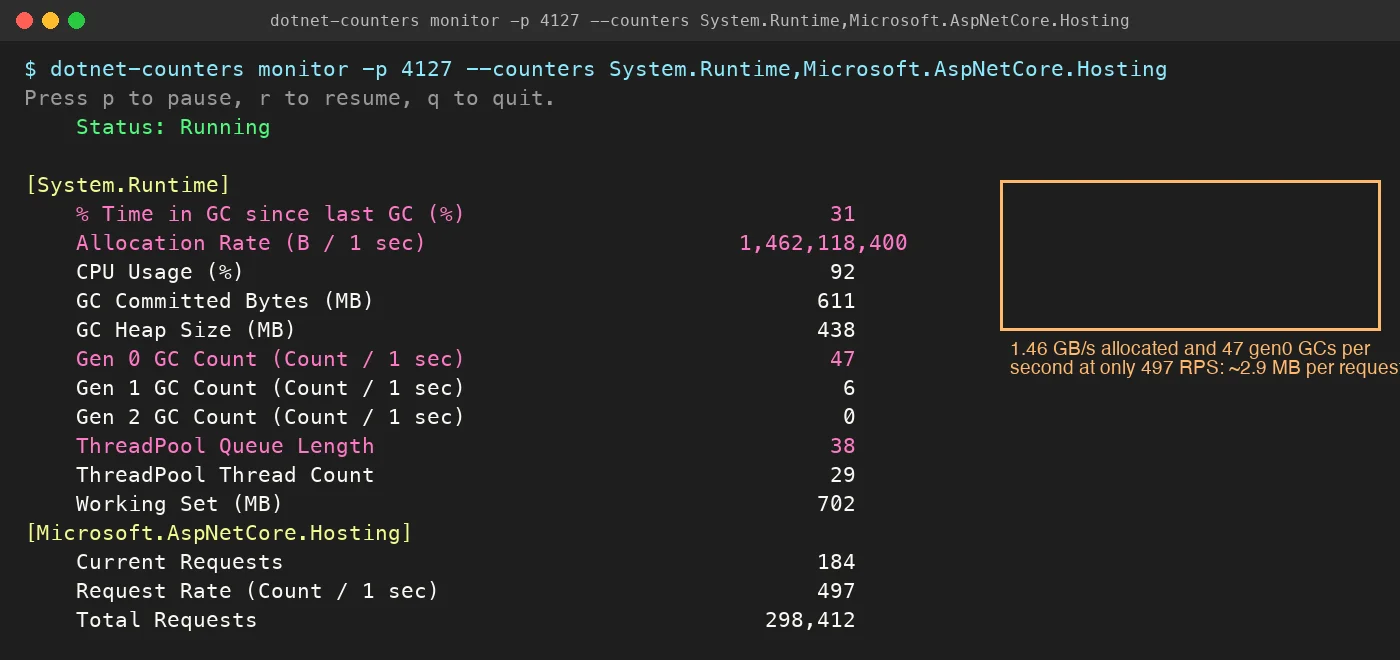
Three lines in that output decide the rest of the investigation:
- Allocation Rate 1.46 GB/s at 497 RPS. That is about 2.9 MB of managed allocations per request for a response that is 4 KB of JSON. Something is materializing far more than it returns.
- Gen 0 GC count 47/s and 31 % time in GC. The allocation rate is high enough that the collector is a third of the CPU. A gen 0 collection is cheap only when it is rare.
- ThreadPool Queue Length 38. Requests are waiting for a thread, not for I/O. Combined with 92 % CPU, this is a CPU-bound endpoint, which rules out the “slow database” theory before any trace is taken.
If instead the counters had shown low CPU, a long thread pool queue and a rising Current Requests, the next tool would have been dotnet-stack or a trace of ThreadPool events to look for blocking. Counters are cheap enough to leave running during an incident; the trace is not.
Step 2: trace, to find the frames
dotnet-trace collects a .nettrace file with sampled CPU stacks. Thirty seconds under load is plenty; the file was 41 MB.
1
2
dotnet-trace collect -p 4127 --profile cpu-sampling --duration 00:00:30 -o orders-summary.nettrace
dotnet-trace report orders-summary.nettrace topN -n 10 --inclusive
topN prints the hottest frames in the terminal, which is enough on a pod with no GUI. Opening the same file in PerfView or Visual Studio’s Performance Profiler gives the by-name view below with exclusive and inclusive time per frame.
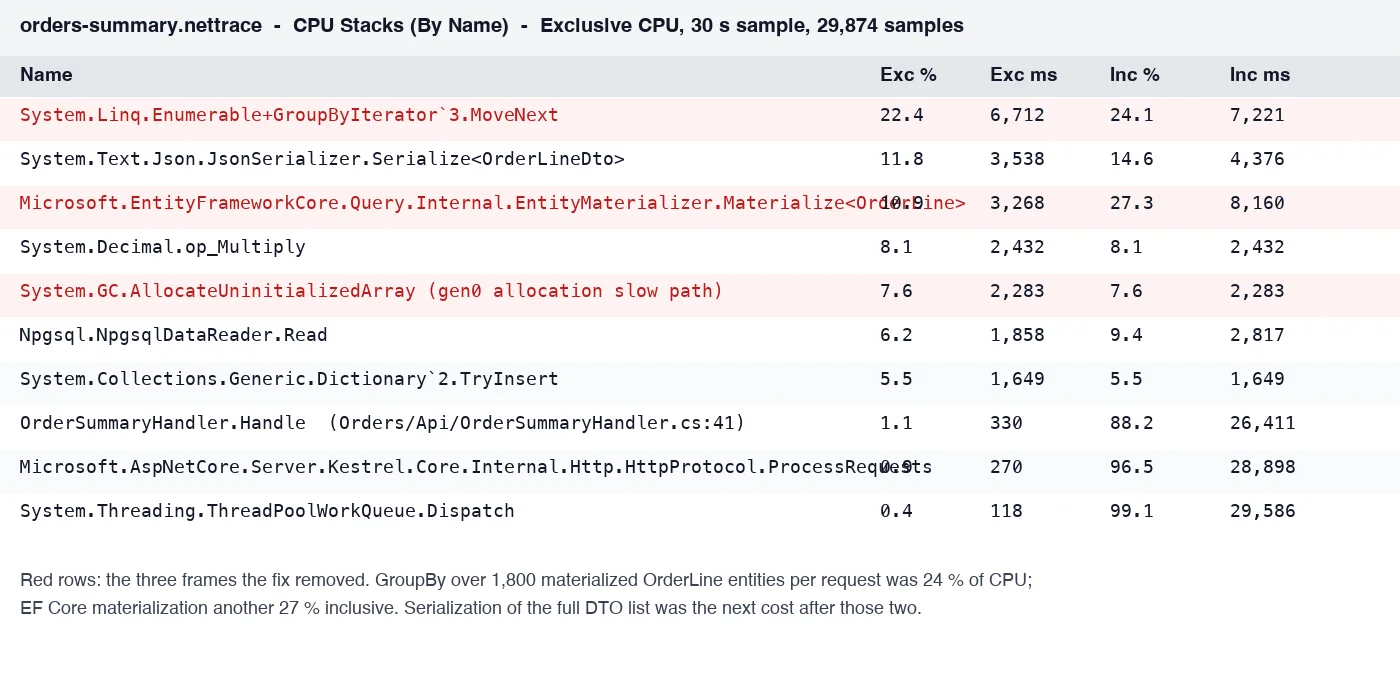
Reading the top of the table:
Enumerable.GroupByIterator.MoveNextat 22.4 % exclusive. AGroupByis running in the handler, in memory, over a collection it should never have held.EntityMaterializer.Materialize<OrderLine>at 27.3 % inclusive. EF Core is building a fullOrderLineentity, 14 columns including ajsonbattributes blob, for every one of the 1,800 lines, when the handler needs three columns.GC.AllocateUninitializedArrayat 7.6 % is the allocation slow path: the gen 0 budget is exhausted so often that allocations keep tripping into the collector. It is a symptom of 1 and 2, not a separate problem.
The handler, as it was:
1
2
3
4
5
6
7
8
9
10
var lines = await db.OrderLines
    .Where(l => l.OrderId == orderId)
    .ToListAsync(ct);                                   // 1,800 full entities, change-tracked

var summary = lines
    .GroupBy(l => l.Product.Category)                   // lazy-load per line on first access
    .Select(g => new CategoryTotal(g.Key, g.Sum(l => l.Quantity * l.UnitPrice)))
    .ToList();

return Results.Ok(new OrderSummaryDto(orderId, summary, lines.Select(ToDto).ToList()));
Three separate costs are visible from the trace alone: the full materialization, the in-memory GroupBy, and the lines.Select(ToDto) that serializes every line into the response, which is where JsonSerializer.Serialize<OrderLineDto> at 11.8 % came from. The last one was a product question; the consumers of this endpoint only read the category totals, and the line list had been added “in case” and was never used by the two clients.
The fix
1
2
3
4
5
6
7
8
var summary = await db.OrderLines
    .Where(l => l.OrderId == orderId)
    .GroupBy(l => l.Product.Category)
    .Select(g => new CategoryTotal(g.Key, g.Sum(l => l.Quantity * l.UnitPrice)))
    .AsNoTracking()
    .ToListAsync(ct);                                   // one GROUP BY, ~12 rows back

return Results.Ok(new OrderSummaryDto(orderId, summary));
EF Core 9 translates this into a single SELECT category, SUM(quantity * unit_price) ... GROUP BY and materializes about a dozen rows instead of 1,800 entities. The database does the grouping it is built for, the mean query time went from 6 ms to 4 ms because it returns less, and the handler allocates around 11 KB per request.
The response shape change (dropping lines) was a versioned API change and shipped behind the same route with a ?include=lines parameter for the one internal tool that might have wanted it. Nothing requested it in the first month.
After: the same counters
Running dotnet-counters against the deployed fix at the same 500 RPS:
| Counter | Before | After |
|---|---|---|
| Allocation Rate | 1.46 GB/s | 5.4 MB/s |
| Gen 0 GC / s | 47 | 0.2 |
| % Time in GC | 31 | <1 |
| CPU Usage | 92 % | 23 % |
| ThreadPool Queue Length | 38 | 0 |
| Working Set | 702 MB | 268 MB |
The latency table at the top follows directly from the CPU line: at 23 % CPU the thread pool queue is empty, so the request time is the query plus serialization and nothing else. p99.9 dropping from 402 to 71 ms is the gen 0 collections disappearing; the tail before the fix was requests that landed on a GC pause.
What to take from it
- Counters before trace. A one-minute look at allocation rate, GC count, CPU and thread pool queue tells you whether you are CPU-bound, allocation-bound or blocked. That decides which trace to take and saves collecting the wrong one.
- Allocations per request is the number to watch. Divide allocation rate by request rate. Anything over a few hundred KB for a JSON API endpoint is worth a trace; 2.9 MB was an entity list that should have been a
GROUP BY. - Trace in production, once, briefly. A 30 second
cpu-samplingtrace cost about 3 % CPU on the pod and found the problem that three weeks of dashboard reading had not. The Span and Memory post covers the micro-level allocation work; this one did not need any of it. - Keep the before and after. The load test numbers are what justified the API change to the people who owned the clients. “It felt faster” would not have.
Related
- Reducing .NET Allocations with Span and Memory - the allocation-level follow-up when the hot path is already the right query.
- .NET JSON Serialization Performance - the serializer cost that was the second-largest frame in this trace.
- In-Memory vs Redis vs HybridCache Latency in .NET - the option that was proposed instead of profiling, and when it is the right one.