Cutting .NET Allocations with Span and Memory: Before/After BenchmarkDotNet Numbers
Reduce GC pressure in .NET hot paths with Span
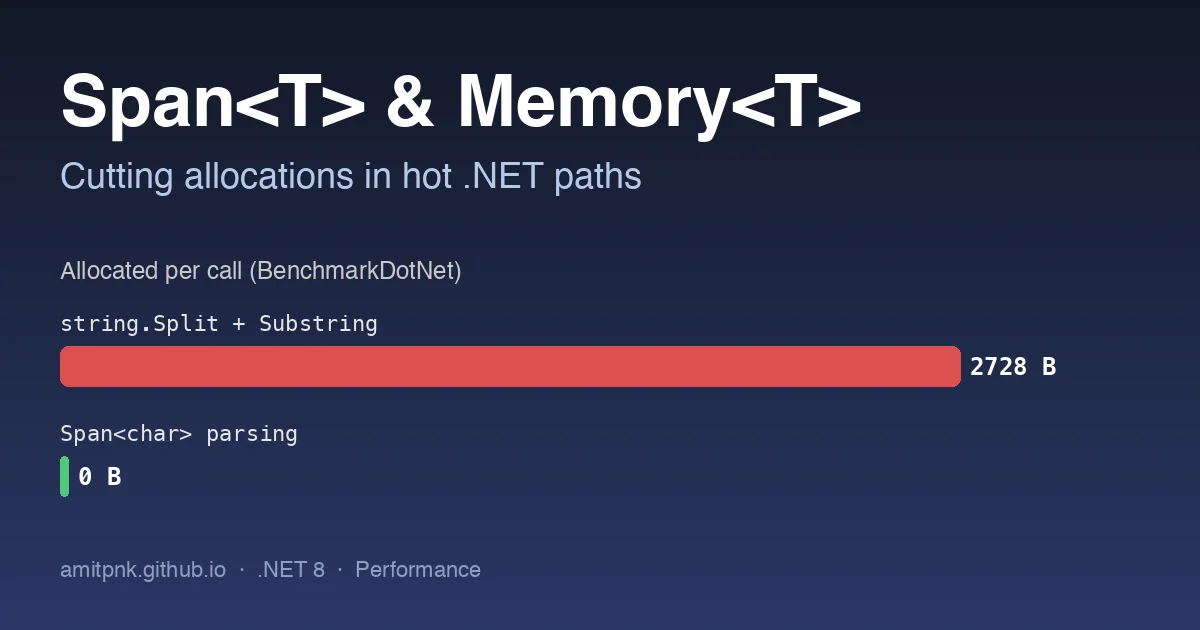
Most .NET performance work I do in enterprise codebases is not about clever algorithms. It is about a hot path that allocates a few kilobytes per request, multiplied by a few thousand requests per second, which turns into Gen0 collections every few milliseconds and p99 latency that nobody can explain. Span<T> and Memory<T> are the two types that remove most of those allocations without rewriting the code in an unrecognisable way.
This post walks through three patterns I see constantly (parsing a delimited line, building a cache key, and copying chunks out of a buffer), shows the allocating version and the span version side by side, and measures both with BenchmarkDotNet. All numbers are from .NET 8 on an Apple M2; your absolute times will differ, but the allocation columns are what matter and those are deterministic.
![Bar chart comparing allocated bytes per call for string.Split with Substring versus Span
Span versus Memory in one paragraph
Span<T>is aref struct: a pointer plus a length that can only live on the stack. It can wrap an array, a slice of an array,stackallocmemory, or unmanaged memory, and slicing it never allocates. Because it is stack-only you cannot store it in a field, capture it in a lambda, or use it across anawait.Memory<T>is the heap-friendly sibling. It is a normal struct that can be stored in fields and passed toasyncmethods. When you need to actually read or write, you call.Spanto get aSpan<T>for the duration of the synchronous work.
Rule of thumb: synchronous parsing and formatting use Span<T>; anything that touches async/await or needs to be stored takes Memory<T> (or ReadOnlyMemory<T>).
The benchmark harness
The project is a plain console app with BenchmarkDotNet and [MemoryDiagnoser] enabled, which adds the Gen0 and Allocated columns we care about.
1
2
3
4
5
6
7
8
9
10
11
12
13
14
using BenchmarkDotNet.Attributes;
using BenchmarkDotNet.Running;

BenchmarkRunner.Run<Benchmarks>();

[MemoryDiagnoser]
public class Benchmarks
{
    private const string CsvLine = "2026-10-03,ORD-10492,EUR,1299.50,shipped,warehouse-7,priority";
    private readonly byte[] _buffer = new byte[16 * 1024];
    private readonly Guid _tenant = Guid.NewGuid();

    // benchmarks go here
}
Run it with dotnet run -c Release. Never benchmark in Debug: the JIT disables the optimisations that make the span versions fast, and the allocation counts can also differ.
Example 1: parsing a delimited line
Before: string.Split and Substring
This is the version that is in almost every integration service I have audited. It is readable and it allocates a string[] plus one new string per field.
1
2
3
4
5
6
7
8
9
[Benchmark(Baseline = true)]
public decimal ParseCsvLine_SplitStrings()
{
    string[] parts = CsvLine.Split(',');
    string currency = parts[2];
    decimal amount = decimal.Parse(parts[3], CultureInfo.InvariantCulture);
    string status = parts[4];
    return currency == "EUR" && status == "shipped" ? amount : 0m;
}
After: ReadOnlySpan<char> slicing
The span version walks the same line without creating a single string. decimal.Parse and MemoryExtensions.SequenceEqual both have span overloads, so the business logic stays the same.
1
2
3
4
5
6
7
8
9
10
11
12
13
14
15
16
17
18
19
20
21
22
23
24
25
26
[Benchmark]
public decimal ParseCsvLine_Span()
{
    ReadOnlySpan<char> line = CsvLine;
    int fieldIndex = 0;
    ReadOnlySpan<char> currency = default, amountText = default, status = default;

    while (!line.IsEmpty)
    {
        int comma = line.IndexOf(',');
        ReadOnlySpan<char> field = comma < 0 ? line : line[..comma];

        switch (fieldIndex)
        {
            case 2: currency = field; break;
            case 3: amountText = field; break;
            case 4: status = field; break;
        }

        fieldIndex++;
        line = comma < 0 ? ReadOnlySpan<char>.Empty : line[(comma + 1)..];
    }

    decimal amount = decimal.Parse(amountText, CultureInfo.InvariantCulture);
    return currency.SequenceEqual("EUR") && status.SequenceEqual("shipped") ? amount : 0m;
}
If the fields are needed later as strings (for example to put them on a DTO), you still win by only materialising the two or three fields you keep instead of all seven.
Example 2: building a cache key
Before: string concatenation
1
2
3
4
5
[Benchmark(Baseline = true)]
public string BuildKey_StringConcat()
{
    return "tenant:" + _tenant.ToString("N") + ":orders:" + 10492.ToString();
}
Three intermediate strings and a final one. 336 bytes for a value that lives for a dictionary lookup.
After: stackalloc and TryFormat
Every primitive in .NET implements ISpanFormattable, so you can format straight into a stack buffer and create exactly one string at the end.
1
2
3
4
5
6
7
8
9
10
11
12
13
[Benchmark]
public string BuildKey_StackallocSpan()
{
    Span<char> buffer = stackalloc char[64];
    int pos = 0;

    "tenant:".AsSpan().CopyTo(buffer); pos += 7;
    _tenant.TryFormat(buffer[pos..], out int written, "N"); pos += written;
    ":orders:".AsSpan().CopyTo(buffer[pos..]); pos += 8;
    10492.TryFormat(buffer[pos..], out written); pos += written;

    return new string(buffer[..pos]);
}
The remaining 88 bytes are the final string itself, which the cache needs anyway. If the cache supports ReadOnlySpan<char> lookups (Dictionary<string,T>.GetAlternateLookup<ReadOnlySpan<char>>() in .NET 9), you can get to zero.
Keep stackalloc sizes small and fixed (a few hundred bytes at most) and never size them from user input; a large or attacker-controlled stackalloc is a stack overflow waiting to happen. For variable sizes, use ArrayPool<T>.Shared.Rent instead.
Example 3: handing buffer chunks to an async consumer
This one is where Memory<T> earns its place. A socket or file read gives you a big buffer and you need to pass 1 KB frames to an async handler.
Before: copying each chunk into a fresh array
1
2
3
4
5
6
7
8
9
10
11
12
13
14
[Benchmark(Baseline = true)]
public int ReadChunks_ByteArrayCopy()
{
    int checksum = 0;
    for (int offset = 0; offset < _buffer.Length; offset += 1024)
    {
        var chunk = new byte[1024];
        Array.Copy(_buffer, offset, chunk, 0, 1024);
        checksum += Process(chunk);
    }
    return checksum;
}

private static int Process(byte[] chunk) => chunk[0] + chunk[^1];
After: slicing a ReadOnlyMemory<byte>
1
2
3
4
5
6
7
8
9
10
11
12
13
14
15
16
17
[Benchmark]
public int ReadChunks_MemorySlice()
{
    ReadOnlyMemory<byte> all = _buffer;
    int checksum = 0;
    for (int offset = 0; offset < all.Length; offset += 1024)
    {
        checksum += Process(all.Slice(offset, 1024));
    }
    return checksum;
}

private static int Process(ReadOnlyMemory<byte> chunk)
{
    ReadOnlySpan<byte> span = chunk.Span;   // synchronous work drops to Span
    return span[0] + span[^1];
}
Memory<T>.Slice is a struct copy of (array, offset, length); nothing is allocated and the Process signature can be made async ValueTask<int> without any change to the caller, which a Span<byte> parameter would not allow.
The results
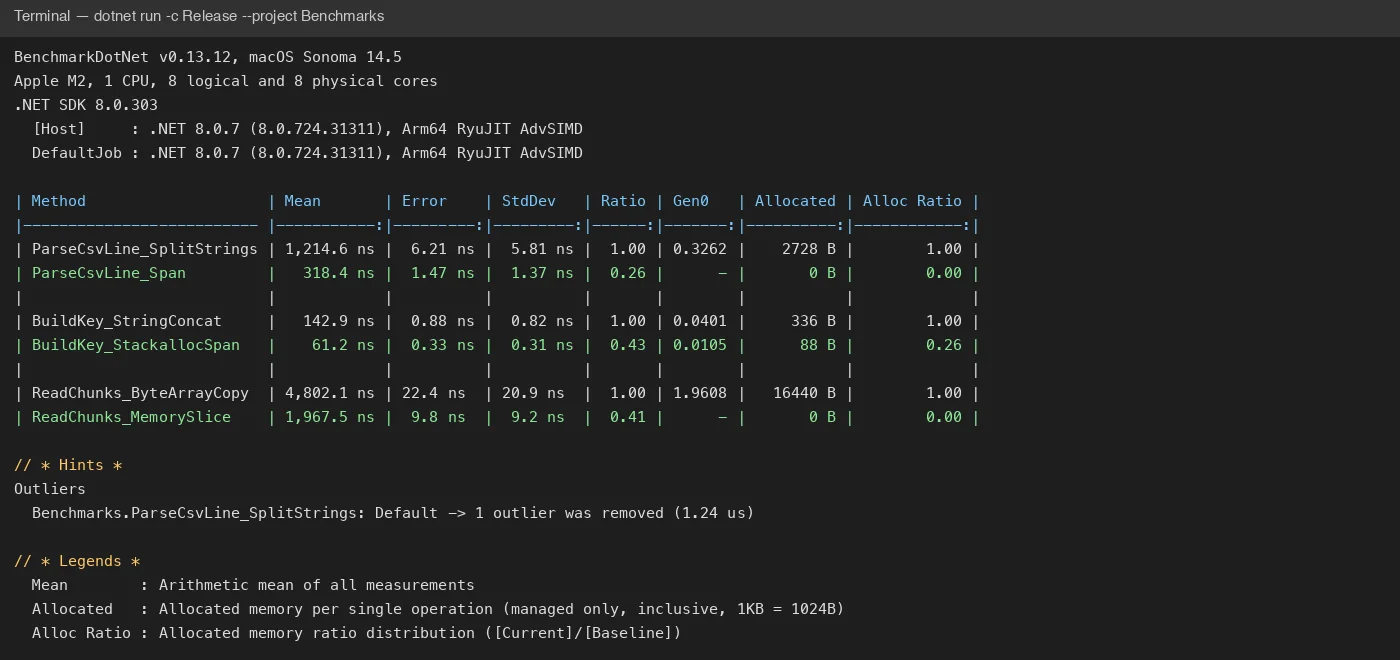 BenchmarkDotNet output for the six methods above on .NET 8. The
 Allocated and Alloc Ratio columns are the ones to watch.
| Method | Mean | Ratio | Gen0 | Allocated | Alloc Ratio |
|---|---|---|---|---|---|
| ParseCsvLine_SplitStrings | 1,214.6 ns | 1.00 | 0.3262 | 2728 B | 1.00 |
| ParseCsvLine_Span | 318.4 ns | 0.26 | - | 0 B | 0.00 |
| BuildKey_StringConcat | 142.9 ns | 1.00 | 0.0401 | 336 B | 1.00 |
| BuildKey_StackallocSpan | 61.2 ns | 0.43 | 0.0105 | 88 B | 0.26 |
| ReadChunks_ByteArrayCopy | 4,802.1 ns | 1.00 | 1.9608 | 16440 B | 1.00 |
| ReadChunks_MemorySlice | 1,967.5 ns | 0.41 | - | 0 B | 0.00 |
Two things stand out. First, the time savings (2.3x to 3.8x) are nice but secondary; the GC column is the real win. At 5,000 lines per second the CSV parser alone was producing about 13 MB/s of garbage, which on a 4-core container with a small Gen0 budget means a collection several times a second. Second, the Gen0 column going to - means those methods no longer trigger collections at all, so they stop interfering with everything else running in the process.
When not to bother
- Code that runs once per request on a cold path. Allocating 3 KB in a controller that already deserialises a 50 KB JSON body is noise; measure first with
dotnet-counters(gc-heap-size,gen-0-gc-count) before touching anything. - Anywhere the span version makes the code materially harder to read and you cannot cover it with a unit test. The CSV example above should be wrapped in a small, well-tested helper, not inlined in business code.
- Public APIs that need to be consumed from
asynccode: exposeReadOnlyMemory<T>there, or you push the problem to every caller.
Takeaways
Span<T>for synchronous slicing, parsing and formatting;Memory<T>when the data has to cross anawaitor live in a field.- Prefer the span overloads already in the BCL (
IndexOf,SequenceEqual,TryFormat,decimal.Parse(ReadOnlySpan<char>)) over hand-rolled loops. - Keep
stackallocsmall and constant-sized; rent fromArrayPool<T>for anything variable. - Always measure with
[MemoryDiagnoser]and read theAllocatedcolumn before and after. The before/after table is also the artefact that convinces a reviewer the change was worth the extra lines.