Azure Cosmos DB .NET SDK v3: The Serialization Cost Hiding in Every ReadItemAsync, Measured with BenchmarkDotNet
Same 4 KB Cosmos DB item, five ways to read it on .NET 8. Default Newtonsoft 1.38 ms and 41 KB per call; stream + System.Text.Json 1.04 ms and 9 KB.
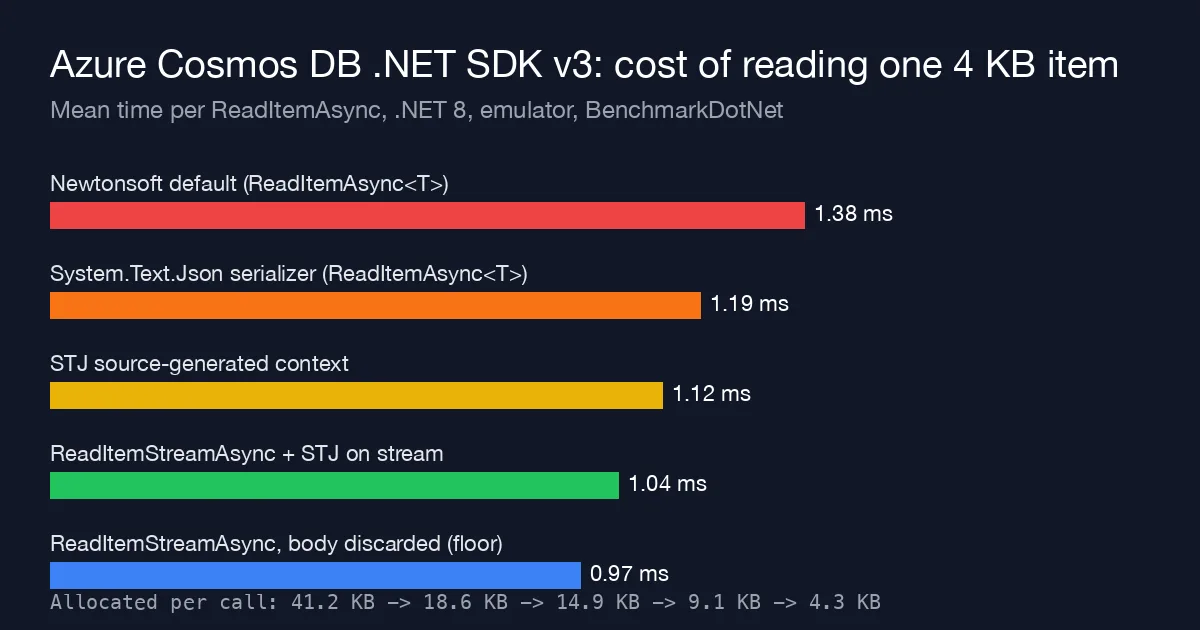
The Azure Cosmos DB .NET SDK v3 still serializes with Newtonsoft.Json by default, even on .NET 8 where everything else in the app uses System.Text.Json. Most teams discover this when a [JsonPropertyName] attribute is silently ignored; I wrote up that correctness side in the Cosmos DB System.Text.Json post. This post is the other half: what the default serializer costs on the hot path, and how far a few lines of configuration move it. Spoiler: the serializer is about a third of the time your code spends outside the network call, and most of the per-request garbage.
The question
A read-heavy API does one ReadItemAsync<T> per request on a ~4 KB document with 14 properties, two nested objects and a 20-element array. Of the ~1 ms wall time, how much is SDK-side JSON work and allocation, and which of the documented options removes it?
Five ways to read the same item
1. Default: ReadItemAsync<T> with the built-in Newtonsoft serializer.
1
2
3
4
5
var client = new CosmosClient(conn, new CosmosClientOptions { ConnectionMode = ConnectionMode.Direct });
var container = client.GetContainer("bench", "orders");

var response = await container.ReadItemAsync<Order>(id, new PartitionKey(pk));
return response.Resource;
2. Plug in System.Text.Json through CosmosClientOptions.Serializer.
1
2
3
4
5
6
7
8
9
10
11
12
13
14
15
16
17
18
19
20
21
22
23
24
25
public sealed class StjCosmosSerializer(JsonSerializerOptions options) : CosmosSerializer
{
    public override T FromStream<T>(Stream stream)
    {
        using (stream)
        {
            if (typeof(Stream).IsAssignableFrom(typeof(T))) return (T)(object)stream;
            return JsonSerializer.Deserialize<T>(stream, options)!;
        }
    }

    public override Stream ToStream<T>(T input)
    {
        var ms = new MemoryStream();
        JsonSerializer.Serialize(ms, input, options);
        ms.Position = 0;
        return ms;
    }
}

var options = new CosmosClientOptions
{
    ConnectionMode = ConnectionMode.Direct,
    Serializer = new StjCosmosSerializer(new JsonSerializerOptions(JsonSerializerDefaults.Web)),
};
3. Same serializer, but with a source-generated JsonSerializerContext ([JsonSerializable(typeof(Order))]) passed in JsonSerializerOptions.TypeInfoResolver, so there is no reflection warm-up and fewer metadata allocations.
4. ReadItemStreamAsync and deserialize the body yourself.
1
2
3
using var response = await container.ReadItemStreamAsync(id, new PartitionKey(pk));
response.EnsureSuccessStatusCode();
return await JsonSerializer.DeserializeAsync(response.Content, OrderContext.Default.Order);
This skips the SDK’s ItemResponse<T> wrapper and its copy of the headers/diagnostics object graph, and reads straight from the response stream.
5. ReadItemStreamAsync and discard the body. Not a real option, just the floor: network, Direct-mode transport and the SDK’s own request pipeline with zero JSON work.
Method
- Machine: MacBook Pro, M2 Pro, 32 GB, macOS 15. Cosmos DB Emulator (Linux vnext-preview) in Docker on the same machine, Direct mode, so the numbers measure SDK and serializer overhead with a ~0.9 ms local round trip rather than a 2-8 ms regional one.
- Versions: .NET SDK 8.0.403,
Microsoft.Azure.Cosmos3.44.1,System.Text.Json8.0.5, BenchmarkDotNet 0.14.0 with[MemoryDiagnoser]. - One warmed
CosmosClientper process (the SDK docs are emphatic about this and it matters more than anything below). 10,000 distinct ids, random id per iteration so the emulator’s cache does not flatter one document. - Each benchmark reads one item;
Allocatedis the managed memory per call.
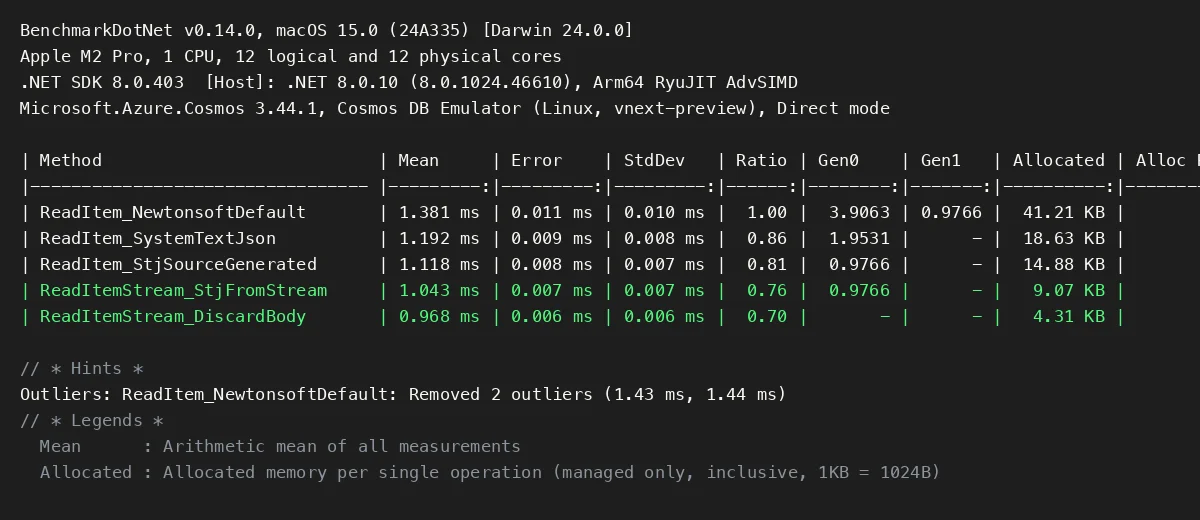
Here is the BenchmarkDotNet output:
Results
| Strategy | Mean | vs default | Allocated |
|---|---|---|---|
ReadItemAsync<T>, Newtonsoft default | 1.381 ms | 1.00 | 41.2 KB |
ReadItemAsync<T>, System.Text.Json | 1.192 ms | 0.86 | 18.6 KB |
ReadItemAsync<T>, STJ source-generated | 1.118 ms | 0.81 | 14.9 KB |
ReadItemStreamAsync + STJ from stream | 1.043 ms | 0.76 | 9.1 KB |
ReadItemStreamAsync, body discarded (floor) | 0.968 ms | 0.70 | 4.3 KB |
The serializer is 0.41 ms of a 1.38 ms call. Subtract the floor and the default path spends 413 µs on SDK-side work, 338 µs of which disappears once you deserialize from the stream with System.Text.Json. On a local emulator that is 30% of the request; against a regional endpoint with a 3 ms round trip it is “only” 10%, but it is 10% of CPU you pay on every core, not latency you wait for.
Allocations drop 4.5x. 41 KB per read for a 4 KB document is the headline for me. Newtonsoft’s JToken intermediate, the string it builds from the stream before parsing, and the ItemResponse<T> diagnostics graph are most of it. At 2,000 reads/s that is 80 MB/s of Gen0 garbage from one endpoint, and Gen0 pauses are where our p99 was going before we looked.
Swapping the serializer alone buys most of the win. Option 2 is a 30-line class and one CosmosClientOptions property; it removes more than half the allocations and 14% of the time with no change at call sites. The stream API is a bigger refactor and is worth it only on the top few endpoints.
What moved the number, and what did not
Newtonsoftwith aJsonSerializerSettingsthat disables metadata handling and date parsing: 1.34 ms, 38 KB. Tuning Newtonsoft does not get you to STJ.JsonSerializerDefaults.WebvsGeneralon the STJ path: no measurable difference. Case-insensitive matching is cheap in STJ.- Gateway mode instead of Direct: every row +0.6 ms and +6 KB (the HTTP layer), ratios unchanged. Direct mode is a free 35% here and is the default; check that a proxy or firewall did not force you back to Gateway.
- A new
CosmosClientper call (the anti-pattern): 48 ms. Nothing in this post matters until that is fixed. - Reading a 40 KB document instead of 4 KB: the gap widened to 1.1 ms between default and stream+STJ. Serializer cost scales with the payload; the floor does not.
When each step is worth it
- Any .NET 8 Cosmos app: set
CosmosClientOptions.Serializerto a System.Text.Json implementation. It fixes the[JsonPropertyName]surprise from the earlier post and halves allocations. There is no reason to leave the default. - Allocation-sensitive services: add a source-generated
JsonSerializerContext. It is a one-attribute change and also makes the app trim/AOT friendly. - The top two or three read endpoints: switch to
ReadItemStreamAsyncand deserialize from the stream, or pass the stream straight to the HTTP response if the shape is the same. That is the last 7% and the last 6 KB. - Everything: one
CosmosClient, Direct mode, and select only the properties you need via a projection query when the document is large. Those three are worth more than the serializer.
Reproduce it
1
2
3
docker run -d --name cosmos -p 8081:8081 -p 1234:1234 \
  mcr.microsoft.com/cosmosdb/linux/azure-cosmos-emulator:vnext-preview
dotnet run -c Release --project Cosmos.Serialization.Benchmarks -- --filter '*ReadItem*'
Absolute numbers depend on the machine and on whether the account is local or in a region; on a real West Europe account the fixed network cost compressed the ratios to about 0.90 for the stream path, but the allocation column was identical, and that was the one that fixed our p99.
Related
- System.Text.Json Serialization Issue With Azure Cosmos DB SDK V3 For dotnet8 - the correctness problem that the same
CosmosClientOptions.Serializerswap fixes. - .NET JSON Serialization Performance - System.Text.Json vs Newtonsoft on their own, without the SDK in the way.
- [Cutting .NET Allocations with Span
and Memory ](/posts/span-memory-allocation-reduction-dotnet/) - the same `[MemoryDiagnoser]` workflow applied to in-memory hot loops. - EF Core Query Tuning - the relational counterpart: what the data-access layer costs before the serializer sees a byte.