Azure OpenAI Content Filters in .NET: Handling finish_reason content_filter Without Breaking Your App
Handle Azure OpenAI content filters in .NET: catch the 400 content_filter error, detect truncated completions via FinishReason and show users an honest message.
Sooner or later a user of your Azure OpenAI feature types something the content filter does not like, or the model produces a reply that gets cut off halfway. If you did not plan for it, the user sees a generic “something went wrong”, your logs show a 400 Bad Request, and support opens a ticket that nobody can reproduce. None of that is a model bug: it is the content filtering system doing exactly what it is configured to do, and your code needs to treat it as a normal, expected outcome.
This post walks through the two places a filter can fire, what each one looks like from the .NET SDK, and how to turn both into a clear message instead of an exception.
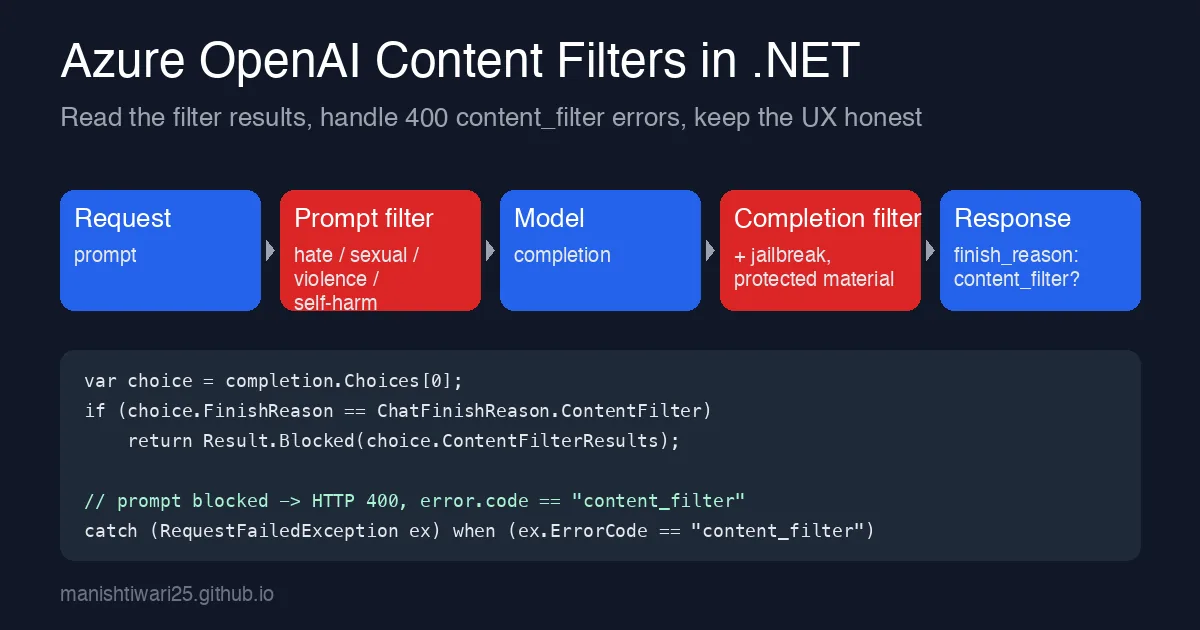
Two filters, two failure shapes
Every Azure OpenAI chat completion passes through two classifiers:
- Prompt filter - runs on your input before the model sees it. If a category (hate, sexual, violence, self-harm, plus optional jailbreak detection) crosses the configured severity threshold, the whole request is rejected with HTTP 400 and
error.code == "content_filter". No tokens are generated and you are not billed for output. - Completion filter - runs on the model output. If it fires, you still get a
200 OK, but the choice hasfinish_reason == "content_filter"and the content is empty or truncated at the point where the filter triggered.
The first one surfaces as an exception in .NET. The second one does not, which is why it gets missed: the call succeeds, you return choice.Content[0].Text to the user, and they see half a sentence.
Reading filter results on a successful call
Using the Azure.AI.OpenAI 2.x SDK, start with the finish reason:
1
2
3
4
5
6
7
8
9
10
11
12
13
14
15
16
17
18
19
20
21
22
23
using Azure;
using Azure.AI.OpenAI;
using OpenAI.Chat;

var client = new AzureOpenAIClient(
    new Uri(Environment.GetEnvironmentVariable("AZURE_OPENAI_ENDPOINT")!),
    new DefaultAzureCredential());

ChatClient chat = client.GetChatClient("gpt-4o-mini");

ChatCompletion completion = await chat.CompleteChatAsync(
[
    new SystemChatMessage("You are a support assistant for an invoicing product."),
    new UserChatMessage(userText)
]);

if (completion.FinishReason == ChatFinishReason.ContentFilter)
{
    // Output was blocked or truncated by the completion filter.
    return ChatResult.Blocked("The reply was withheld by the content safety filter.");
}

return ChatResult.Ok(completion.Content[0].Text);
FinishReason also tells you about the other truncation case, ChatFinishReason.Length, when max_tokens ran out. Handle both, because to a user they look identical: a message that stops mid-sentence.
If you want to know why the filter fired, the Azure-specific extensions expose the per-category results:
1
2
3
4
5
6
7
8
9
10
11
var filter = completion.GetResponseContentFilterResult();

if (filter is not null)
{
    Log.Information("Filter: hate={Hate} sexual={Sexual} violence={Violence} selfharm={SelfHarm}",
        filter.Hate?.Severity, filter.Sexual?.Severity,
        filter.Violence?.Severity, filter.SelfHarm?.Severity);

    if (filter.ProtectedMaterialText?.Detected == true)
        Log.Warning("Protected material detected in completion");
}
Log the severities, not the user text. The categories are enough to spot a pattern (for example, a prompt template that keeps tripping the violence filter at medium) without storing anything you would not want in a log file.
Catching a blocked prompt
When the prompt filter rejects the input, CompleteChatAsync throws ClientResultException (or RequestFailedException on older SDKs) with status 400. Do not catch all 400s as filter hits; check the error code:
1
2
3
4
5
6
7
8
9
10
11
12
13
14
15
16
17
18
19
try
{
    completion = await chat.CompleteChatAsync(messages);
}
catch (ClientResultException ex) when (ex.Status == 400 && IsContentFilter(ex))
{
    return ChatResult.Blocked("Your message could not be sent because it was flagged by the content safety filter.");
}

static bool IsContentFilter(ClientResultException ex)
{
    var raw = ex.GetRawResponse();
    if (raw is null) return false;

    using var doc = JsonDocument.Parse(raw.Content);
    return doc.RootElement.TryGetProperty("error", out var err)
        && err.TryGetProperty("code", out var code)
        && code.GetString() == "content_filter";
}
The error body also contains innererror.content_filter_result with the same per-category structure as the success case, so the logging helper above can be reused for both paths.
Streaming changes the timing, not the shape
With CompleteChatStreamingAsync the completion filter runs on chunks as they are produced. A blocked completion shows up as a final update whose FinishReason is ContentFilter after some text has already been streamed to the browser. The earlier post on streaming responses covers the plumbing; the one extra step is to send a terminal event when that finish reason arrives so the UI can replace the partial text with an explanation instead of leaving it hanging:
1
2
3
4
5
6
7
8
9
10
11
await foreach (var update in chat.CompleteChatStreamingAsync(messages))
{
    if (update.FinishReason == ChatFinishReason.ContentFilter)
    {
        await writer.WriteAsync(SseEvent.Blocked());
        break;
    }

    foreach (var part in update.ContentUpdate)
        await writer.WriteAsync(SseEvent.Token(part.Text));
}
If you enabled asynchronous filtering on the deployment, chunks arrive before the filter has finished, and a block can land several chunks later. The code above still works; just do not assume text that has already been displayed is final.
Tell the user the truth
The worst outcome is the silent one: an empty bubble, or a reply that ends mid-word. A few rules that have held up in production:
- Distinguish “your input was blocked” from “the reply was withheld”. The first asks the user to rephrase; the second is nothing they did wrong.
- Never retry a
content_filter400. The same input gets the same verdict, and you burn rate limit for nothing. Retries belong to 429s, not filter hits. - Do not log the prompt on a filter hit. Log the category severities and a correlation id.
- Watch the rate. If more than a few percent of real traffic trips the filter, either your system prompt is steering the model somewhere it should not go, or the deployment’s severity thresholds are too strict for the domain. Both are fixable in Azure AI Foundry without a code change.
Summary
Content filter hits are not errors, they are results. Check FinishReason on every completion, catch the 400 with error.code == "content_filter" separately from other bad requests, and give the user a message that says which of the two happened. Ten lines of code, and a whole class of “the bot just stopped” tickets disappears.