Azure OpenAI Embeddings in .NET: Semantic Search Without a Vector Database
Generate text-embedding-3 vectors with the Azure OpenAI .NET SDK, store them in memory, and rank documents with cosine similarity for a small semantic search.
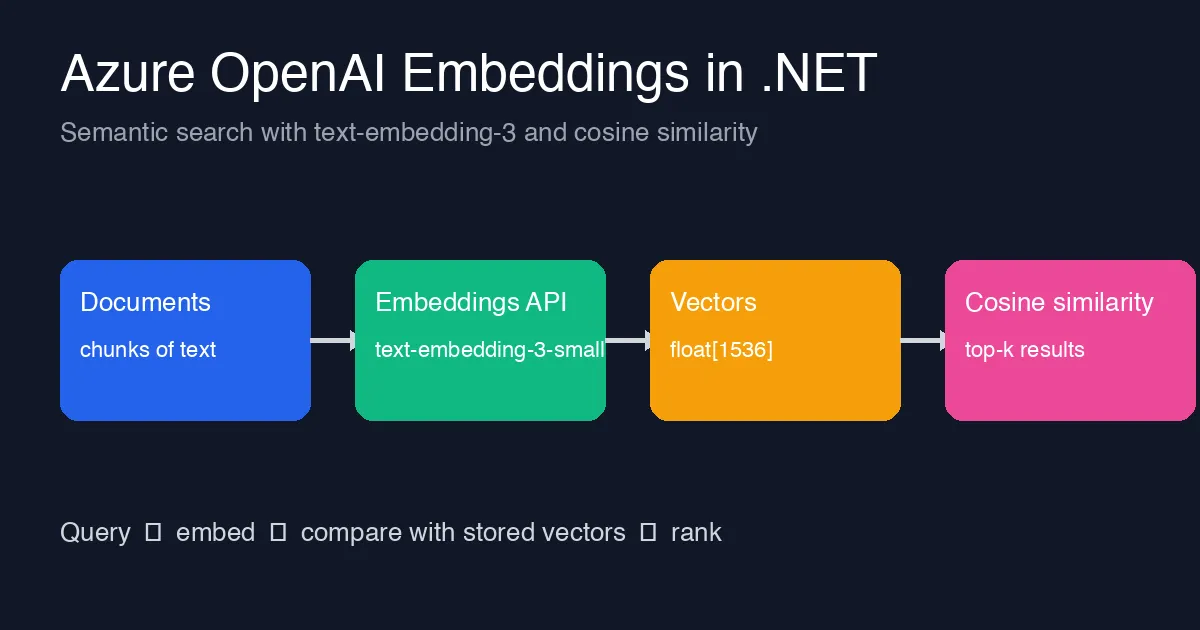
Keyword search fails the moment a user types “how do I reset my password” and the document says “credential recovery”. Embeddings fix that: both sentences map to nearby points in a vector space, so you can rank by meaning instead of by shared words. You do not need a vector database to start. For a few thousand documents, a float[] per document and a cosine similarity loop is enough, and it keeps the moving parts to one API call.
This post walks through generating embeddings with Azure OpenAI from .NET, storing them in memory, ranking a query against them, and the details that bite in practice: chunk size, batching, and never mixing vectors from two different models.
What an embedding is
An embedding is a fixed-length array of floats that represents the meaning of a piece of text. text-embedding-3-small returns 1536 numbers per input; text-embedding-3-large returns 3072. Texts with similar meaning produce vectors that point in similar directions, which is why cosine similarity (the angle between two vectors) is the usual comparison. The absolute numbers are meaningless on their own; only comparisons between vectors from the same model mean anything.
Deploying the model
In Azure AI Foundry (or the Azure OpenAI resource), create a deployment of text-embedding-3-small. Note the deployment name; the SDK addresses the deployment, not the model. Then grab the endpoint and a key, or use DefaultAzureCredential with the Cognitive Services OpenAI User role.
Generating embeddings in C#
Install the SDK:
1
2
dotnet add package Azure.AI.OpenAI
dotnet add package Azure.Identity
Then create a client and embed a batch of texts in one request:
1
2
3
4
5
6
7
8
9
10
11
12
13
14
15
16
17
18
19
20
21
22
23
24
25
using Azure.AI.OpenAI;
using Azure.Identity;
using OpenAI.Embeddings;

var client = new AzureOpenAIClient(
    new Uri("https://<your-resource>.openai.azure.com/"),
    new DefaultAzureCredential());

EmbeddingClient embeddings = client.GetEmbeddingClient("text-embedding-3-small");

string[] documents =
[
    "Reset your credentials from the account security page.",
    "Invoices are generated on the first day of each month.",
    "Two-factor authentication can be enabled under Security settings.",
    "Contact billing support for refunds and payment disputes."
];

OpenAIEmbeddingCollection result = await embeddings.GenerateEmbeddingsAsync(documents);

var index = new List<(string Text, float[] Vector)>();
foreach (OpenAIEmbedding e in result)
{
    index.Add((documents[e.Index], e.ToFloats().ToArray()));
}
Batching matters. One request with 100 inputs is far cheaper in latency than 100 requests, and the service accepts up to 2048 inputs per call. Keep each input under the model’s token limit (8191 tokens for the text-embedding-3 family) or the whole batch fails.
Ranking with cosine similarity
1
2
3
4
5
6
7
8
9
10
11
12
13
14
15
16
17
18
19
20
21
22
23
static float Cosine(ReadOnlySpan<float> a, ReadOnlySpan<float> b)
{
    float dot = 0, na = 0, nb = 0;
    for (int i = 0; i < a.Length; i++)
    {
        dot += a[i] * b[i];
        na += a[i] * a[i];
        nb += b[i] * b[i];
    }
    return dot / (MathF.Sqrt(na) * MathF.Sqrt(nb));
}

string query = "how do I reset my password";
OpenAIEmbedding q = await embeddings.GenerateEmbeddingAsync(query);
float[] qv = q.ToFloats().ToArray();

var top = index
    .Select(d => (d.Text, Score: Cosine(qv, d.Vector)))
    .OrderByDescending(x => x.Score)
    .Take(3);

foreach (var (text, score) in top)
    Console.WriteLine($"{score:F3}  {text}");
Expected output puts “Reset your credentials from the account security page.” first, even though it shares no word with the query apart from “reset”. Scores are typically in the 0.2–0.8 range for text-embedding-3; do not expect values near 1.0 unless the texts are nearly identical.
If you already reference System.Numerics.Tensors, TensorPrimitives.CosineSimilarity(a, b) does the same thing with SIMD and is noticeably faster on large indexes.
Chunking: the step that decides quality
Embedding a whole 20-page document as one vector blurs its meaning into mush. Split documents into chunks of roughly 200–500 tokens, ideally along headings or paragraphs, and embed each chunk. Store the source document and offset with each vector so a hit can be shown in context. Overlapping chunks by a sentence or two reduces answers that fall exactly on a boundary.
Storing vectors
For small corpora, serialize the float[] arrays to JSON or a binary file next to the text and load them at startup; 10,000 chunks of 1536 floats is about 60 MB in memory, which is fine for most services. When you outgrow that, Azure AI Search, Cosmos DB vector search or PostgreSQL with pgvector all accept the same arrays. The embedding code does not change; only the storage does.
Mistakes to avoid
- Mixing models. Vectors from
text-embedding-3-smalland-largelive in different spaces. Re-embed everything when you switch models, and store the model name alongside the vectors so you can detect a mismatch. - Embedding on every request. Cache the embedding of repeated queries; the document side should be embedded once at ingest, never at query time.
- Ignoring 429s. Embedding ingestion is bursty and hits tokens-per-minute limits quickly. Use the SDK’s retry policy or back off manually, as covered in the Azure OpenAI 429 retry post.
- Trusting the score threshold. A fixed cutoff like
> 0.5behaves differently per model and per corpus. Rank, take the top-k, and tune any cutoff against real queries.
Wrapping up
Embeddings turn “does the document contain these words” into “does the document mean this”, and the first version needs nothing beyond one API call, a float[] per chunk and a cosine loop. Start there, measure the ranking on real questions, and move to a vector store only when the index no longer fits in memory.