Enterprise AI: Data Residency and Compliance Checklist for Azure OpenAI Deployments
A 12-point data residency and compliance checklist for Azure OpenAI: deployment types, abuse monitoring, stored data, CMK, logging, DPIA and a CI test.
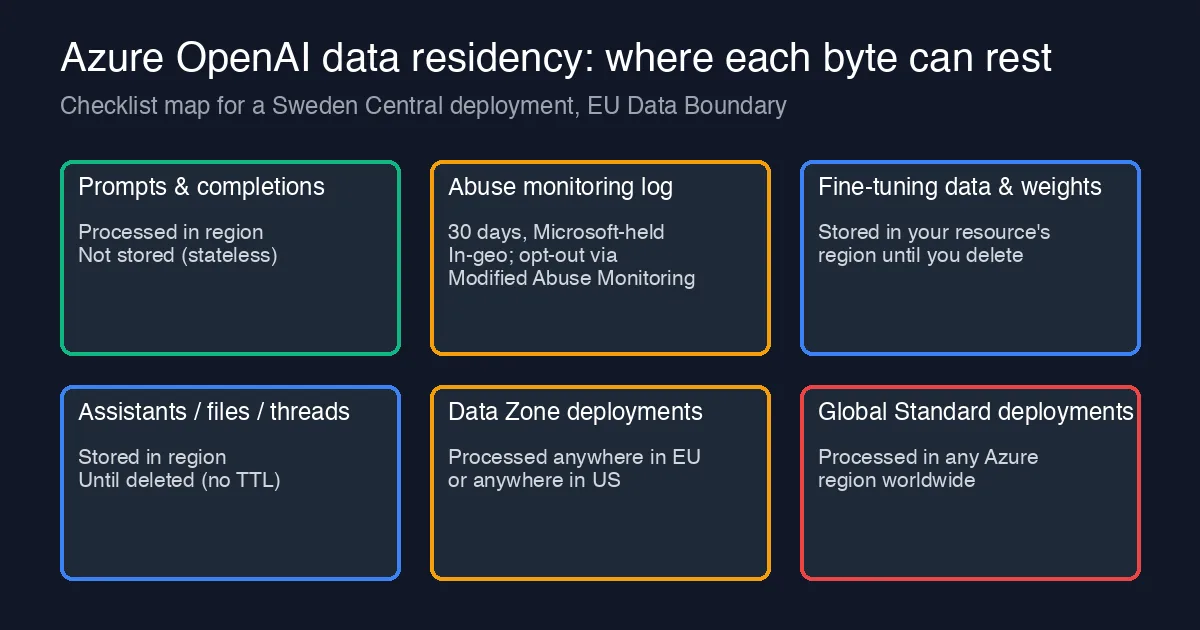
“Azure OpenAI is in our EU region, so we are compliant” is the sentence that gets a project through the first architecture review and fails the first audit. The resource being in Sweden Central says where the control plane lives. It says nothing about which deployment type you picked, where the abuse-monitoring copy of your prompts sits, who holds the encryption key for your fine-tuning files, or whether the log pipeline you built in the governance post quietly ships to a workspace in another geography.
This post is the checklist we now run before any Azure OpenAI workload touches personal or regulated data. It is written for the EU case (GDPR, EU Data Boundary), but every item has a US, UK or Swiss equivalent. For each control: what it actually guarantees, how to prove it, and who owns it.
First, understand what “resides” and what only “passes through”
Azure OpenAI has three different data stories, and most compliance arguments go wrong by mixing them up:
| Data | Default behaviour | Residency lever |
|---|---|---|
| Prompts and completions | Processed, not stored by the service (stateless inference) | Deployment type decides where processing happens |
| Abuse monitoring sample | Stored up to 30 days, reviewable by authorised Microsoft staff, within the resource’s geography | Modified Abuse Monitoring (approval needed) turns storage off |
| Stored customer data: fine-tuning files, fine-tuned weights, Assistants threads/files, Batch inputs and outputs, stored completions | Stored in the resource’s region until you delete them | Customer-managed keys, your own purge runbook |
The first row is the one that surprises teams. The deployment type, not the resource region, decides where inference runs:
- Standard (regional): processed in the resource’s region. Residency-safe, lowest quota.
- Data Zone Standard / Data Zone Provisioned: processed anywhere inside the EU or anywhere inside the US. Fine for an “EU data boundary” requirement, not fine for a “must stay in Sweden” one.
- Global Standard / Global Provisioned: processed in any Azure region worldwide. Best quota and price, and the one that an engineer picks because the portal lists it first.
If your contract says “data processed in the EU” and someone created a GlobalStandard deployment to get past a 429, you have a residency incident, not a configuration detail. That is why item 12 below is a test, not a wiki page.
The 12-point checklist
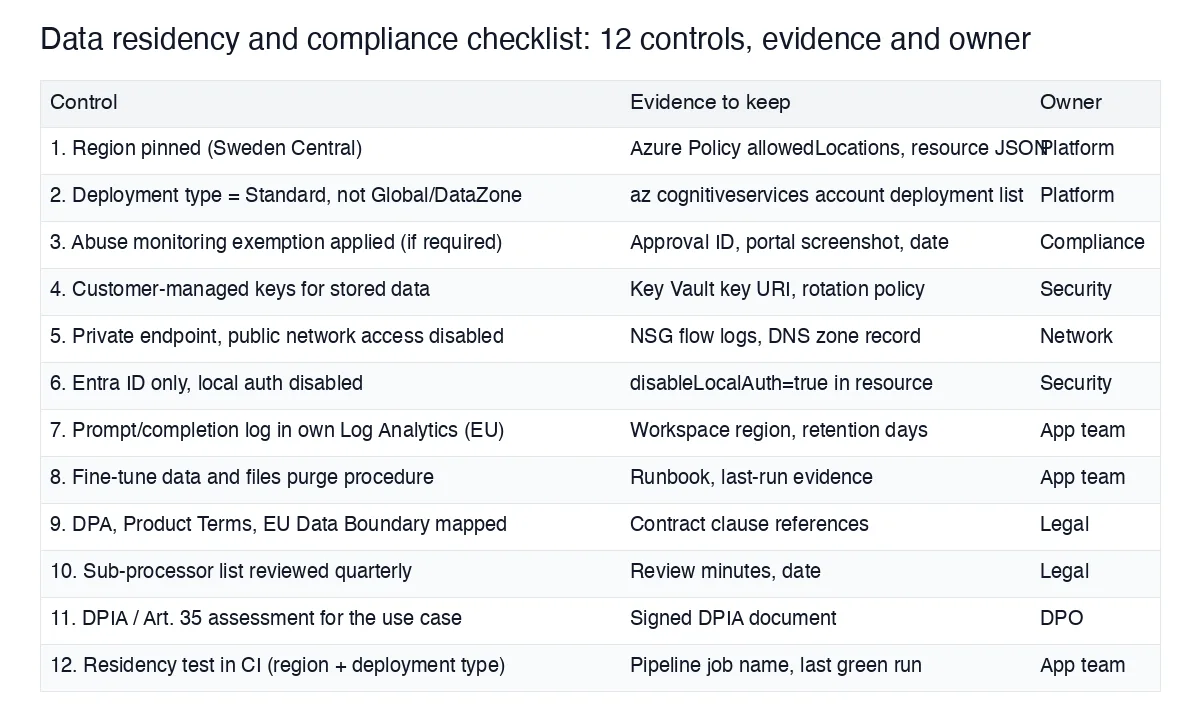
1. Pin the resource region with policy, not convention
An Azure Policy allowedLocations assignment on the subscription that hosts AI resources, with the approved regions only. Evidence: the policy assignment ID and the resource JSON. Owner: platform team.
2. Pin the deployment type too
Policy on Microsoft.CognitiveServices/accounts/deployments denying sku.name of GlobalStandard, GlobalProvisionedManaged and (if your rule is per-country) DataZoneStandard. Until that policy exists, at least audit:
1
2
3
az cognitiveservices account deployment list \
  --name aoai-prod-swc --resource-group rg-ai-prod \
  --query "[].{name:name, sku:sku.name, model:properties.model.name}" -o table
Anything other than Standard or ProvisionedManaged in a residency-scoped resource is a finding.
3. Decide on abuse monitoring explicitly
By default a sample of prompts and completions is stored for up to 30 days for abuse detection, in the resource’s geography. For many regulated workloads that is acceptable and documented in the DPA. If it is not (health, legal privilege, special-category data), apply for Modified Abuse Monitoring and keep the approval ID, date and portal screenshot. Owner: compliance. Do not assume the exemption carries over to a new subscription; it is per-subscription.
4. Customer-managed keys for everything that is stored
Fine-tuning data, fine-tuned models, Assistants files and stored completions are encrypted at rest by Microsoft keys unless you configure CMK through Key Vault. Evidence: the key URI on the resource, the rotation policy, and the Key Vault’s own region (it must match). Owner: security.
5. Private endpoint, public network access disabled
publicNetworkAccess: Disabled, a private endpoint in the hub VNet, and the privatelink.openai.azure.com DNS zone. Residency is also about path: traffic that leaves via the public internet to a regional endpoint still leaves your network boundary. Evidence: NSG flow logs and the DNS zone record.
6. Entra ID only, local auth off
disableLocalAuth: true. Keys cannot be scoped, rotated per caller or tied to a person, which matters when the auditor asks “who sent this prompt”. Managed identities for services, user-assigned roles for people. This is item 2 of the governance post; it belongs here too because access control is a GDPR Article 32 measure.
7. Your own prompt and completion log, in the right geography
The log you keep for incident reconstruction is personal data too. The Log Analytics workspace, the storage account behind any export, and the Event Hub if you stream must all be in approved regions with a retention period you can defend (we use 90 days for raw, 2 years for aggregates). Evidence: workspace region and retentionInDays. The APIM policy that produces this log is in the token-quota and chargeback post.
8. A purge runbook for stored data
Fine-tuning files, Assistants threads and uploaded files have no TTL. Someone uploads a 40 MB CSV of customer records to test fine-tuning and it stays until deleted. Write the runbook (files delete, fine_tuning jobs cancel, thread cleanup), run it on a schedule, and keep the last-run output. Owner: app team.
9. Map the contract chain
Your DPA with Microsoft, the Product Terms for Azure OpenAI, the EU Data Boundary documentation, and your own customer contracts need to say the same thing about location and retention. Write down which clause covers which item in this list. Owner: legal. This is the item most often missing, and the one an auditor asks for first.
10. Review the sub-processor list quarterly
Microsoft publishes its sub-processor list and changes it. Put a quarterly calendar entry on it and record the review. Ten minutes a quarter, and the absence of it is a finding.
11. DPIA for the use case, not the platform
A Data Protection Impact Assessment is about what you do with the model: invoice coding with supplier bank details, HR summarisation, customer-support drafts. One DPIA per use case, signed by the DPO, referencing the controls above. Reuse the platform sections; rewrite the purpose, legal basis and risk sections every time.
12. A residency test in CI
Everything above decays unless something checks it. Ours is a 40-line pipeline job that runs nightly and on every infrastructure PR:
1
2
3
4
5
6
7
8
9
10
11
12
13
14
15
16
17
18
19
20
#!/usr/bin/env bash
set -euo pipefail
RG=rg-ai-prod; ACC=aoai-prod-swc
ALLOWED_REGIONS="swedencentral"
ALLOWED_SKUS="Standard ProvisionedManaged"

loc=$(az cognitiveservices account show -g "$RG" -n "$ACC" --query location -o tsv)
[[ " $ALLOWED_REGIONS " == *" $loc "* ]] || { echo "FAIL region $loc"; exit 1; }

pna=$(az cognitiveservices account show -g "$RG" -n "$ACC" --query properties.publicNetworkAccess -o tsv)
[[ "$pna" == "Disabled" ]] || { echo "FAIL publicNetworkAccess=$pna"; exit 1; }

local_auth=$(az cognitiveservices account show -g "$RG" -n "$ACC" --query properties.disableLocalAuth -o tsv)
[[ "$local_auth" == "true" ]] || { echo "FAIL local auth enabled"; exit 1; }

az cognitiveservices account deployment list -g "$RG" -n "$ACC" \
  --query "[].[name,sku.name]" -o tsv | while read -r name sku; do
  [[ " $ALLOWED_SKUS " == *" $sku "* ]] || { echo "FAIL deployment $name sku $sku"; exit 1; }
done
echo "residency checks passed for $ACC in $loc"
It has fired twice in a year: once for a GlobalStandard deployment created to dodge a quota ceiling, once for a workspace export to a West Europe storage account. Both were fixed the same day instead of being discovered in an audit.
What this costs
Items 1, 2, 5, 6 and 12 are a few days of platform work once and are then free. Item 3 may cost you latency budget for a human review step on flagged content, since you lose Microsoft’s abuse review. Item 4 adds a Key Vault and a rotation runbook. Items 9 to 11 are legal and DPO time, roughly two days per new use case. Against that, the residency incidents we have seen each consumed two to three weeks of senior time in root cause, customer notification and remediation. The checklist is cheaper.
Related
- Enterprise AI: Six Governance Controls Before Azure OpenAI Goes to Production in a Regulated Org - the broader governance set this checklist deepens on the residency items.
- Enterprise AI: Per-Team Token Quotas and Chargeback for Azure OpenAI with Azure API Management - the APIM logging pipeline that item 7 keeps in-geography.
- Enterprise AI: Vendor Lock-In and Exit Cost - Azure OpenAI Managed Endpoints vs a Self-Hosted Open-Weights Model - where the data residency contract sits in the lock-in audit.