Enterprise AI: Governance as Code for Azure OpenAI - Azure Policy Guardrails and Budget Alerts Before the First Deployment Exists
Turn the Azure OpenAI governance checklist into Azure Policy and budget alerts in Bicep, so bad configurations are denied at creation, not found in an audit.
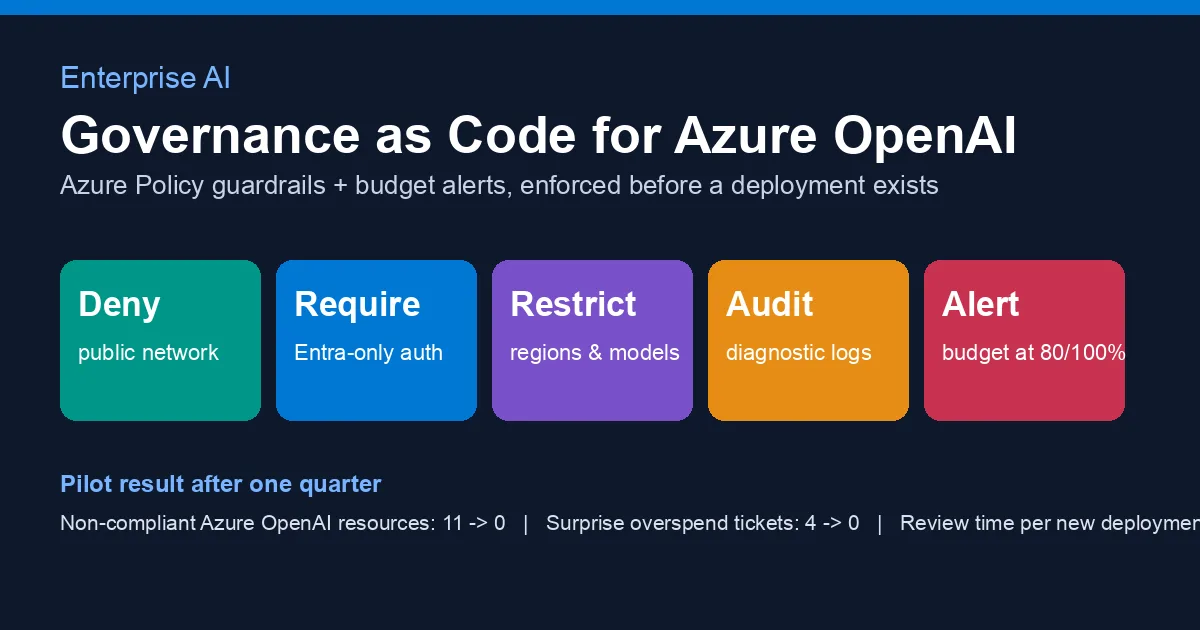
The six governance controls post was a checklist for the review meeting. It worked, right up until the eleventh team created an Azure OpenAI account on a Friday afternoon with public network access on, an API key in a pipeline variable and a model nobody had approved. Nothing in the checklist stopped them, because a checklist is read by people and resources are created by scripts. This post is the next step: the same controls expressed as Azure Policy assignments and budget alerts in Bicep, so the platform denies the wrong configuration at creation time and the finance team hears about spend drift before the invoice. It is governance as code, and it is the part of Enterprise AI that is mostly plumbing and mostly worth it.
Why policy and not a wiki page
Three reasons we kept coming back to:
- Checklists do not scale past the team that wrote them. By the time you have more than a handful of teams calling Azure OpenAI, somebody will skip a step, and you will find out in an audit rather than at
az deployment create. - Deny is cheaper than remediate. A resource that never existed does not need a ticket, a migration or an apology to the data-protection officer.
- Cost is a governance control too. Most Enterprise AI budgets blow up not from one expensive model but from a forgotten load test or a chatty retry loop. A budget alert at 80 % costs nothing and catches both.
Azure Policy evaluates every resource write against assigned rules and can Deny, Audit, Modify or DeployIfNotExists. Azure Cost Management budgets fire action groups at spend thresholds. Together they cover the controls from the checklist that are about configuration rather than application code.
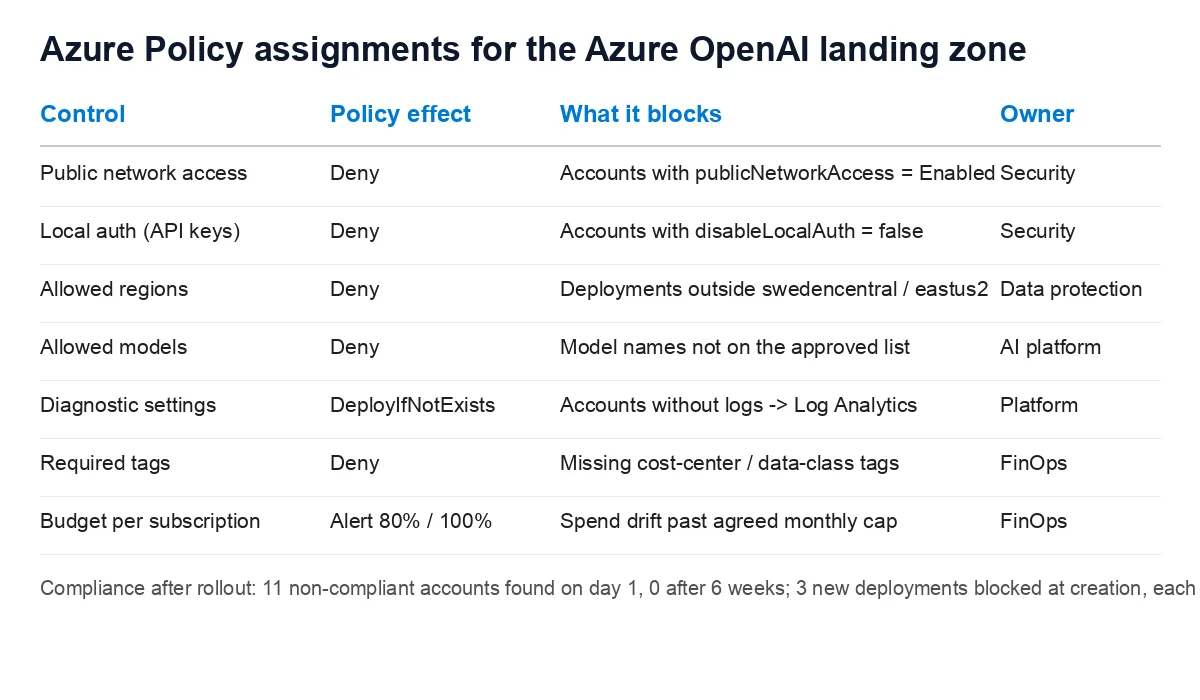
The controls, mapped to policy effects
| Control from the checklist | Policy effect | Property it checks |
|---|---|---|
| Private network only | Deny | properties.publicNetworkAccess != Disabled |
| Entra ID only, keys off | Deny | properties.disableLocalAuth != true |
| Data residency | Deny | location not in the allowed list |
| Approved models only | Deny | Microsoft.CognitiveServices/accounts/deployments with properties.model.name not in the list |
| Logging you own | DeployIfNotExists | diagnostic settings pointing at the shared Log Analytics workspace |
| Chargeback | Deny | missing cost-center and data-class tags |
| Spend cap | budget alert | 80 % and 100 % of the monthly amount |
Content safety and human review from the original list stay in the application; policy cannot see your prompts. Everything else is enforceable at the control plane.
Deny public network access and API keys
Two custom policy definitions, one Bicep file at management-group scope. Both target Microsoft.CognitiveServices/accounts with kind == OpenAI so we do not accidentally lock down Speech or Vision resources owned by other teams.
1
2
3
4
5
6
7
8
9
10
11
12
13
14
15
16
17
18
19
20
21
22
23
24
25
26
27
28
29
30
31
32
33
34
35
36
37
38
39
40
41
42
43
44
45
targetScope = 'managementGroup'

resource denyPublicNetwork 'Microsoft.Authorization/policyDefinitions@2023-04-01' = {
  name: 'deny-aoai-public-network'
  properties: {
    displayName: 'Azure OpenAI accounts must disable public network access'
    policyType: 'Custom'
    mode: 'Indexed'
    policyRule: {
      if: {
        allOf: [
          { field: 'type', equals: 'Microsoft.CognitiveServices/accounts' }
          { field: 'kind', equals: 'OpenAI' }
          {
            field: 'Microsoft.CognitiveServices/accounts/publicNetworkAccess'
            notEquals: 'Disabled'
          }
        ]
      }
      then: { effect: 'Deny' }
    }
  }
}

resource denyLocalAuth 'Microsoft.Authorization/policyDefinitions@2023-04-01' = {
  name: 'deny-aoai-local-auth'
  properties: {
    displayName: 'Azure OpenAI accounts must disable local authentication (API keys)'
    policyType: 'Custom'
    mode: 'Indexed'
    policyRule: {
      if: {
        allOf: [
          { field: 'type', equals: 'Microsoft.CognitiveServices/accounts' }
          { field: 'kind', equals: 'OpenAI' }
          {
            field: 'Microsoft.CognitiveServices/accounts/disableLocalAuth'
            notEquals: true
          }
        ]
      }
      then: { effect: 'Deny' }
    }
  }
}
The disableLocalAuth rule is the one that produced the most support tickets in the first week, because every quick-start on the internet uses an API key. The fix on the client side is a one-line change to DefaultAzureCredential, which the governance post already shows, so the ticket response was a link.
Restrict regions and models
Regions use the built-in Allowed locations policy, assigned with a parameter, so there is nothing custom to maintain. Models need a custom definition because the approved list lives on the child deployments resource:
1
2
3
4
5
6
7
8
9
10
11
12
13
14
15
16
17
18
19
20
21
22
23
24
25
26
27
28
29
30
31
32
33
34
35
36
resource allowedModels 'Microsoft.Authorization/policyDefinitions@2023-04-01' = {
  name: 'aoai-allowed-models'
  properties: {
    displayName: 'Azure OpenAI deployments must use an approved model'
    policyType: 'Custom'
    mode: 'All'
    parameters: {
      allowedModels: {
        type: 'Array'
        metadata: { description: 'Model names approved by the AI platform team' }
      }
    }
    policyRule: {
      if: {
        allOf: [
          { field: 'type', equals: 'Microsoft.CognitiveServices/accounts/deployments' }
          {
            field: 'Microsoft.CognitiveServices/accounts/deployments/model.name'
            notIn: '[parameters(\'allowedModels\')]'
          }
        ]
      }
      then: { effect: 'Deny' }
    }
  }
}

resource allowedModelsAssignment 'Microsoft.Authorization/policyAssignments@2024-04-01' = {
  name: 'aoai-allowed-models'
  properties: {
    policyDefinitionId: allowedModels.id
    parameters: {
      allowedModels: { value: [ 'gpt-4o', 'gpt-4o-mini', 'text-embedding-3-large' ] }
    }
  }
}
The approved list is a parameter on the assignment, not hard-coded in the definition, so adding a model is a one-line pull request reviewed by the AI platform team rather than a redeploy of the definition. That pull request is also the approval record the compliance team asked for; nobody needs a separate form.
Deploy diagnostic settings if they are missing
Deny is wrong for logging, because the account can legitimately exist for a moment before its diagnostic settings do. DeployIfNotExists checks for a setting that ships Audit and RequestResponse logs to the shared workspace and creates it when absent. The policy’s managed identity needs Monitoring Contributor and Log Analytics Contributor; the assignment grants both. The remediation task runs on existing resources as well, which is how the first scan found eleven accounts with no logs at all.
1
2
3
4
5
6
7
8
9
10
11
12
resource diagAssignment 'Microsoft.Authorization/policyAssignments@2024-04-01' = {
  name: 'aoai-diagnostics'
  location: deployment().location
  identity: { type: 'SystemAssigned' }
  properties: {
    policyDefinitionId: aoaiDiagnostics.id
    parameters: {
      logAnalytics: { value: sharedWorkspaceId }
      logsEnabled:  { value: 'True' }
    }
  }
}
With logs landing in one workspace the cost observability dashboard and the token quota chargeback report start working for new teams without anyone wiring them up.
Budget alerts: the cost control nobody argues about
Each subscription that hosts Azure OpenAI gets a budget sized from the team’s own forecast, with alerts at 80 % and 100 % of actual spend and a forecast alert at 100 %. The action group emails the team’s owner and posts to their channel; at 100 % it also opens a ticket with FinOps.
1
2
3
4
5
6
7
8
9
10
11
12
13
14
15
16
17
18
19
20
21
22
23
24
25
26
targetScope = 'subscription'

param monthlyAmount int
param ownerActionGroupId string

resource aoaiBudget 'Microsoft.Consumption/budgets@2023-11-01' = {
  name: 'aoai-monthly'
  properties: {
    category: 'Cost'
    amount: monthlyAmount
    timeGrain: 'Monthly'
    timePeriod: { startDate: '2026-10-01T00:00:00Z' }
    filter: {
      dimensions: {
        name: 'ServiceName'
        operator: 'In'
        values: [ 'Azure OpenAI' ]
      }
    }
    notifications: {
      actual80:   { enabled: true, operator: 'GreaterThan', threshold: 80,  thresholdType: 'Actual',     contactGroups: [ ownerActionGroupId ] }
      actual100:  { enabled: true, operator: 'GreaterThan', threshold: 100, thresholdType: 'Actual',     contactGroups: [ ownerActionGroupId ] }
      forecast100:{ enabled: true, operator: 'GreaterThan', threshold: 100, thresholdType: 'Forecasted', contactGroups: [ ownerActionGroupId ] }
    }
  }
}
A budget does not stop spend; it tells someone. Hard stops belong in the API Management token quota policy from the chargeback post, and the two are complementary: the quota prevents a single team running away, the budget catches the sum of many small drifts. The forecast alert is the one that paid for itself; it fired two weeks into a month for a team whose new feature had doubled average prompt length, early enough to switch to prompt caching before the bill arrived.
Rolling it out without breaking anyone
We did not start with Deny. The sequence that worked:
- Assign every definition with
effect: Auditand let the compliance scan run for a week. Day one showed eleven non-compliant accounts across nine subscriptions; four had keys enabled, three were public, eleven had no diagnostic settings. - Run the
DeployIfNotExistsremediation for logging. That fixed eleven of eleven with no team involvement. - Give owners of the remaining findings two weeks and a link to the fix. Seven fixed themselves; one needed a private endpoint the network team had to provision.
- Flip the assignments to
Deny. Since then three new deployments have been blocked at creation, each fixed the same day because the error message names the policy and the policy’s description links to this runbook.
Six weeks after the first scan the compliance view showed zero non-compliant Azure OpenAI resources, surprise-overspend tickets went from four in the previous quarter to none, and the governance review for a new deployment went from a three-day meeting cycle to the time it takes to read a Bicep diff.
What this does not cover
- Prompt and output content. Content filters and human-in-the-loop stay in the application; see the content filter handling post.
- Quality regressions. Policy knows nothing about whether the model got worse; that is the job of SLOs and canary deploys.
- Exceptions. A policy exemption resource with an expiry date and a ticket number is how we handle the research team that genuinely needs a preview model. Exemptions without an expiry are a finding.
Checklist
- Custom definitions for public network, local auth and allowed models at management-group scope
- Built-in
Allowed locationsassigned with the data-residency regions DeployIfNotExistsfor diagnostic settings into the shared Log Analytics workspace, remediation task run once- Required-tag policy for
cost-centeranddata-class - Monthly budget per subscription filtered to Azure OpenAI, 80 % / 100 % actual and 100 % forecast alerts
- Audit first, remediate, then Deny; exemptions expire
Related posts
- Enterprise AI: Six Governance Controls Before Azure OpenAI Goes to Production in a Regulated Org
- Enterprise AI: Per-Team Token Quotas and Chargeback for Azure OpenAI with Azure API Management
- Enterprise AI: A Cost Observability Dashboard for Azure OpenAI with Log Analytics, KQL and Workbooks
- Enterprise AI: Cost and Latency SLOs for LLM Workloads