Auditing This Jekyll Blog's Performance: What 139 Posts, 317 Images and One Build Output Actually Weigh
Performance audit of this Jekyll blog from its own build output: 10.8 KB gzipped post HTML, 96% of images sized, 8 images over 300 KB, and what is still open.
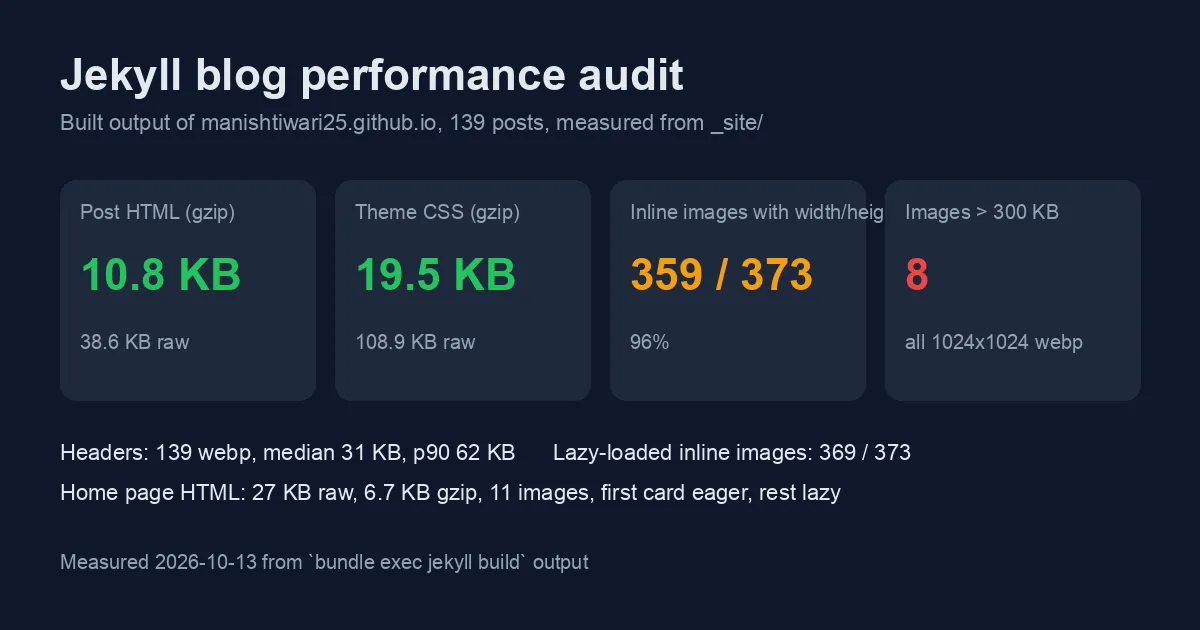
Most of the Performance posts on this blog measure other people’s systems: inference gateways, embedding pipelines, cache layers. This one turns the same habit on the blog itself. It is a static Jekyll site on GitHub Pages using the Chirpy theme, 139 posts at the time of writing, and every number below comes from the _site/ directory that bundle exec jekyll build produces, so anyone with the repository can reproduce it in under ten seconds.
The point is not to brag about a static site being fast. Static sites are fast by default and then get slow one unoptimised screenshot at a time. The point is to show which checks catch that drift, what they found here, and what is still open.
How the audit was run
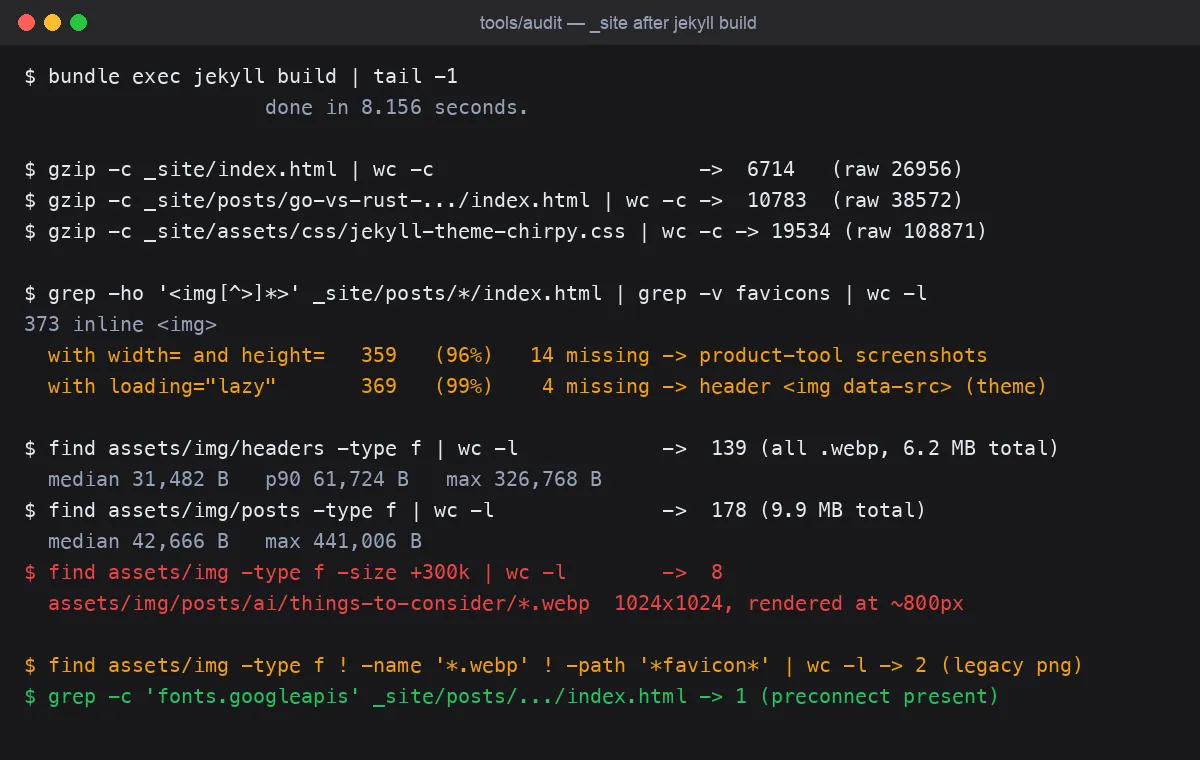
No browser, no Lighthouse run against production: everything is measured from the build output, which is what the CDN serves byte for byte. That keeps the audit reproducible in CI and independent of network conditions.
1
2
3
4
5
6
bundle exec jekyll build
gzip -c _site/index.html | wc -c
gzip -c _site/posts/go-vs-rust-ai-inference-gateway-latency-memory/index.html | wc -c
gzip -c _site/assets/css/jekyll-theme-chirpy.css | wc -c
grep -ho '<img[^>]*>' _site/posts/*/index.html | grep -v favicons | wc -l
find assets/img -type f -size +300k
The build itself finished in 8.2 seconds for 139 posts, which matters for the authoring loop more than for readers.
What the numbers say
| Metric | Value | Verdict |
|---|---|---|
| Home page HTML | 27.0 KB raw, 6.7 KB gzipped | Good |
| Typical post HTML | 38.6 KB raw, 10.8 KB gzipped | Good |
| Theme CSS | 108.9 KB raw, 19.5 KB gzipped | Acceptable, theme-owned |
| Header images | 139, all WebP, median 31 KB, p90 62 KB | Good |
| Inline post images | 178, median 43 KB | Good |
Inline <img> with width/height | 359 of 373 (96%) | 14 to fix |
Inline <img> with loading="lazy" | 369 of 373 (99%) | Theme handles headers |
| Images over 300 KB | 8 | Open |
| Non-WebP images outside favicons | 2 legacy PNGs | Minor |
Three of those rows are the result of earlier fixes, and one is the gap that remains.
Fix 1: WebP everywhere, with the originals deleted
Every post header and nearly every inline screenshot is WebP. The headers total 6.2 MB for 139 posts, a median of 31 KB each. A single unreferenced 1 MB heroImage.png that nothing linked to was removed in October after a check for unreferenced assets flagged it, which is the kind of dead weight a static site accumulates without anyone noticing because no page loads it and therefore no page gets slower.
The remaining two PNGs (folder-structure.png, azure-devops-d365-auto-backup.png) are 26 KB and 68 KB in posts from 2024; converting them would save maybe 40 KB on two pages. Not worth a separate change, but worth noting so nobody wonders why the count is not zero.
Fix 2: explicit dimensions on inline images
Cumulative Layout Shift is the Core Web Vital a text-heavy blog is most likely to fail, and the usual cause is an image without intrinsic size that pushes the paragraph below it down when it loads. Chirpy sets width/height on headers itself. For inline images the convention here is a kramdown IAL after the Markdown image:
1
{: width="1200" height="760" }
That is now on 359 of 373 inline images. The 14 without dimensions are all screenshots in five product-tool posts (embedding visualizer, context window chart, structured output validator, text chunker, tiktoken playground). They share a layout, so one pass adding the IAL to each fixes the whole set. Until then those five pages are the ones most likely to show a layout shift.
Fix 3: lazy loading below the fold
Chirpy adds loading="lazy" to inline images and the home page eager-loads only the first card’s image, with the rest lazy. On the home page that means 11 images in the HTML and one requested before first paint. The four inline images without loading="lazy" are header <img data-src> elements the theme manages itself, so that count is a theme detail, not a defect.
What is still open: the 1024x1024 illustrations
Eight images are over 300 KB, and they are all in one place: assets/img/posts/ai/things-to-consider/. They are 1024x1024 WebP illustrations, 379 to 441 KB each, rendered at roughly 800 CSS pixels in the post column. That one post carries about 3.3 MB of images, more than a third of all inline image bytes on the site, for illustrations that would look identical at 800x800 and around 120 KB each at quality 80.
The fix is mechanical, cwebp -resize 800 800 -q 80, and would cut that page from 3.3 MB to roughly 1 MB. It was not made in this change because the audit is one thing and the resize is another; keeping them separate means the before and after are both measurable.
Why measure from the build and not from Lighthouse
Lighthouse is the right tool for a one-off look at a page, but it is a poor regression check for a blog: scores move with network variance, with the ad-free nature of a static site making them all land in the 90s anyway, and running it needs a browser in CI. Byte counts and attribute counts from _site/ are deterministic, run in a second, and the thresholds that matter (no image over 300 KB, every inline image sized, every post with a header image) can each be one grep or find in the project’s existing test script. That is the same argument the .NET vs Node gateway post made for measuring added latency rather than end-to-end latency: strip out the variable you do not control and the number you are left with is the one you can act on.
Decision
- Keep: WebP for all new images,
width/heightIAL on every inline image, and the unreferenced-asset check. - Next: resize the eight
things-to-considerillustrations to 800x800 and add the IAL to the 14 unsized tool screenshots. Together they close every red and amber row in the table above. - Do not bother: converting the two legacy PNGs, or chasing the theme CSS size, which is shared across every Chirpy site and cached after the first page.