Model Context Window Chart: How Much Fits Before You Start Trimming
How the Lamplit Labs Model Context Window Chart compares context window, max output and knowledge cutoff for 26 LLMs, and turns tokens into pages.
Every retrieval pipeline, agent loop or “paste the whole repo in” experiment eventually hits the same question: how much can this model actually take, and how much can it give back? The numbers are scattered across six vendors’ docs, change every few months, and are quoted in tokens that nobody intuitively feels. The Model Context Window Chart on Lamplit Tools puts them in one sortable table and adds the conversion to words and pages that makes the figures usable in a design discussion. This post follows the Tiktoken Playground write-up: that tool shows how many tokens a prompt is; this one shows how many tokens a model holds.
What the tool is, and what it is not
The chart is a static, browser-only comparison table. There is no API call, no key and nothing leaves the page. It lists 26 models across OpenAI, Anthropic, Google, Meta, Mistral and DeepSeek, with six columns per model:
- Context - the total window, input plus output, in tokens.
- Max output - the largest completion the model will produce in one call.
- Relative size - a bar scaled against the largest window in the table, so a 128K model reads visibly as a sliver next to a 2M one.
- Cutoff - the published knowledge cutoff month.
It is a reference, not a live feed. The figures are the publicly documented defaults, so if your provider has given you an enlarged window or a preview tier, your limit is whatever your contract says, not what the table says. Treat it as the starting point for a sizing conversation, and verify the one number you are about to depend on against the vendor page before you bake it into a config.
Filter, sort and copy
The controls at the top are the whole interface. The provider dropdown narrows the table to one vendor, the sort selector orders by context window, max output, name or provider, and the search box matches on model name. The provider chips under the controls do the same filtering with one click.
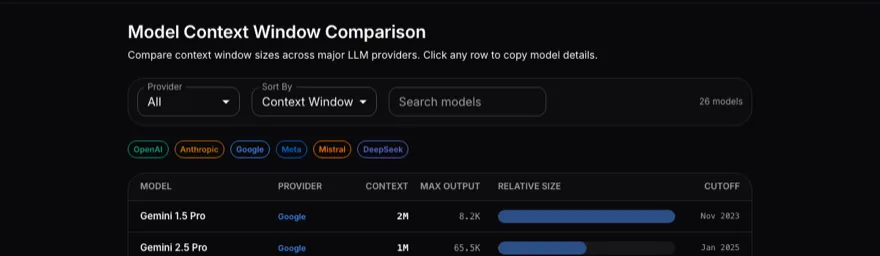
Clicking a row copies that model’s details to the clipboard as text, which is a small thing that saves retyping “200K context, 64K output” into a ticket or an architecture note.
Reading the table
Sorted by context window with no filter, the table opens with the four Gemini entries at 1M to 2M tokens, then a block of 200K models from OpenAI’s o-series and Anthropic’s Claude 3 to 4 range, then the 128K to 131K band where GPT-4o, the Llama 3 family, DeepSeek V3 and R1 and Mistral Large sit, and finally the older 64K, 32K and 8.2K models at the bottom.
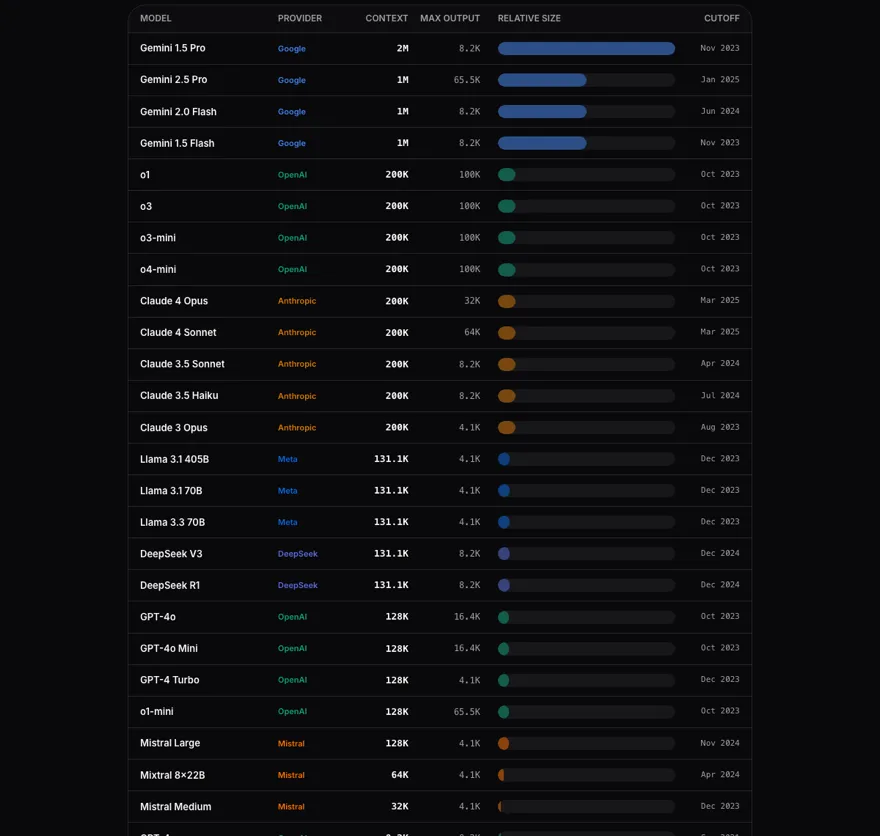
Two things jump out once the numbers are side by side rather than on separate vendor pages:
- Context and output are not proportional. Claude 3 Opus and Claude 4 Opus share a 200K window, but the max output goes from 4.1K to 32K. Gemini 1.5 Pro has the biggest window in the table at 2M and one of the smaller outputs at 8.2K. If your workload is “read a lot, write a little” (summarisation, classification, extraction) the context column is what matters; if it is “write a lot” (code generation, long-form drafting, agent tool calls that return big payloads) the max-output column is the constraint that will bite first, and it is the one people forget to check.
- The window says nothing about the cutoff. Three OpenAI models at 200K share an Oct 2023 cutoff with GPT-4o at 128K; the Claude 4 models at the same 200K are dated Mar 2025. A large window lets you paste in recent documentation, but it does not make the model know anything newer than its cutoff on its own, which is usually the real argument for retrieval rather than “the window is big enough.”
Tokens to pages
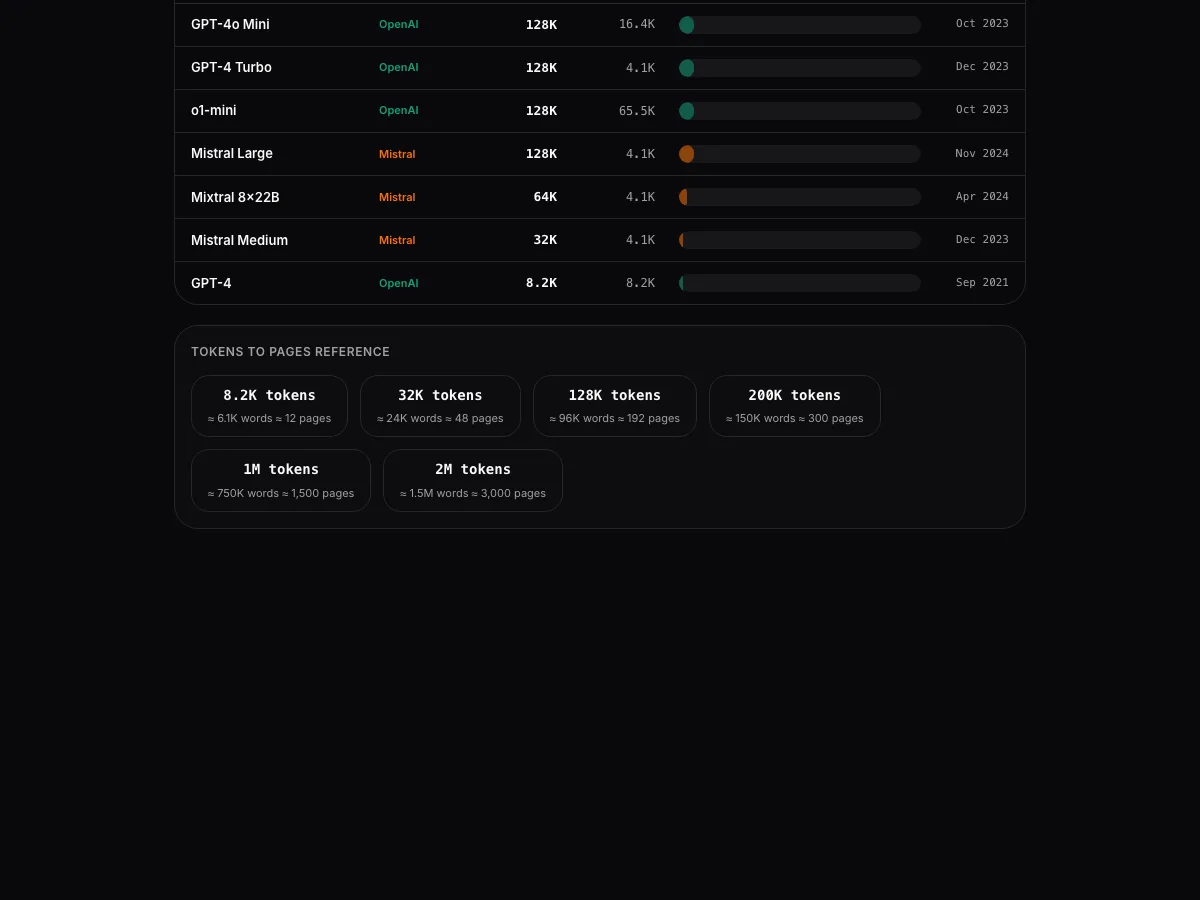
The section under the table is the part worth bookmarking. It converts the common window sizes to approximate words and pages at the usual 0.75 words per token and 500 words per page.

That table is what turns a token budget into a sentence a product owner can follow: a 128K model reads roughly a 190-page document in one call, a 200K model about a 300-page one, and a 1M model about 1,500 pages. The ratio is for English prose; as the Tiktoken post shows, source code tokenizes at roughly two characters per token and CJK or Arabic text can approach one, so for a codebase or a multilingual corpus halve the page estimate before you promise anything.
Where it fits in the workflow
- Model selection. Filter to the providers you are approved to use, sort by max output or context depending on which side of the call is heavy, and shortlist from there rather than from marketing pages.
- Chunking decisions. If a document set averages 40 pages, the pages table tells you a 128K model takes four of them per call with room for the instructions and the answer, which sets the chunk size for the retrieval layer.
- Review conversations. Copy the row and paste it into the design doc, so “we chose a 200K model” is accompanied by the output limit and cutoff that came with it.
- Sanity-checking an estimate. Run the real prompt through the Tiktoken Playground to get its token count, then look it up here to see what fraction of the window it takes on each candidate model.
Summary
The Model Context Window Chart is a one-page, offline reference for context window, max output and knowledge cutoff across 26 models from six providers, with provider filtering, sorting, search, click-to-copy rows and a tokens-to-pages table that makes the figures legible to people who do not think in tokens. It will not know about your enlarged enterprise limit and it is only as current as its last update, so confirm the one number you ship against. Use it at tools.lamplitlabs.com/context-windows when the question is “which model can hold this,” and pair it with the Tiktoken Playground when the question is “how big is this.”