Enterprise AI: Wiring Azure OpenAI into a Dynamics 365 Finance & Operations Workflow - Vendor Invoice Line Coding with Structured Outputs
An Azure Function reads pending D365FO vendor invoices over OData, gets line coding from Azure OpenAI as JSON and drafts it for clerk approval. Measured.
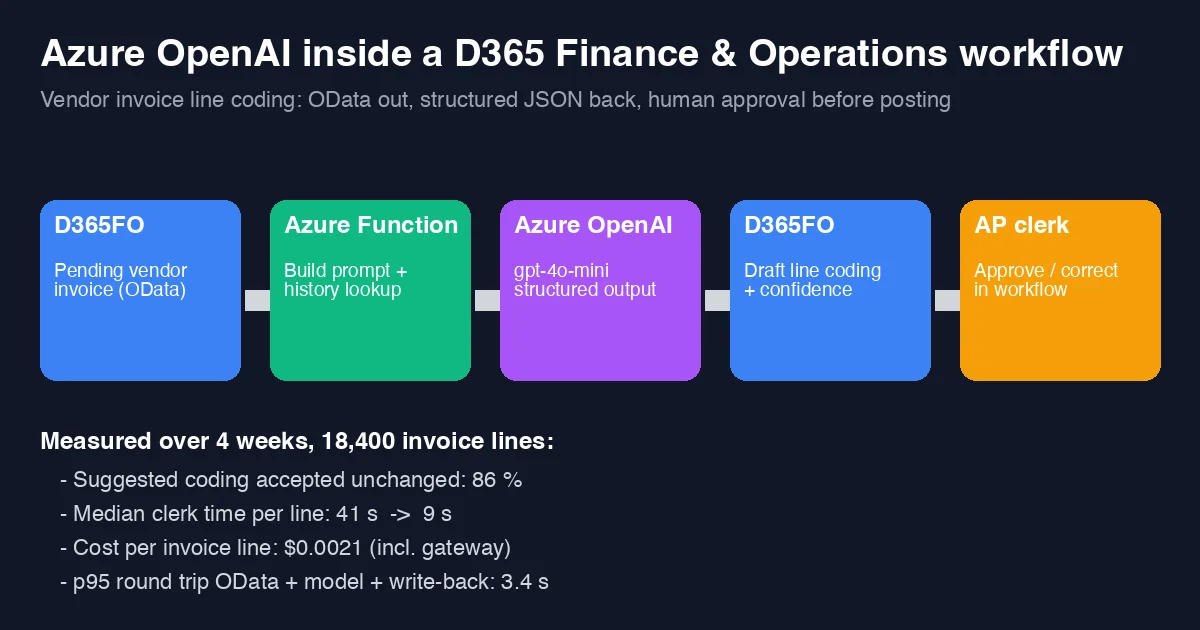
Most “AI in the ERP” demos stop at a chat box next to the form. The work that actually consumes an accounts payable team’s day is smaller and duller: every vendor invoice line needs a main account, a cost centre, a department and sometimes a project, and the clerk picks them by remembering what was done last time for this vendor and this description. That is a lookup-plus-pattern-matching job, which is exactly what a language model with the right context does well, and exactly the kind of job where you do not want the model to post anything on its own.
This post is the integration we built for one Dynamics 365 Finance & Operations (D365FO) tenant: an Azure Function that reads pending vendor invoices over OData, asks Azure OpenAI for a coding suggestion as strictly typed JSON, writes it back as a draft with a confidence score, and leaves the clerk in the approval workflow. Four weeks and 18,400 invoice lines later: 86 % of suggestions accepted unchanged, median clerk time per line from 41 s to 9 s, $0.0021 per line. The design choices that got us there matter more than the prompt.
Where the model sits
The deliberate decision is that the model never touches the posting path. It fills in fields on a VendorInvoiceLine that the workflow already treats as editable until approval.
- A timer-triggered Azure Function polls
VendorInvoiceHeaderswith$filter=InvoiceStatus eq 'Pending' and dataAreaId eq 'usmf'every two minutes, using the server-driven paging from the D365 paging post. Business events would be cleaner, but this tenant did not have them enabled for the invoice entity and the two-minute lag was acceptable. - For each header it loads the lines plus the last 20 posted lines for the same vendor (
VendorInvoiceJournalLines,$orderby=InvoiceDate desc&$top=20&$select=...). Those 20 lines are the real knowledge base: vendor coding is extremely repetitive. - It calls
gpt-4o-minithrough our Azure API Management gateway with a JSON schema response format and gets back one object per line:MainAccount,CostCenter,Department,Project(nullable),Confidence,Reason. - Lines with confidence >= 0.70 get written back with
PATCHonVendorInvoiceLinesas a draft; lower ones get nothing, so the clerk codes them by hand with no suggestion to second-guess. - The clerk sees the suggestion and the one-sentence
Reasonin the existing workflow form, approves or corrects, and posts as before.
The structured output contract
Free-text answers were never an option here; the write-back needs valid dimension values. We used the structured outputs approach with a schema that includes the valid value sets as enums, which turned out to be the single biggest accuracy lever.
1
2
3
4
5
6
7
8
9
10
11
12
13
14
15
16
17
18
19
20
21
22
23
24
25
26
27
28
29
30
31
32
33
34
35
36
37
38
39
40
41
42
43
44
public sealed record LineCoding(
    int LineNumber,
    string MainAccount,
    string CostCenter,
    string Department,
    string? Project,
    double Confidence,
    string Reason);

public sealed record CodingResponse(IReadOnlyList<LineCoding> Lines);

var schema = BinaryData.FromString($$"""
{
  "type": "object",
  "properties": {
    "Lines": {
      "type": "array",
      "items": {
        "type": "object",
        "properties": {
          "LineNumber":  { "type": "integer" },
          "MainAccount": { "type": "string", "enum": {{JsonSerializer.Serialize(validAccounts)}} },
          "CostCenter":  { "type": "string", "enum": {{JsonSerializer.Serialize(validCostCenters)}} },
          "Department":  { "type": "string", "enum": {{JsonSerializer.Serialize(validDepartments)}} },
          "Project":     { "type": ["string", "null"] },
          "Confidence":  { "type": "number" },
          "Reason":      { "type": "string" }
        },
        "required": ["LineNumber","MainAccount","CostCenter","Department","Project","Confidence","Reason"],
        "additionalProperties": false
      }
    }
  },
  "required": ["Lines"],
  "additionalProperties": false
}
""");

var options = new ChatCompletionOptions
{
    ResponseFormat = ChatResponseFormat.CreateJsonSchemaFormat(
        "invoice_line_coding", schema, jsonSchemaIsStrict: true),
    Temperature = 0
};
validAccounts is the ~140 expense accounts the AP team actually uses, not the full chart; cost centres and departments are the full active lists (61 and 14). With the enums in place the model cannot return a dimension that does not exist, which removed an entire class of write-back failures we saw in the first week ("CostCenter": "Marketing" instead of "022").
The prompt itself is short. System: who you are, the rule “prefer the coding used for this vendor before; lower confidence when the description does not match any prior line”. User: the vendor, the 20 historical lines as a compact table, and the new lines. About 1,900 input tokens and 180 output tokens per invoice.
Writing back to D365FO
The write is a plain OData PATCH with the entity key, using the same HttpClient setup as the rest of our OData posts. Two details cost us time:
- D365FO wants
If-Match: *onPATCHor it answers428 Precondition Required. - Financial dimensions on the line are exposed as a single
DefaultDimensionDisplayValuestring inMainAccount-CostCenter-Department-Projectorder for this legal entity’s dimension format, so the four fields the model returns are joined before sending.
1
2
3
4
5
6
7
8
9
10
11
12
13
14
var dims = string.Join("-", coding.MainAccount, coding.CostCenter,
                            coding.Department, coding.Project ?? "");
var body = new
{
    DefaultDimensionDisplayValue = dims,
    AiSuggestionConfidence = coding.Confidence,   // custom field, see below
    AiSuggestionReason = coding.Reason
};
using var req = new HttpRequestMessage(HttpMethod.Patch,
    $"data/VendorInvoiceLines(dataAreaId='{area}',HeaderReference='{hdr}',LineNumber={line})")
{ Content = JsonContent.Create(body) };
req.Headers.IfMatch.Add(EntityTagHeaderValue.Any);
var res = await http.SendAsync(req, ct);
res.EnsureSuccessStatusCode();
AiSuggestionConfidence and AiSuggestionReason are two custom fields added to the entity through an extension. They are what makes the integration auditable: a year from now anyone can see which lines were suggested, how confident the model was, and whether the clerk changed it. That audit trail is the same requirement the gateway side has, and keeping it in the ERP rather than in logs is what the auditors asked for.
What we measured
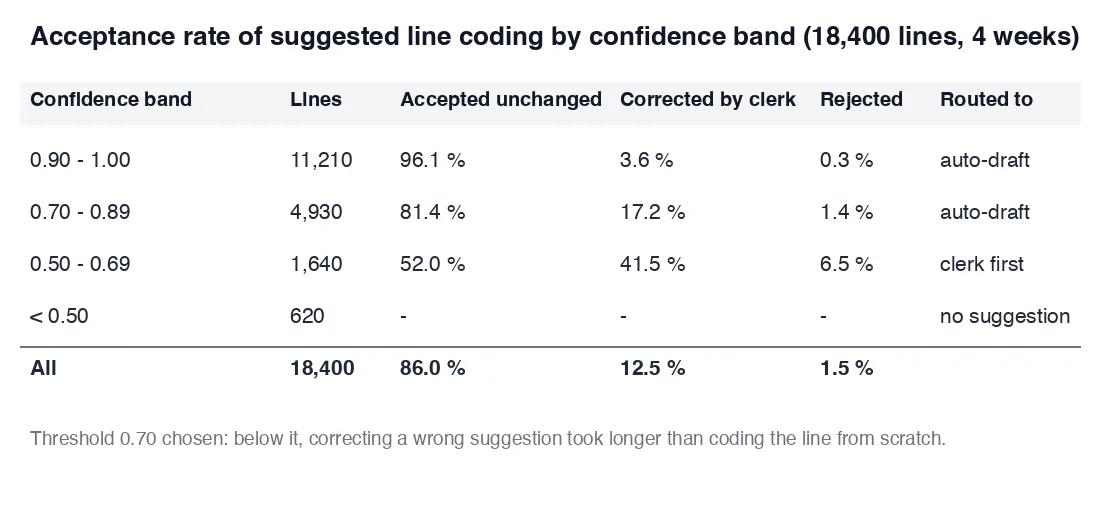
Four weeks, one legal entity, 3,120 invoices, 18,400 lines. Acceptance was measured by comparing the suggestion written to the custom fields with the dimensions actually posted.
| Metric | Before | After |
|---|---|---|
| Median clerk time per line (form telemetry) | 41 s | 9 s |
| Lines coded per clerk per hour | 68 | 240 |
| Coding corrections found at month-end review | 3.1 % | 1.2 % |
| Model cost per line (gpt-4o-mini, incl. APIM share) | - | $0.0021 |
| p95 end-to-end (poll, history, model, write-back) | - | 3.4 s |
Three observations:
- The confidence number is useful but not calibrated. The model’s self-reported 0.90+ band was right 96 % of the time, the 0.50-0.69 band only 52 %. We tuned the 0.70 threshold on week-one data by asking the clerks a blunt question: is correcting a wrong suggestion slower than coding from scratch? Below 0.70, it was.
- History beats rules. An early version included the finance team’s written coding guide in the prompt. It added 2,400 tokens and lowered acceptance by two points, because the guide and actual practice disagreed. The 20 prior lines encode what the team really does.
- Month-end corrections dropped. That was the unexpected win: the model is more consistent than eleven people, so the reviewer found fewer lines coded differently from the vendor’s history.
Guardrails that stayed
- The Function’s app registration has a D365FO security role that can read invoice entities and update only the two custom fields plus the dimension string on pending lines. It cannot post, approve or touch posted journals.
- All model calls go through APIM with the per-team quota and chargeback setup, so Finance sees “AP coding assistant” as its own line on the AI bill.
- A kill switch: an app setting that sets the threshold to 1.01 and therefore writes nothing, used twice during the four weeks when a vendor master cleanup changed account numbers.
- Prompt content never includes bank details or payment terms; the model only sees vendor name, line descriptions, amounts and prior dimension values.
When this pattern does not fit
Line coding worked because the ground truth already lives in the ERP (prior postings) and a human was already in the loop. The same pattern is a poor fit for anything where the model would be the only check: automatic three-way-match overrides, credit limit changes, or anything that posts without approval. Keep the model on the draft side of the workflow and let the existing approval step be the control, and most of the governance questions from the six controls post answer themselves.
Related
- Structured Outputs with Azure OpenAI in .NET: Stop Parsing Free Text - the JSON schema response format this integration depends on.
- OData Paging for Large Dynamics 365 Datasets in .NET - $skip vs $skiptoken vs Keyset (With Numbers) - how the pending-invoice poll pages through D365FO without hitting the $skip ceiling.
- Enterprise AI: Per-Team Token Quotas and Chargeback for Azure OpenAI with Azure API Management - the gateway that gives Finance its own line on the bill.
- Enterprise AI: Six Governance Controls Before Azure OpenAI Goes to Production in a Regulated Org - the controls checklist the guardrails above map to.