Retries, Timeouts and Rate Limits: Making Your First Model Call Survive the Real World
Beginner tutorial: handle timeouts, 429 rate limits and 5xx errors from a model API with exponential backoff, a retry budget and a safe fallback.
TL;DR
- In Calling a Language Model from Code the request always worked. In real life it sometimes does not: the network is slow, the provider is busy, or you asked too often.
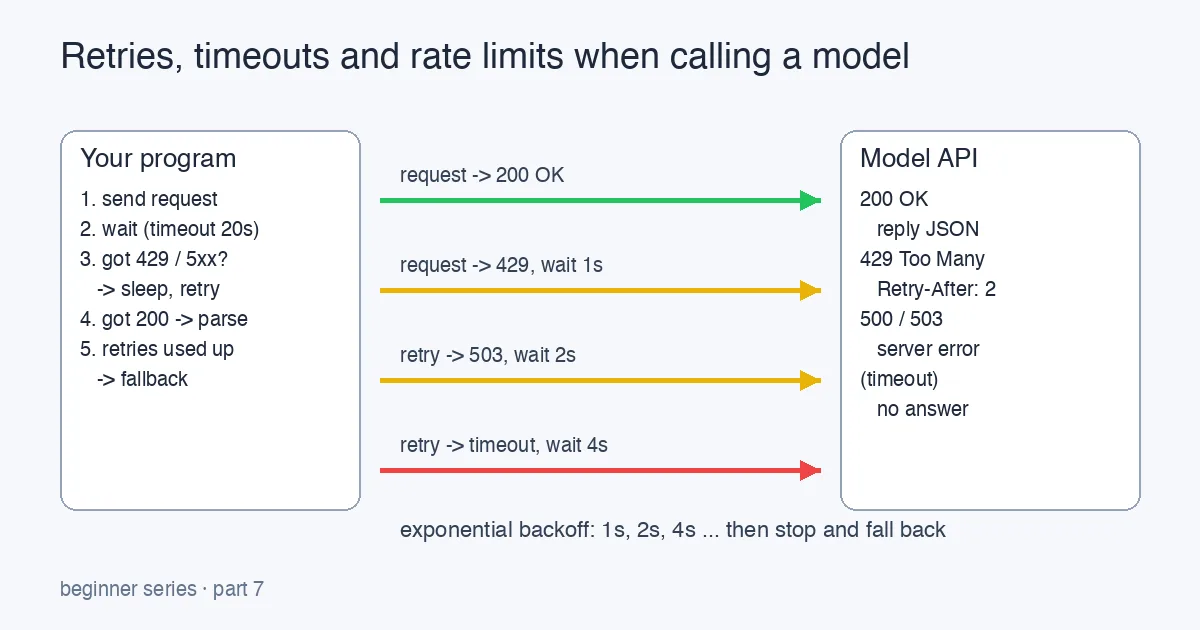
- There are only four outcomes you need to handle: success (200), “slow down” (429), “we broke” (5xx) and no answer at all (timeout).
- Handle them with three small habits: always set a timeout, retry the temporary failures with growing waits, and have a fallback for when retries run out.
- Never retry a 4xx other than 429 (bad request, wrong key, content blocked). Repeating a wrong request just gives you the same error faster.
Why a working demo stops working
Your first model call happens on your laptop, once, with nobody else around. It works, you celebrate, and you wire it into something real. Then one afternoon the feature hangs for a minute and shows the user a stack trace.
Nothing in your code changed. What changed is that you are now calling a remote service, over a network, shared with thousands of other people. Three things that never happened on your laptop now happen every day:
| What happened | What you see | Is it your fault? |
|---|---|---|
| The provider is busy or your quota ran out | HTTP 429 Too Many Requests | Partly: you asked faster than your plan allows |
| The provider had an internal problem | HTTP 500, 502, 503 | No |
| The reply never came back | Your code waits… forever, or until something else gives up | No, but your code must decide when to stop waiting |
None of these mean your program is wrong. They mean your program has to be prepared for a temporary failure. This post is about that preparation.
The four outcomes a model call can have, and how the waits grow between retries.
Step 1: always set a timeout
The worst outcome is not an error; it is silence. A request with no timeout can sit for minutes, holding a thread, a database connection, and a user’s patience. Every HTTP library lets you say how long you are willing to wait:
1
2
3
4
5
6
7
8
import requests

response = requests.post(
    url,
    headers=headers,
    json=body,
    timeout=20,          # seconds; raise if no reply by then
)
How long is right? Model calls are slow compared to normal APIs because the model writes its answer token by token. A short answer typically takes one to five seconds; a long one with a big prompt can take twenty or more. A good beginner rule: set the timeout to roughly twice what a normal reply takes, and lower max_tokens if you find yourself needing a very long timeout. A timeout that fires is a signal, not a crash: your code catches it and treats it like any other temporary failure.
Step 2: tell temporary failures apart from permanent ones
This is the decision that matters most, and beginners often get it backwards.
| Status | Meaning | Retry? |
|---|---|---|
200 | Success | No, use the reply |
429 | Rate limited; you sent too much, too fast | Yes, after waiting |
500, 502, 503, 504 | Provider-side problem | Yes, after waiting |
| timeout / connection error | Network or overloaded server | Yes, after waiting |
400 | Your request is malformed (bad JSON, unknown field) | No, fix the code |
401, 403 | Wrong or missing API key / no permission | No, fix the key |
404 | Wrong URL or model name | No, fix the config |
| content filter / policy block | The provider refused this input | No, change the input or tell the user |
The rule of thumb: if sending the exact same bytes again could plausibly succeed, retry; if the same bytes will always fail, do not. Retrying a 401 ten times does not make your key valid; it just makes your logs ten times longer.
Many providers include a Retry-After header on a 429. If it is there, honour it: it tells you exactly how many seconds to wait.
Step 3: wait longer each time (exponential backoff)
When the server says “slow down”, the wrong response is to ask again immediately. If a thousand programs all retry at once, the server stays overloaded and everybody gets another 429. The fix is exponential backoff: wait 1 second, then 2, then 4, then 8. Each retry gives the server more room to recover.
Add a little randomness, called jitter, so that all the programs that failed at the same moment do not all retry at the same moment either:
1
2
3
4
5
6
import random
import time

def backoff_seconds(attempt: int) -> float:
    base = 2 ** attempt            # 1, 2, 4, 8 ...
    return base + random.uniform(0, 1)
And put a cap on it. Three or four retries is plenty for an interactive feature; if the service has not recovered after fifteen seconds of waiting, the user needs an answer from you, not another spinner.
Step 4: put it together
Here is the complete pattern in about thirty lines. It wraps the single call from the earlier post and adds the three habits:
1
2
3
4
5
6
7
8
9
10
11
12
13
14
15
16
17
18
19
20
21
22
23
24
25
26
27
28
29
30
31
32
33
import random
import time
import requests

RETRYABLE = {429, 500, 502, 503, 504}

class ModelUnavailable(Exception):
    """Raised after all retries are used up."""

def call_model(body: dict, headers: dict, url: str, max_retries: int = 3) -> dict:
    for attempt in range(max_retries + 1):
        try:
            response = requests.post(url, headers=headers, json=body, timeout=20)
        except (requests.Timeout, requests.ConnectionError) as exc:
            if attempt == max_retries:
                raise ModelUnavailable("no reply from the model") from exc
            time.sleep(backoff_seconds(attempt))
            continue

        if response.status_code == 200:
            return response.json()                  # the happy path

        if response.status_code in RETRYABLE and attempt < max_retries:
            wait = float(response.headers.get("Retry-After", backoff_seconds(attempt)))
            time.sleep(wait)
            continue

        # Anything else is permanent: surface it with the provider's message.
        response.raise_for_status()
    raise ModelUnavailable("model still unavailable after retries")

def backoff_seconds(attempt: int) -> float:
    return 2 ** attempt + random.uniform(0, 1)
Read it top to bottom:
- Timeout on every request (
timeout=20), with timeouts and connection errors treated as retryable. - Success returns immediately.
- Retryable statuses sleep, preferring the server’s
Retry-Afterwhen it exists, then loop. - Everything else raises straight away via
raise_for_status(), so a wrong key or a bad request fails loudly on the first try. - When retries are exhausted you get a single, named exception,
ModelUnavailable, that the rest of your program can catch.
Step 5: decide what the user sees when it still fails
Retries reduce failures; they do not eliminate them. The last habit is a fallback, and it belongs in the code that calls call_model, not inside it:
1
2
3
4
5
6
try:
    reply = call_model(body, headers, url)
    show_to_user(reply["choices"][0]["message"]["content"])
except ModelUnavailable:
    show_to_user("The assistant is busy right now. Your question was saved; try again in a minute.")
    log_for_later(body)
The fallback does not have to be clever. “We are busy, try again shortly” is honest and far better than a spinner that never stops or a raw 503 on screen. If your feature can degrade (show a plain search result instead of an AI summary, say), do that.
Three mistakes to avoid
- Retrying inside a retry. If your HTTP library already retries and you add your own loop, three retries become nine and one slow request becomes a minute-long hang. Pick one layer and do it there.
- Retrying a request that already succeeded. If a timeout fires after the server did the work, a retry sends the prompt again. For a chat completion that is harmless (you pay twice); for anything that writes data it is not. Keep model calls read-only, and let the thing that acts on the answer be the step that checks for duplicates.
- Retrying forever. Every retry has a cost in money, in time, and in load on a server that is already struggling. A budget of three or four attempts and a visible fallback is the kind thing to do for everyone.
Where to go next
You now have the five basics of a model call that behaves in production: a timeout, a clear retryable/permanent split, exponential backoff with jitter, a retry budget and a fallback. The production-depth version of these ideas lives in the .NET series: Handling 429 Rate Limits from Azure OpenAI in .NET: Backoff That Actually Works builds the same policy with a resilience library and explains what the 429 actually counts (tokens per minute, not just requests) and how to stay under it.