Grounding a Model with Your Own Documents and Getting a Reply Your Code Can Check
Beginner guide to grounding a language model in your own documents (simple RAG) and asking for a JSON reply your code can validate.
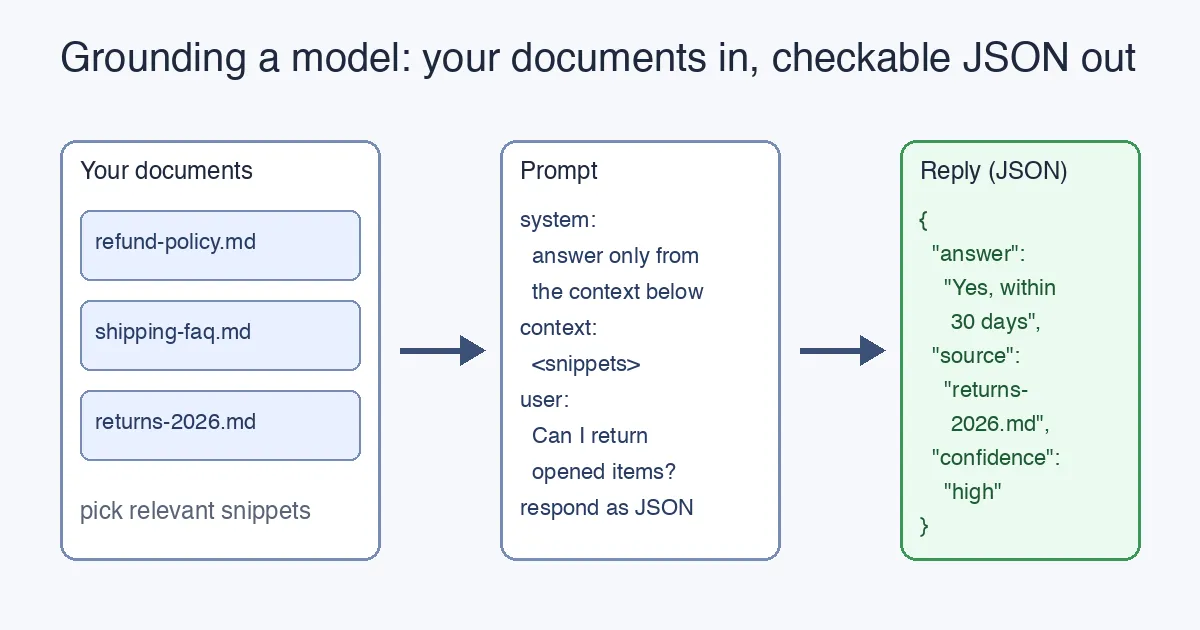
TL;DR
A language model only knows what was in its training data and what is in your prompt. If you want it to answer questions about your documents, you put the relevant parts of those documents into the prompt and tell it to answer only from them. That is “grounding” (the simplest form of what the industry calls RAG). Then, instead of asking for a paragraph, you ask for a fixed JSON shape so your code can check the reply before anyone sees it. This post builds both steps on top of the request from the previous article.
This is the sixth article in the beginner series. It continues directly from Calling a Language Model from Code, which showed the HTTP request we will now extend. The earlier posts are How to Become a Software Engineer, The Language of Computers, Variables, Values and References and How a Language Model Answers You.
The problem: the model has never read your files
Ask a model “Can customers return opened items?” and it will answer confidently, because it has read thousands of return policies. It has not read yours. The answer will be plausible and possibly wrong. Nothing in the model is going to say “I don’t know your policy” unless you make it.
Remember from How a Language Model Answers You: the model predicts the next token from the text in front of it. So the fix is almost embarrassingly direct: put your policy in front of it.
Step 1: paste the document into the prompt
Here is the request from the last post, with two changes: the system message now says to answer only from the supplied text, and the user message carries the document followed by the question.
1
2
3
4
5
6
7
8
9
10
11
12
13
14
curl https://api.openai.com/v1/chat/completions \
  -H "Authorization: Bearer $OPENAI_API_KEY" \
  -H "Content-Type: application/json" \
  -d '{
    "model": "gpt-4o-mini",
    "messages": [
      { "role": "system",
        "content": "Answer the question using ONLY the context between <context> tags. If the context does not contain the answer, say you do not know." },
      { "role": "user",
        "content": "<context>\nReturns policy (returns-2026.md): Items may be returned within 30 days of delivery. Opened items are accepted if the product is undamaged. Refunds go to the original payment method within 5 business days.\n</context>\n\nQuestion: Can I return an item I already opened?" }
    ],
    "max_tokens": 150,
    "temperature": 0
  }'
That is grounding. The model now has the real policy in its “short-term memory” (the prompt), and temperature: 0 keeps it from getting creative. Three things make this work well:
- Mark where the context starts and ends. The
<context>tags are just text, but they let the system instruction point at exactly one region. Any clear marker works. - Say what to do when the answer is missing. Without the “say you do not know” sentence, the model will fill the gap from its training data, which is exactly the failure you are trying to prevent.
- Name the source inside the context. Including
returns-2026.mdin the text lets the model cite it, which we will use in step 3.
Step 2: when you have more documents than fit
A prompt has a size limit (the context window, measured in the tokens from the earlier post). Three policy pages fit; three thousand do not. The standard beginner-friendly approach is:
- Split your documents into chunks of a few paragraphs each.
- When a question arrives, pick the handful of chunks most related to it.
- Paste only those chunks into
<context>.
Step 2 is the part people call retrieval, and together the pattern is Retrieval-Augmented Generation (RAG). The simplest retrieval is a keyword search over your chunks; the better one uses embeddings, numeric fingerprints of meaning. You do not need embeddings to start. Start with keyword matching, confirm the model answers correctly when the right chunk is present, and upgrade retrieval later. Once you are ready for that, Azure OpenAI Embeddings and Semantic Search in .NET walks through it, and RAG vs Fine-Tuning for an Enterprise Internal Copilot explains why grounding is almost always the right first move over retraining the model.
Step 3: ask for a shape your code can check
A paragraph of prose is fine for a chat window. It is useless to a program: how does your code know whether the model said yes, no, or “I don’t know”? The answer is to ask for JSON with named fields. Change the system message:
1
2
3
4
5
6
7
Answer the question using ONLY the context between <context> tags.
Reply with a single JSON object and nothing else, in exactly this shape:
{
  "answer": "<one or two sentences, or 'unknown' if the context does not say>",
  "source": "<the document name from the context you used, or null>",
  "confidence": "high" | "medium" | "low"
}
Most providers also let you enforce JSON. With the OpenAI-style API you add "response_format": { "type": "json_object" } to the request body, and the server guarantees the reply parses as JSON (it does not guarantee the fields; that is still your job). A typical reply then looks like this:
1
2
3
4
5
{
  "answer": "Yes. Opened items can be returned within 30 days of delivery as long as the product is undamaged.",
  "source": "returns-2026.md",
  "confidence": "high"
}
Step 4: check it before you trust it
This is the step that turns a demo into software. In Python it is a few lines:
1
2
3
4
5
6
7
8
9
10
11
12
13
14
15
16
17
18
19
20
21
import json

ALLOWED_CONFIDENCE = {"high", "medium", "low"}
KNOWN_SOURCES = {"returns-2026.md", "shipping-faq.md", "refund-policy.md"}

def check_reply(text: str) -> dict:
    data = json.loads(text)                       # 1. is it even JSON?
    for key in ("answer", "source", "confidence"):
        if key not in data:                       # 2. are all fields there?
            raise ValueError(f"missing field: {key}")
    if data["confidence"] not in ALLOWED_CONFIDENCE:
        raise ValueError("bad confidence value")  # 3. is it one of the allowed values?
    if data["source"] is not None and data["source"] not in KNOWN_SOURCES:
        raise ValueError("model cited a document we never gave it")  # 4. did it make up a source?
    return data

reply = check_reply(response_text)
if reply["answer"] == "unknown" or reply["confidence"] == "low":
    show_to_user("I couldn't find that in our policies. Here is how to contact support.")
else:
    show_to_user(f'{reply["answer"]} (source: {reply["source"]})')
Notice what each check buys you:
| Check | What goes wrong without it |
|---|---|
json.loads | The model adds “Sure! Here is the JSON:” and your program crashes. |
| Required fields | A field is silently missing and you show None to a customer. |
| Allowed values | The model writes "confidence": "very high" and your if never matches. |
| Known sources | The model cites a document that does not exist, and the citation looks trustworthy. |
If a check fails, you have options: retry the request once, fall back to “I don’t know”, or log it for a human. What you never do is pass the raw text straight to the user. The model is a component that can be wrong; the checks are what make the rest of your program able to tell.
Putting it together
The whole flow, in plain words:
- Receive the user’s question.
- Pick the chunks of your documents that relate to it.
- Build a prompt: strict system instruction,
<context>with the chunks (each labelled with its file name), the question, and the required JSON shape. - Send the request with
temperature: 0and, if available, JSON mode. - Parse and validate the reply.
- Show the answer with its source, or a graceful “I don’t know”.
Every production “chat with your documents” feature is this loop with better retrieval, better chunking and more checks. The shape does not change.
Where to go next
You now have the complete beginner arc: what a program is, how a model predicts text, how to call it, how to ground it in your data, and how to make its answer checkable. The .NET series on this blog picks up each piece at production depth: Structured Outputs with Azure OpenAI in .NET enforces the JSON schema, not just JSON syntax; Testing LLM Prompts in .NET shows how to write tests so a prompt change cannot quietly break the checks above; and Azure OpenAI Embeddings and Semantic Search replaces keyword retrieval with embeddings.