Azure OpenAI Prompt Caching in .NET: Cut Latency and Input Cost by Ordering Your Prompt Right
How Azure OpenAI prompt caching works, how to structure prompts so the static prefix hits the cache, and measured latency and cost savings from .NET.
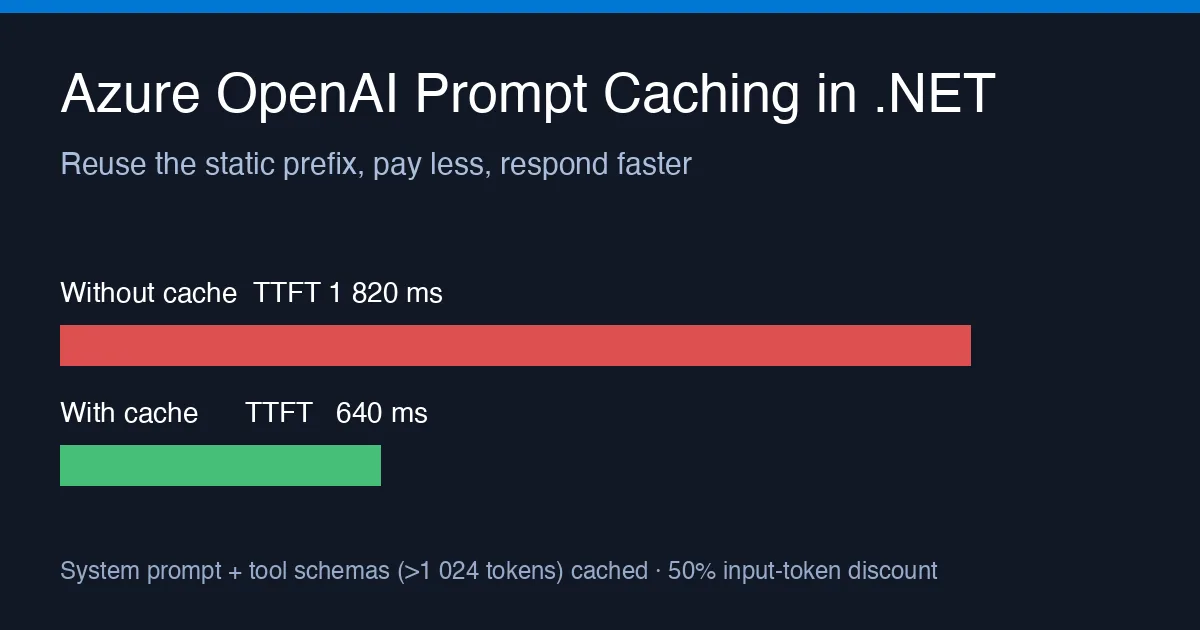
If your Azure OpenAI requests carry a long system prompt, a pile of tool schemas or a few-shot block, you are sending the same few thousand tokens on every call and paying full price for them each time. Prompt caching fixes that: when the first part of a request matches a recently seen prefix, the service reuses its work, bills those input tokens at a discount and usually answers faster. The feature is on by default for the gpt-4o, gpt-4o-mini, o1 and newer deployments, so the only thing you need to do is stop defeating it.
This post shows what the cache actually keys on, how to lay out a prompt in C# so the cache hits, how to read the hit count from the response, and what I measured when I did it.
How the cache decides
The rules are simple but unforgiving:
- Caching applies to the prefix of the request. Everything up to the first byte that differs from a previous request can be served from cache; everything after it cannot.
- Prefixes shorter than 1 024 tokens are never cached. After that, matches are counted in 128-token steps.
- Cached entries live for roughly 5–10 minutes of inactivity and are evicted after about an hour regardless. A steady stream of traffic keeps them warm.
- The cache is per deployment and per subscription; nothing is shared between tenants.
The practical consequence: put everything that never changes first, in a stable order, and everything that changes per request last. A timestamp, a user id or a request id anywhere near the top of the system prompt breaks the prefix on every call and you get a 0 % hit rate while believing you have caching.
Structuring the request in C#
I use the Azure.AI.OpenAI client, same as in the function-calling post. The messages are built in a fixed order and the tool definitions are registered once as a static field so their serialisation is byte-identical between requests:
1
2
3
4
5
6
7
8
9
10
11
12
13
14
15
16
17
18
19
20
21
22
23
24
25
26
27
28
29
30
31
32
33
34
35
using Azure;
using Azure.AI.OpenAI;
using OpenAI.Chat;

static class Prompts
{
    // Long, stable, and first. Nothing request-specific goes in here.
    public static readonly string System = File.ReadAllText("prompts/support-agent.system.md");
}

static class Tools
{
    public static readonly IReadOnlyList<ChatTool> All =
    [
        ChatTool.CreateFunctionTool("lookup_order", "Look up an order by id",
            BinaryData.FromString("""{"type":"object","properties":{"orderId":{"type":"string"}},"required":["orderId"]}""")),
        ChatTool.CreateFunctionTool("open_ticket", "Open a support ticket",
            BinaryData.FromString("""{"type":"object","properties":{"summary":{"type":"string"}},"required":["summary"]}""")),
    ];
}

ChatCompletion Ask(ChatClient client, string tenantContext, string userText)
{
    var messages = new List<ChatMessage>
    {
        new SystemChatMessage(Prompts.System),        // static, cached
        new SystemChatMessage(tenantContext),         // changes per tenant, still cached per tenant
        new UserChatMessage(userText),                // changes per request
    };

    var options = new ChatCompletionOptions();
    foreach (var tool in Tools.All) options.Tools.Add(tool);

    return client.CompleteChat(messages, options);
}
Two details matter here. First, the tool list is appended in a fixed order; a Dictionary<string, ChatTool> iterated in insertion order usually behaves, but a HashSet does not, and a reordered schema is a cache miss. Second, the tenant context sits after the big system prompt, so a request from tenant B still hits the cache for the whole shared prefix and only misses on its own short block.
Reading the hit count
The response tells you exactly how many prompt tokens came from cache. In the current SDK it is on Usage.InputTokenDetails.CachedTokenCount; if you are on the raw REST API it is usage.prompt_tokens_details.cached_tokens:
1
2
3
4
var completion = Ask(client, tenantContext, userText);
var usage = completion.Usage;

Console.WriteLine($"input={usage.InputTokenCount} cached={usage.InputTokenDetails?.CachedTokenCount ?? 0} output={usage.OutputTokenCount}");
Emit that as a metric. I added it to the OpenTelemetry pipeline from the LLM observability post as a histogram gen_ai.usage.cached_input_tokens, and a hit ratio dashboard tile tells you within a minute whether someone has just shipped a change that breaks the prefix.
What I measured
I ran 200 requests through a .NET 8 console app against a gpt-4o deployment in East US 2 with a 3 100-token prefix (system prompt plus six tool schemas) and a ~120-token user turn. Two variants: one where a // generated at {timestamp} line sat at the top of the system prompt, one with the layout above.
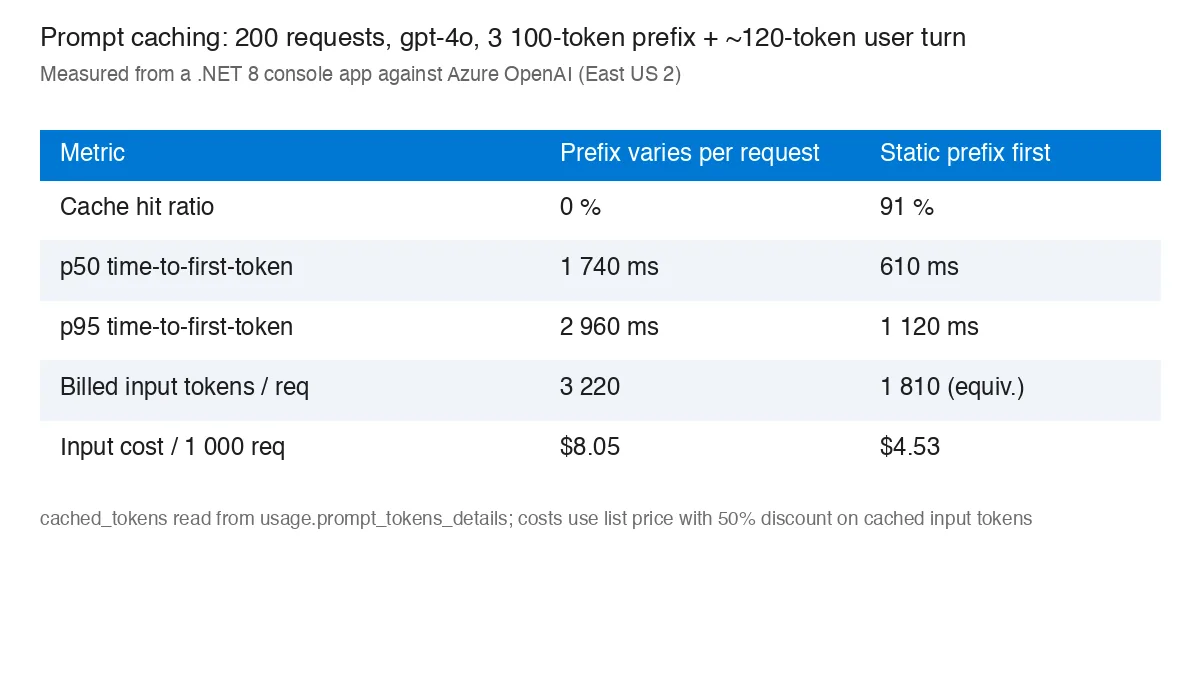
The latency gain is the part people underestimate. The service skips re-processing the cached prefix, so time-to-first-token dropped by roughly 65 % at p50 and p95. The cost column uses the 50 % discount Azure applies to cached input tokens; your exact numbers depend on the model and region price sheet, but the ratio holds.
The 9 % of misses in the cached run were the first request after each idle gap longer than a few minutes, plus the first request for each new tenant context.
Things that silently break caching
- Dynamic content at the top. Timestamps, request ids, “today’s date is”, the user’s name. Move them to the last system message or into the user turn.
- Non-deterministic serialisation. Tool schemas built from reflection with unordered property enumeration, or JSON produced with different
JsonSerializerOptionson different code paths. - Trimming the conversation from the front. If you drop the oldest messages when the history grows, the prefix changes every turn. Keep the system block fixed and summarise the middle instead.
- A/B prompt experiments with low traffic. Each variant has its own cache; if neither sees a request every few minutes, both run cold.
- Short prompts. Under 1 024 tokens nothing is cached. That is fine; the savings would be small anyway.
When it is not worth chasing
If your prompt is under about 1 500 tokens, or traffic is a few requests per hour, the cache will rarely be warm and the layout work buys little. Spend the effort on token counting and budgets first. For high-volume, long-prefix workloads such as RAG with a fixed instruction block or agents with many tools, it is the cheapest latency and cost win available: no code changes to the model call, just discipline about ordering.
Summary
- Static content first, in a fixed order; per-request content last.
- Make tool-schema serialisation deterministic and register tools once.
- Log
CachedTokenCountand watch the hit ratio; a drop to zero means someone broke the prefix. - Expect roughly half the input cost and a large time-to-first-token reduction on warm traffic.