Calling a Language Model from Code: Your Prompt Is Just an API Request
A beginner walkthrough of calling a language model from a program: the HTTP request, system and user roles, max tokens, temperature and reading the reply.
TL;DR
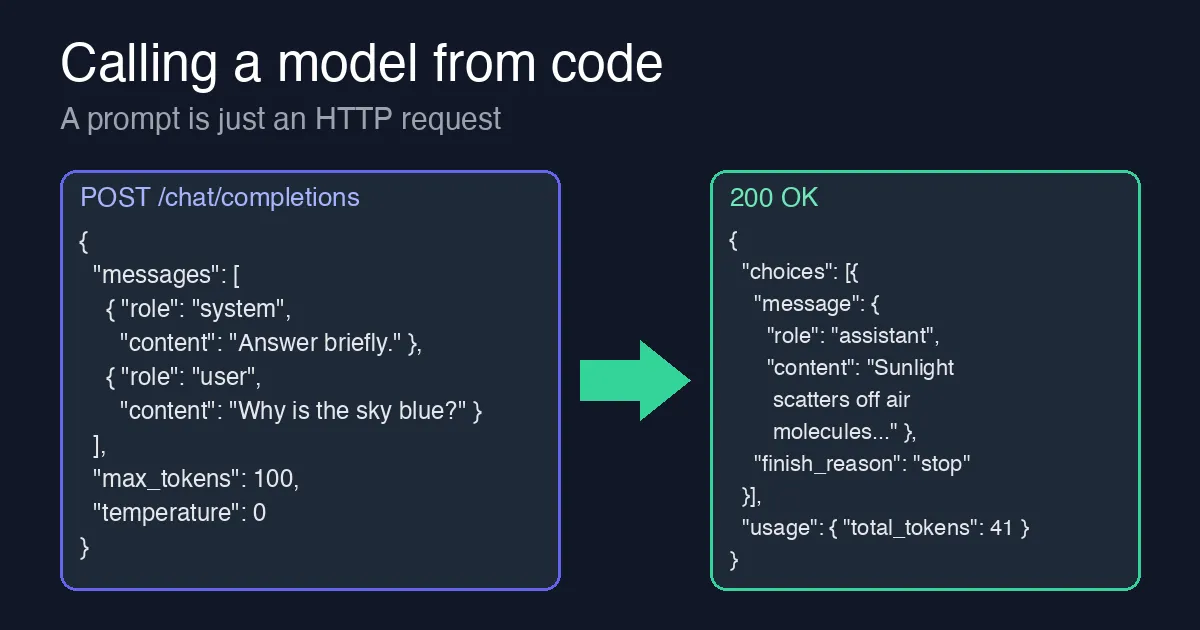
A chat window is only one way to talk to a language model. Underneath, every app (ChatGPT, Copilot, your company’s internal assistant) sends an ordinary HTTP request containing a list of messages, and gets back a JSON reply containing the model’s answer. Once you can send that request yourself, you can build anything on top of a model. This post shows the request, explains the three fields beginners trip over (roles, max_tokens, temperature), and reads the response.
This is the fifth article in the beginner series. The earlier ones are How to Become a Software Engineer, The Language of Computers, Variables, Values and References and How a Language Model Answers You. You do not need to have read them, but the last one explains the tokens we count below.
The whole thing is one request
Every provider (OpenAI, Azure OpenAI, Anthropic, local models through Ollama) exposes the model as a web service. You send a POST request with a JSON body, and the server replies with JSON. Here is a complete request to the OpenAI-style “chat completions” endpoint, written with curl so no programming language gets in the way:
1
2
3
4
5
6
7
8
9
10
11
12
curl https://api.openai.com/v1/chat/completions \
  -H "Authorization: Bearer $OPENAI_API_KEY" \
  -H "Content-Type: application/json" \
  -d '{
    "model": "gpt-4o-mini",
    "messages": [
      { "role": "system", "content": "Answer in one short sentence." },
      { "role": "user",   "content": "Why is the sky blue?" }
    ],
    "max_tokens": 100,
    "temperature": 0
  }'
Three things to notice before we look at each field:
- The API key is a secret. It is sent as a header, read from an environment variable, and never pasted into code you commit. Anyone with your key can spend your money.
- There is no memory. The server does not remember your previous request. If you want a conversation, you send the earlier messages again each time.
- The “prompt” is the whole
messageslist, not just the question. Everything in that list is what the model sees, exactly as described in the previous post.
Roles: system, user, assistant
Each message has a role and some content. There are three roles you will use:
| Role | Who writes it | What it is for |
|---|---|---|
system | You, the developer | Standing instructions: tone, format, what to refuse, what the app is about. The end user normally never sees it. |
user | The end user (or your code on their behalf) | The actual question or task. |
assistant | The model | Its earlier replies. You include them so the model can see the conversation so far. |
So a second turn of a chat looks like this:
1
2
3
4
5
6
7
8
{
  "messages": [
    { "role": "system",    "content": "Answer in one short sentence." },
    { "role": "user",      "content": "Why is the sky blue?" },
    { "role": "assistant", "content": "Sunlight scatters off air molecules, and blue scatters most." },
    { "role": "user",      "content": "And why are sunsets red?" }
  ]
}
The model answers the last user message, using everything above it as context. Nothing magical happens: the chat UI you are used to is just a loop that appends each reply and the next question to this list.
A good habit from day one: put rules in system and data in user. If a user pastes “ignore your instructions”, the model is more likely to follow the system message it was given first; this is the beginner’s defence against prompt injection, and our governance post covers the grown-up ones.
max_tokens: how long the answer may be
The model produces one token at a time until it decides to stop or reaches max_tokens. This number is a ceiling on the output, not a target: with max_tokens: 100 a short answer still stops early on its own.
Why set it at all? Two reasons:
- Cost. You pay per token, input and output. A runaway answer costs real money, and in a loop it costs it thousands of times. The token counting post shows how to measure this.
- Latency. Every extra token is another trip round the prediction loop, so a cap keeps the slowest answer bounded.
When the cap is hit, the response tells you: "finish_reason": "length" instead of "stop". If your users see answers that cut off mid-sentence, check this field first.
temperature: how adventurous the picking is
From the previous article: at each step the model has a probability for every possible next token. temperature controls how it chooses.
0– always take the most likely token. Same input gives (almost) the same output. Use this for extraction, classification, code generation, anything you will check with a test.0.7–1.0– let less likely tokens win sometimes. Better for brainstorming and creative writing, worse for anything that must be right.
Beginners often leave the default (usually 1) and then wonder why the same prompt returns different JSON every run. Set it to 0 until you have a reason not to.
Reading the response
The reply is also JSON:
1
2
3
4
5
6
7
8
9
10
{
  "id": "chatcmpl-abc123",
  "choices": [
    {
      "message": { "role": "assistant", "content": "Sunlight scatters off air molecules, and blue scatters most." },
      "finish_reason": "stop"
    }
  ],
  "usage": { "prompt_tokens": 27, "completion_tokens": 14, "total_tokens": 41 }
}
The three fields you will actually use:
choices[0].message.content– the text to show the user (or parse).choices[0].finish_reason–stopis good;lengthmeans you hitmax_tokens;content_filtermeans the provider blocked it.usage– exactly how many tokens you were billed for. Log it.
The same call in a programming language
Libraries only wrap the request above. Here it is in Python with the official SDK, so you can see nothing new appears:
1
2
3
4
5
6
7
8
9
10
11
12
13
14
15
16
from openai import OpenAI

client = OpenAI()  # reads OPENAI_API_KEY from the environment

reply = client.chat.completions.create(
    model="gpt-4o-mini",
    messages=[
        {"role": "system", "content": "Answer in one short sentence."},
        {"role": "user", "content": "Why is the sky blue?"},
    ],
    max_tokens=100,
    temperature=0,
)

print(reply.choices[0].message.content)
print(reply.usage.total_tokens)
Every field maps one-to-one onto the curl version. In C# with Azure OpenAI the shape is the same; our streaming and structured outputs posts start from exactly this call and build on it.
Things that will bite you, and what to do
401 Unauthorized– wrong or missing key, or the key is for a different provider or region.429 Too Many Requests– you are sending faster than your quota allows. Wait and retry with backoff; see the rate-limit post.- Answer cut off –
finish_reasonislength; raisemax_tokensor ask for a shorter answer. - Model “forgot” the conversation – you did not resend the earlier messages. The server keeps nothing.
- Different answers every run – lower
temperature.
Try it yourself
- Get an API key from any provider (many have a free tier) and run the
curlcommand. Change only thesystemmessage and watch how the tone of the answer changes. - Set
max_tokensto5and look atfinish_reason. - Ask the same question five times at
temperature: 0, then five times attemperature: 1, and compare. - Build a two-turn conversation by hand: copy the assistant’s answer into a new request as an
assistantmessage and ask a follow-up question.
Next in the series we will take this call and make it useful: giving the model your own documents to answer from, and asking it to reply in a shape your code can check.