GCP Authentication Without JSON file
Authenticate to Google Cloud or Firebase from .NET without committing the service account JSON file to your repository, using environment variables.
In this blog post, I will explain how we can authenticate GCP or Firebase without storing JSON in your repository.
TL/DR
If you are just interested in code, you can just visit the GitHub repository. The code is compatible with .NET 7.
Recently I got a chance to work on Firebase with .Net 7. all over the internet all the docs were saying to add the JSON file and then connect.
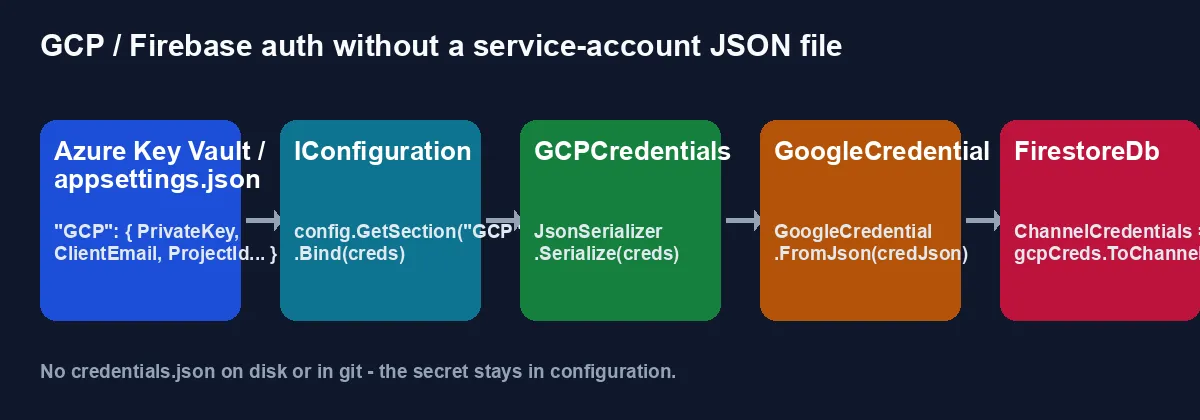
In my case, I had to use Azure Key vault with an option pattern.
after digging throw the docs and reading over the internet, I was able to use IConfiguration.
In the example, I am using Firestore, but I think it should work with all other services.
Here is the whole flow we are going to build, from configuration to a working FirestoreDb:
First thing first, we need to add some NuGets
1
2
Google.Cloud.Channel.V1
Google.Cloud.Firestore
After that, Add a class called GCPCredentials.cs
1
2
3
4
5
6
7
8
9
10
11
12
13
14
15
16
17
18
19
20
21
22
23
24
25
26
27
28
29
30
31
32
33
34
using System.Text.Json.Serialization;
namespace GcpWithoutJson;
public class GCPCredentials
{
    [JsonPropertyName("type")]
    public string Type { get; set; }

    [JsonPropertyName("private_key")]
    public string PrivateKey { get; set; }

    [JsonPropertyName("private_key_id")]
    public string PrivateKeyId { get; set; }

    [JsonPropertyName("project_id")]
    public string ProjectId { get; set; }

    [JsonPropertyName("client_email")]
    public string ClientEmail { get; set; }

    [JsonPropertyName("client_id")]
    public string ClientId { get; set; }

    [JsonPropertyName("auth_uri")]
    public string AuthURI { get; set; }

    [JsonPropertyName("token_uri")]
    public string TokenURI { get; set; }

    [JsonPropertyName("auth_provider_x509_cert_url")]
    public string AuthProviderCertURL { get; set; }

    [JsonPropertyName("client_x509_cert_url")]
    public string ClientCertURL { get; set; }
}
Add following section on you appsettings.json file
1
2
3
4
5
6
7
8
9
10
11
12
 "GCP": {
    "Type": "service_account",
    "PrivateKey": "",
    "PrivateKeyId": "",
    "ProjectId": "",
    "ClientEmail": "",
    "ClientId": "",
    "AuthURI": "",
    "TokenURI": "",
    "AuthProviderCertURL": "",
    "ClientCertURL": ""
  }
In the example, I am using a console application so I am creating configurations using ConfigurationBuilder.
but if you are using Minimal API or Web app, you should use DI.
1
2
3
4
5
6
 var builder = new ConfigurationBuilder()
                        .SetBasePath(Directory.GetCurrentDirectory())
                        .AddJsonFile("appsettings.json", optional: false);
var config = builder.Build();
var creds = new GCPCredentials();
config.GetSection("GCP").Bind(creds);
Now you are ready to connect to GCP.
First, we need to create GoogleCredential
1
2
var credJson = JsonSerializer.Serialize(creds);
var gcpCreds = GoogleCredential.FromJson(credJson);
after this, the code is related to Firestore, but I think the approach should be similar to other services.
create FirestoreDb using FirestoreDbBuilder
1
2
3
4
5
6
var firestoreDbBuilder = new FirestoreDbBuilder
{
    ProjectId = creds.ProjectId,
    ChannelCredentials = gcpCreds.ToChannelCredentials()
};
var firestoreDb = await firestoreDbBuilder.BuildAsync();
Now your code is ready. you can add data to the Firestore collection.
1
await firestoreDb.Collection("blogs").AddAsync(new { Hello = "Hello World!!!" });
That’s It!!! I hope it helps.
Happy Coding :)