How a Language Model Answers You: Tokens, Prediction and Repetition
A beginner-friendly explanation of what happens between typing a prompt and getting an AI answer: tokens, next-token prediction and why models make things up.
TL;DR
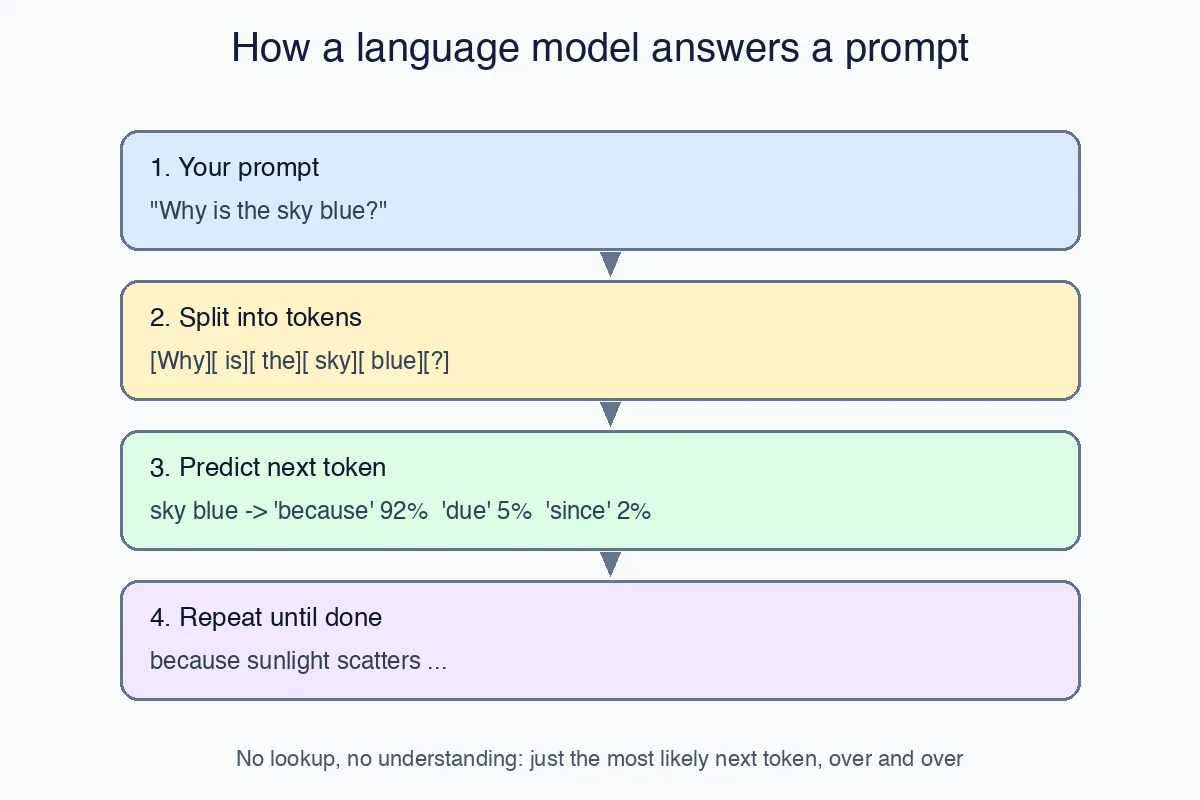
A large language model (LLM) does not look anything up and does not “know” facts the way a database does. It turns your text into small pieces called tokens, predicts the single most likely next token, appends it, and repeats until it predicts a “stop”. Everything you see from ChatGPT, Copilot or Azure OpenAI is that one loop, run very fast. Once you understand the loop, the model’s strengths and its odd mistakes stop being mysterious.
This is the fourth article in the beginner series. The earlier ones are How to Become a Software Engineer, The Language of Computers and Variables, Values and References.
Step 1: your prompt is just text
When you type Why is the sky blue?, the model receives exactly that string, plus any hidden instructions the application adds (the “system prompt”) and, in a chat, the earlier messages. Nothing else. It cannot see your screen, your files or the internet unless the application pastes that content into the prompt for it.
Step 2: text becomes tokens
Computers work with numbers, so the text is split into tokens: chunks that are usually a word, part of a word, or a punctuation mark. Each token has an ID number.
1
2
"Why is the sky blue?"  ->  [Why] [ is] [ the] [ sky] [ blue] [?]
                        ->  [5195, 374, 279, 13180, 6437, 30]
Two practical consequences:
- Pricing and limits are in tokens, not words. A rough rule for English is 1 token ≈ 4 characters, or about 750 words per 1,000 tokens. Our token counting post shows how to measure this in C#.
- Spelling tasks are hard for the model. Ask “how many r’s are in strawberry” and the model sees
[str][aw][berry], not individual letters, which is why it often gets this wrong.
Step 3: predict the next token
The model is a huge mathematical function. Given the sequence of tokens so far, it outputs a probability for every token in its vocabulary being the next one:
1
2
3
4
5
6
"Why is the sky blue? The sky is blue because"
    sunlight   0.62
    of         0.21
    light      0.09
    the        0.04
    ...
Then one token is picked. With temperature = 0 it always picks the most likely one, so the answer is nearly the same every time. A higher temperature lets less likely tokens win sometimes, which feels more creative but also more random.
Where do the probabilities come from? From training: the model read an enormous amount of text and adjusted billions of internal numbers (the weights) so that its predictions matched what actually came next. That is all “learning” means here.
Step 4: repeat until done
The chosen token is appended to the sequence, and the whole thing runs again:
1
2
3
... because            -> sunlight
... because sunlight   -> scatters
... because sunlight scatters -> more
This continues until the model predicts a special end-of-message token or hits the maximum length you allowed. That is why answers stream word by word in the UI: they really are produced one token at a time. Our streaming post shows how to display them as they arrive.
Why the model sometimes makes things up
Because every step only asks “what is the most plausible next token?”, the model will happily produce a plausible-looking citation, API method or statistic that does not exist. This is called a hallucination, and it is not a bug that will be “fixed” in the loop above; it is what the loop does. The practical fixes are outside the model:
- Give it the facts in the prompt (paste the documentation, the error message, the data). This is the idea behind retrieval-augmented generation, compared with fine-tuning in RAG vs fine-tuning.
- Ask for a checkable format, such as JSON with a fixed schema, so your code can validate it. See structured outputs.
- Verify anything that matters by running the code, following the link or checking the number.
A small mental checklist
When an AI answer looks wrong, run through the loop:
- What did it actually receive? Maybe the key detail was never in the prompt.
- Could tokenisation hide it? Letters, digits in long numbers and rare names are split in awkward ways.
- Was the most plausible continuation simply wrong? Add context or ask it to show its reasoning step by step.
- Did it stop early? You may have hit the maximum output length.
Try it yourself
- Open any tokenizer playground (OpenAI and Hugging Face both publish one) and paste a sentence. Count the tokens, then try a long word and a line of code.
- Ask the same question with temperature 0 and temperature 1 a few times and compare the answers.
- Ask a model for the documentation link of a function you know well, then check whether the link exists.
Next in the series we will look at how programs talk to these models through an API, and what a “prompt” looks like when it is code rather than a chat window.