Call to get Azure Search index failed - Server responded with status 403
Fix the Azure OpenAI 'call to get Azure Search index failed' 403 error by granting the service the right role on your Azure AI Search resource.
Posted Updated 
Screenshot of the Azure OpenAI error message: call to get Azure Search index failed, server responded with status 403
By Manish Tiwari
1 min read
Call to get Azure Search index failed - Server responded with status 403
Why?
Azure Open AI Service does not have access to Azure Search service.
How to fix?
Assign Role
- Go to Azure AI Search Service (Formally known as Azure Search Service and Cognitive Search Service).
- You have to provide one of the following roles to open ai service
| Role | Assignee | Resource | Description |
|---|---|---|---|
| Search Index Data Reader | Azure OpenAI | Azure AI Search | Inference service queries the data from the index. |
| Search Service Contributor | Azure OpenAI | Azure AI Search | Inference service queries the index schema for auto fields mapping. Data ingestion service creates index, data sources, skill set, indexer, and queries the indexer status. |
For more information, please visit Using your data with Azure OpenAI securely
- Assign the role to open ai service, Follow this to know more about role assignment please go through MS Docs
Enable RBAC
- Go to Azure AI Search Service (Formally known as Azure Search Service and Cognitive Search Service).
- Under Settings section, click on Keys
Under API Access control either select Both or Role-based access control, I would recommend using RBAC(Role-based access control)
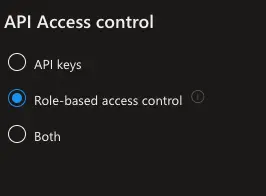
- Press Yes when it asks for confirmation
Related posts
This post is licensed under CC BY 4.0 by the author.