Continuous batching, measured: llama.cpp static vs continuous scheduling on one M2 Pro
Real llama.cpp numbers, 3 runs each: continuous batching cut p95 time to first token from 55 s to 6.4 s and nearly doubled throughput.
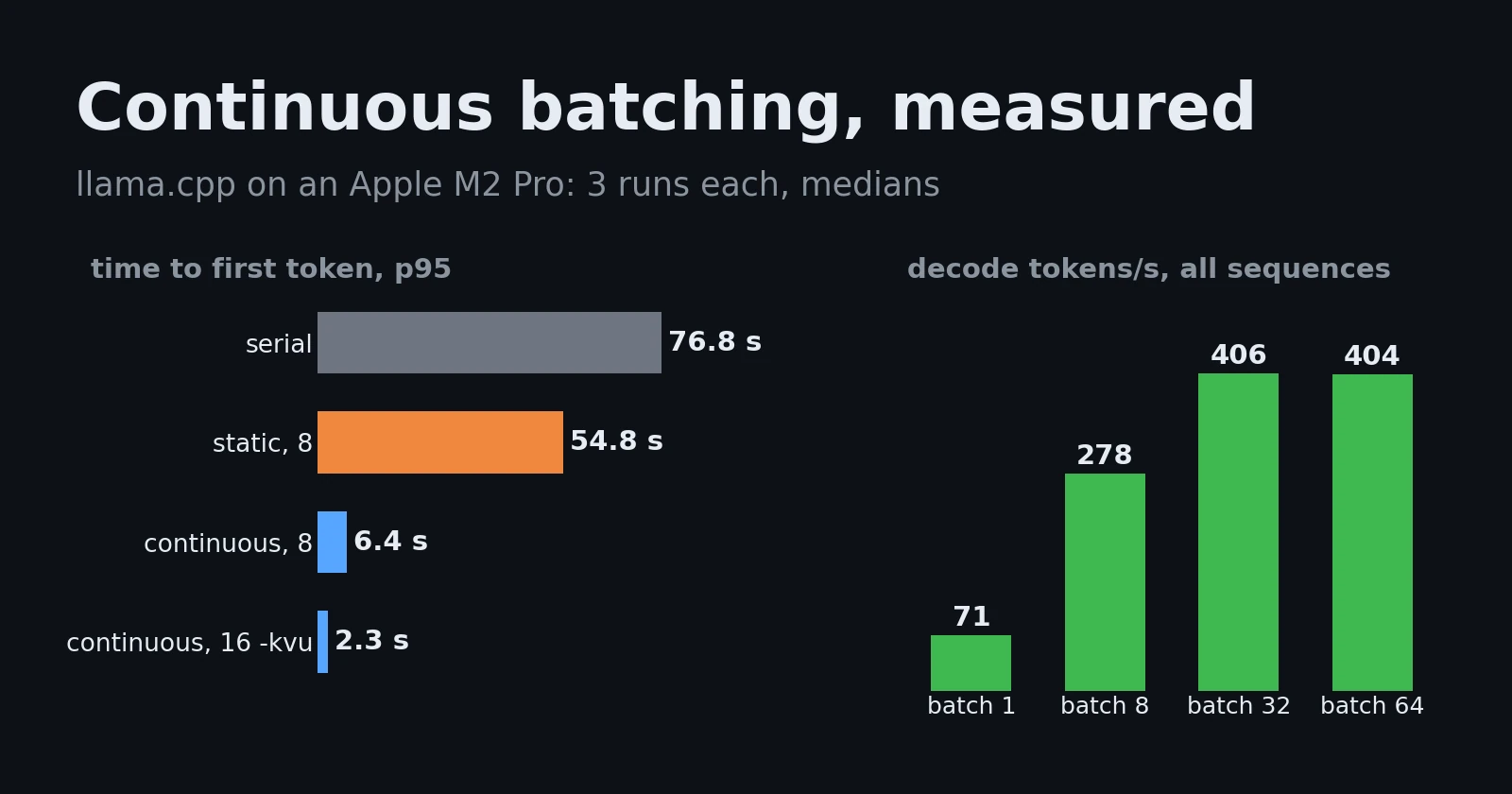
Every LLM server sold in the last two years lists “continuous batching” on its feature page, usually next to a throughput multiplier with no setup behind it. This post measures it on a box you can buy: one Apple M2 Pro, one 3.1B model, llama.cpp, and a load generator that sends the same 48 requests to each scheduler. Each configuration ran three times. Every number below is the median of those three runs, and the charts are drawn from the raw results.
The short version: on identical hardware and weights, switching llama-server from static to continuous batching cut the p95 time to first token from 54.8 s to 6.4 s and raised throughput from 82 to 156 tokens/s. Two flags made a further difference that most guides skip: a unified KV cache (-kvu) when you raise the slot count, and a smaller physical batch (-ub) when stalls in the token stream matter more than throughput.
What batching changes in a decode step
A decoder produces one token per sequence per forward pass. At batch size 1 that pass is bandwidth-bound: the GPU reads every weight in the model to do a few thousand multiply-adds per weight row, then waits for the next read. Put 8 sequences in the same pass and the weights are read once for all 8. The step gets a little slower and you get 8 tokens out of it instead of 1.
llama-batched-bench measures exactly that, with no scheduler in the way. We ran it with a 256-token prompt and 128 generated tokens per sequence, for 1 to 64 parallel sequences:
1
2
llama-batched-bench -m model-Q4_K_M.gguf -c 32768 -kvu -fa on \
  -npp 256 -ntg 128 -npl 1,2,4,8,16,32,64 --output-format jsonl
The setup: a 3.1B-parameter SmolLM3-architecture model (36 layers, 16 query heads sharing 4 KV heads) as GGUF Q4_K_M (1.9 GB), llama.cpp build 11669 with Metal on an Apple M2 Pro with 16 GB of unified memory, flash attention on.
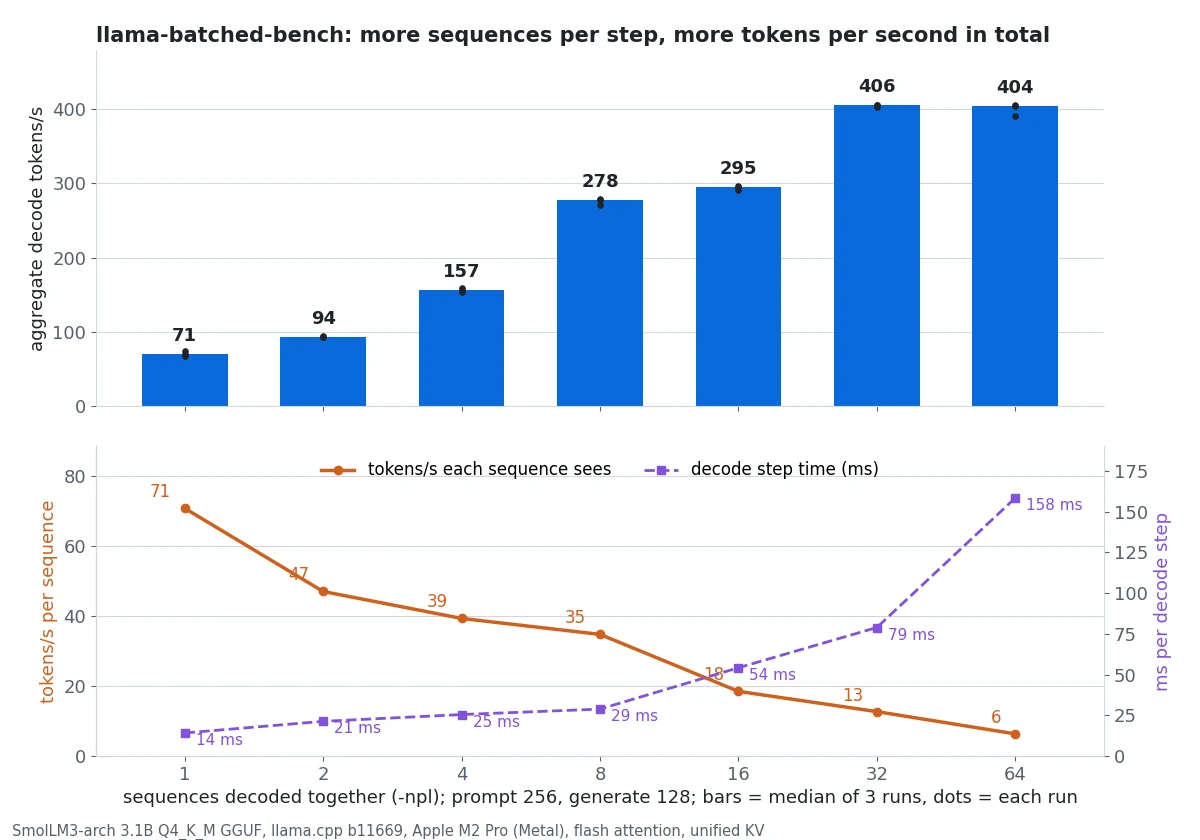
| Sequences | Total decode tok/s | Per sequence tok/s | Decode step | vs batch 1 |
|---|---|---|---|---|
| 1 | 71 | 70.7 | 14.1 ms | 1.0x |
| 2 | 94 | 47.0 | 21.3 ms | 1.3x |
| 4 | 157 | 39.3 | 25.5 ms | 2.2x |
| 8 | 278 | 34.7 | 28.8 ms | 3.9x |
| 16 | 295 | 18.5 | 54.2 ms | 4.2x |
| 32 | 406 | 12.7 | 78.9 ms | 5.7x |
| 64 | 404 | 6.3 | 158.4 ms | 5.7x |
Three regimes show up in the table:
- 1 to 8 sequences is close to free. The step only doubles (14.1 to 28.8 ms) while total throughput grows 3.9x. Each user’s stream drops from 71 to 35 tokens/s, which is still faster than anyone reads.
- 8 to 16 is a bad trade on this GPU. The step time nearly doubles again for 6% more throughput. 32 sequences get back to a better point (406 tokens/s), so on this machine the curve has a step in it rather than a smooth bend. Measure your own hardware rather than trusting a rule of thumb.
- Past 32 there is nothing left. At 64 sequences throughput is flat (404 tokens/s) and every stream runs at 6 tokens/s. The step has become compute-bound; adding sequences only divides the same output among more users.
Prompt processing, for comparison, ran at 750 to 790 tokens/s at every batch size. Prefill is already compute-bound at batch 1, so batching it does not help. That matters below, because prefill is what interrupts decode.
The sweep shows what batching can do. It does not show what a server does with real traffic, where requests arrive at random and want very different output lengths.
Static vs continuous: the scheduler under load
Static batching collects up to N requests, runs them together until all of them finish, and only then admits the next group. Continuous batching (also called in-flight or iteration-level batching) re-forms the batch at every decode step: a sequence that finishes leaves at once, and a waiting request joins at the next step. llama-server does continuous batching by default; -nocb turns it off.
The load generator, scripts/llama_server_loadgen.py in this blog’s repository, uses only the Python standard library. It sends 48 streaming /completion requests with seeded Poisson arrivals over 36 seconds. Prompts are 63 to 204 tokens and output lengths range from 32 to 512 tokens, with most answers short and a few long. ignore_eos holds every request to its exact length, so each configuration generates the same 7,184 tokens. Prompt caching is off. The script records a client-side timestamp for every streamed token, so time to first token (TTFT) includes queueing. We ran six server configurations, each three times, with a fresh server for every run:
1
2
3
4
5
6
7
llama-server -m model-Q4_K_M.gguf -c 16384 -fa on -np 1          # serial
llama-server -m model-Q4_K_M.gguf -c 16384 -fa on -np 8 -nocb    # static, 8 slots
llama-server -m model-Q4_K_M.gguf -c 16384 -fa on -np 8          # continuous, 8 slots
llama-server -m model-Q4_K_M.gguf -c 16384 -fa on -np 8 -b 64 -ub 64
llama-server -m model-Q4_K_M.gguf -c 16384 -fa on -np 16
llama-server -m model-Q4_K_M.gguf -c 16384 -fa on -np 16 -kvu
python3 scripts/llama_server_loadgen.py 8080 load_cont8_r1.jsonl 48
The difference is easiest to see request by request. Each bar below is one request: yellow while it waits for its first token, coloured while it streams.
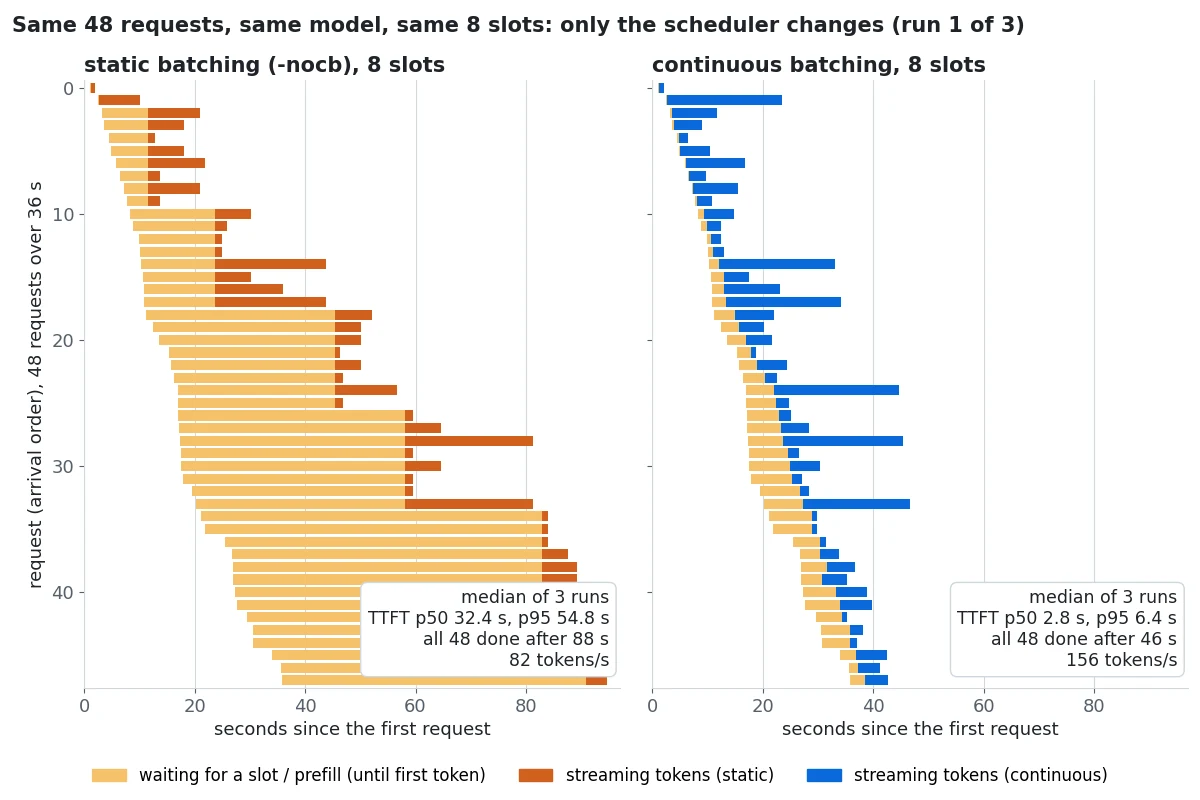
Under static batching the requests move in waves. In run 1, eight requests got their first token together at 11.5 s, eight more at 23.7 s, and the next group at 45.5 s. Each wave lasts as long as its longest answer: one 512-token request holds seven finished slots idle while the queue grows. That is head-of-line blocking, and it is why static batching barely beats serial service here (82 vs 64 tokens/s) even though it has 8x the slots.
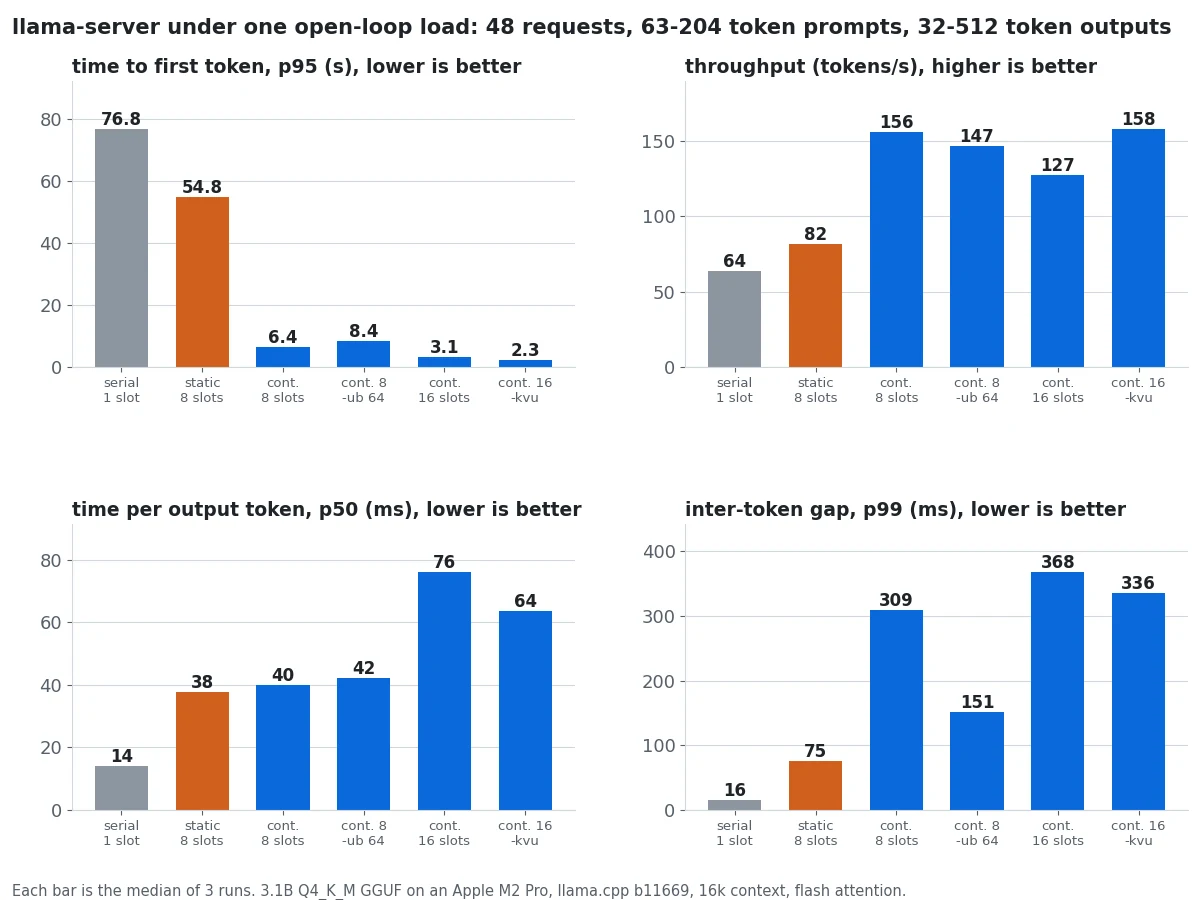
| Configuration | TTFT p50 | TTFT p95 | Short answers done (p50) | Throughput | Time per token p50 | Token gap p99 |
|---|---|---|---|---|---|---|
serial, -np 1 | 46.6 s | 76.8 s | 55.4 s | 64 tok/s | 14 ms | 16 ms |
static, -np 8 -nocb | 32.4 s | 54.8 s | 35.5 s | 82 tok/s | 38 ms | 75 ms |
continuous, -np 8 | 2.8 s | 6.4 s | 5.3 s | 156 tok/s | 40 ms | 309 ms |
continuous, -np 8 -b 64 -ub 64 | 4.6 s | 8.4 s | 7.3 s | 147 tok/s | 42 ms | 151 ms |
continuous, -np 16 | 0.46 s | 3.1 s | 4.4 s | 127 tok/s | 76 ms | 368 ms |
continuous, -np 16 -kvu | 0.39 s | 2.3 s | 3.7 s | 158 tok/s | 64 ms | 336 ms |
“Short answers done” is the median end-to-end time for requests of 64 tokens or fewer, which is closest to what a chat user feels. Throughput is all generated tokens divided by the time from the first arrival to the last completion, so it includes the tail where only one long answer is still running. That is why it sits well below the 278 tokens/s the microbenchmark reached at batch 8. The three runs agreed closely: continuous-8 throughput ranged from 155 to 157 tokens/s and its p95 TTFT from 6.4 to 7.3 s. Static batching varied most (76 to 82 tokens/s, 54.5 to 60.8 s).
What the measurements say:
Continuous batching is a latency feature first. With the same model and the same 8 slots, p95 TTFT fell 8.5x (54.8 to 6.4 s) and a short answer finished in 5.3 s instead of 35.5 s. Throughput nearly doubled (82 to 156 tokens/s), because slots no longer sit idle behind the longest answer in their wave.
Per-token speed did not change; waiting did. Static and continuous batching over 8 slots both stream at about 40 ms per token, because both decode about 8 sequences per step. The difference is all in the queue.
Continuous batching makes the stream stutter. The p99 gap between two tokens of one answer rose from 75 ms (static) to 309 ms (continuous). When a new request joins, its whole prompt is prefilled in the same step as everyone else’s next token. At about 760 prefill tokens/s, a 200-token prompt adds roughly 260 ms to that step for every user already streaming. This is the stall that chunked prefill exists to fix.
A smaller physical batch is llama.cpp’s chunked prefill. With -b 64 -ub 64, a server iteration holds at most 64 tokens, so a new prompt is spread over several steps that each still advance the running streams. The p99 gap halved (309 to 151 ms) and the worst gap fell from 353 to 184 ms. The cost was 6% throughput (156 to 147 tokens/s) and 2 s more p95 TTFT. Use it for voice and typing-speed UIs where a visible hitch is worse than a slightly later start. Leave it off for batch jobs.
More slots without -kvu lost throughput. Going from 8 to 16 slots cut p95 TTFT to 3.1 s, but throughput fell from 156 to 127 tokens/s. Two things changed at once. Each step now carried up to 16 sequences, and the sweep above shows 16 is a poor point on this GPU. Also, without -kvu, llama-server splits -c evenly across slots: the server log reported n_ctx_slot = 1024 for 16 slots, against 16384 with -kvu. With a unified KV cache, the same 16 slots reached 158 tokens/s and a 2.3 s p95 TTFT, the best result on both axes. Every slot can also use the full context, so a long prompt no longer fails just because it landed on a 1,024-token slot.
Sizing slots: the KV cache is the budget
Each slot holds its sequence’s keys and values for every layer. For this model the arithmetic is 2 (K and V) x 36 layers x 4 KV heads x 128 dimensions x 2 bytes at f16, or 72 KiB per token. A full 16,384-token cache is 1.1 GiB. That is small next to the 1.9 GB of weights, which is why 16 slots fit on a 16 GB laptop. A 70B model with the same per-token footprint would be a different story. Grouped-query attention, with 4 KV heads instead of 16, is what keeps this number a quarter of what it would otherwise be.
To estimate how many tokens your own prompts need per slot, the Lamplit Labs token counter and the context window reference give the input side. Add your longest expected answer to get the per-slot context.
Choosing settings
| If your traffic is… | Start with | Why |
|---|---|---|
| A chat UI with a handful of users | continuous, -np 8 | 6.4 s p95 TTFT under a 48-request burst, 2x the static throughput |
| Bursty with many short requests | continuous, -np 16 -kvu | Lowest TTFT (0.39 s p50) and the best throughput we measured |
| Voice or live typing, where stalls show | add -b 64 -ub 64 | Halves the p99 token gap for 6% throughput |
| Offline batch jobs | the highest -np the KV cache allows, -kvu | Only total tokens/s matters; the sweep flattens at 32 sequences here |
| Any of the above | never -nocb for interactive traffic | Head-of-line blocking made it barely better than serial |
Three caveats. First, this is a 3.1B model on a laptop GPU. Absolute numbers on an H100 running vLLM are an order of magnitude higher, but the scheduler effects have the same shape; the vLLM vs TGI vs TensorRT-LLM comparison shows the datacenter end. Second, the machine was shared with other work, with load averages between 3.7 and 16 at the start of the runs. That is why we report medians of three runs, and why the ranges above matter more than the second digit. Third, the quantization post ran a smaller version of this experiment with a different seeded workload. Its absolute TTFT numbers differ, but the ordering of the schedulers is the same.
Reproducing it
Everything is in this blog’s repository. scripts/llama_server_loadgen.py is the load generator. scripts/summarise_continuous_batching_runs.py turns the raw runs into scripts/data/continuous-batching-llama-cpp-m2pro.json, and scripts/gen_continuous_batching_post_images.py draws every chart on this page from that file. Change the seed or the arrival rate and run it against your own server; the summary script reports the same percentiles for any number of runs.
Repeating a benchmark three times on every change, checking the results in next to the code and regenerating the charts from them is the kind of check-gated, repeatable loop that Pulse, Lamplit Labs’ self-improving automation product, is being built to run across projects. Pulse is coming soon.
Related
- GGUF vs AWQ vs GPTQ: what 4-bit quantization really costs in quality and latency - the format choice that sets the bandwidth this sweep starts from.
- vLLM vs TGI vs TensorRT-LLM: LLM Serving Latency and Throughput on One H100, Measured at p99 - the same scheduler questions on datacenter servers.
- Enterprise AI: Cost and Latency SLOs for LLM Workloads - where TTFT and time-per-token targets come from.
- Profiling a Rust LLM Token Batcher with cargo flamegraph - the batching layer from the application side.