Enterprise AI: surviving Azure OpenAI model retirements without a weekend of firefighting
Azure OpenAI versions retire and auto-upgrade. How we inventory deployments, pin versions in Bicep, gate upgrades on a golden eval set and canary via APIM.
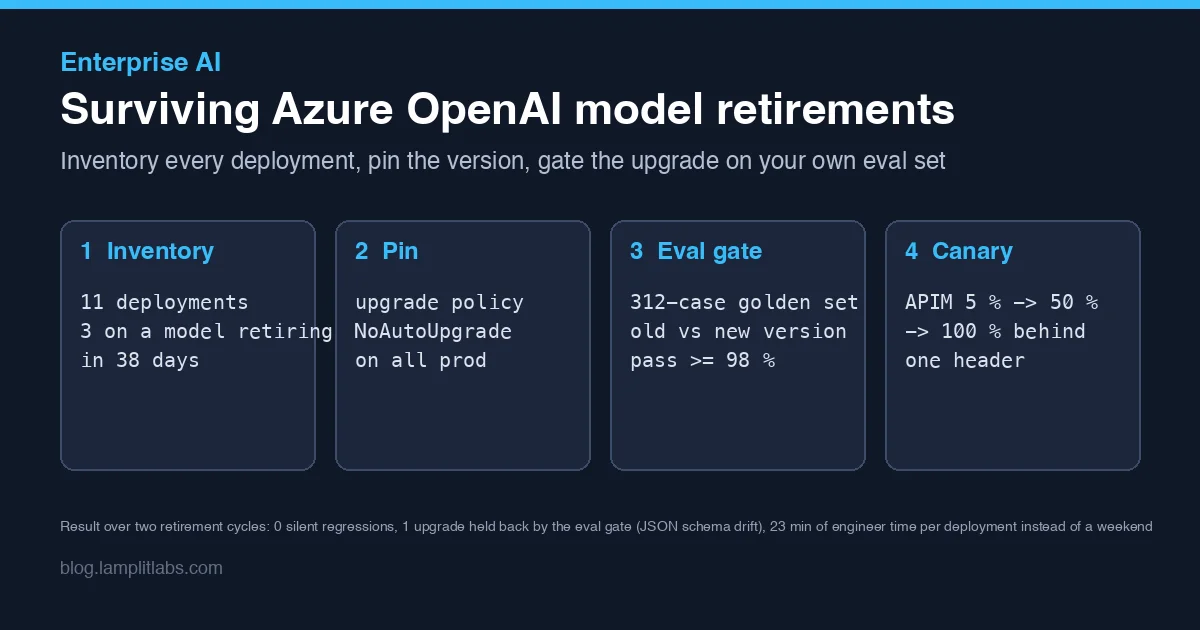
Azure OpenAI model versions have a shelf life. Every version gets a retirement date, and a deployment left on its default upgrade policy will switch to the new version on that date whether or not anyone is in the room. We learned this the way most teams do: a ticket summariser started returning slightly different JSON on a Tuesday, nobody had deployed anything, and it took half a day to notice the model version in the response headers had changed.
This post is what we do now instead. It is three small pieces - an inventory script, an eval gate and a canary - and it has carried us through two retirement cycles with zero silent regressions. It follows on from our governance and prompt testing posts; if you already have a golden set from the second one, you are most of the way there.
Step 1: know what you are running
The first problem is that nobody could answer “which deployments are affected?” from memory. Across four accounts and two regions we had eleven deployments, and the version and upgrade policy for each lived only in the portal.
aoai-inventory.sh walks every Azure OpenAI account in a subscription with az cognitiveservices account deployment list, joins the result against the published retirement dates, and prints one row per deployment. It exits non-zero when any production deployment either auto-upgrades or retires inside sixty days, so it runs in a nightly pipeline and pages the on-call channel instead of being something somebody remembers to look at.
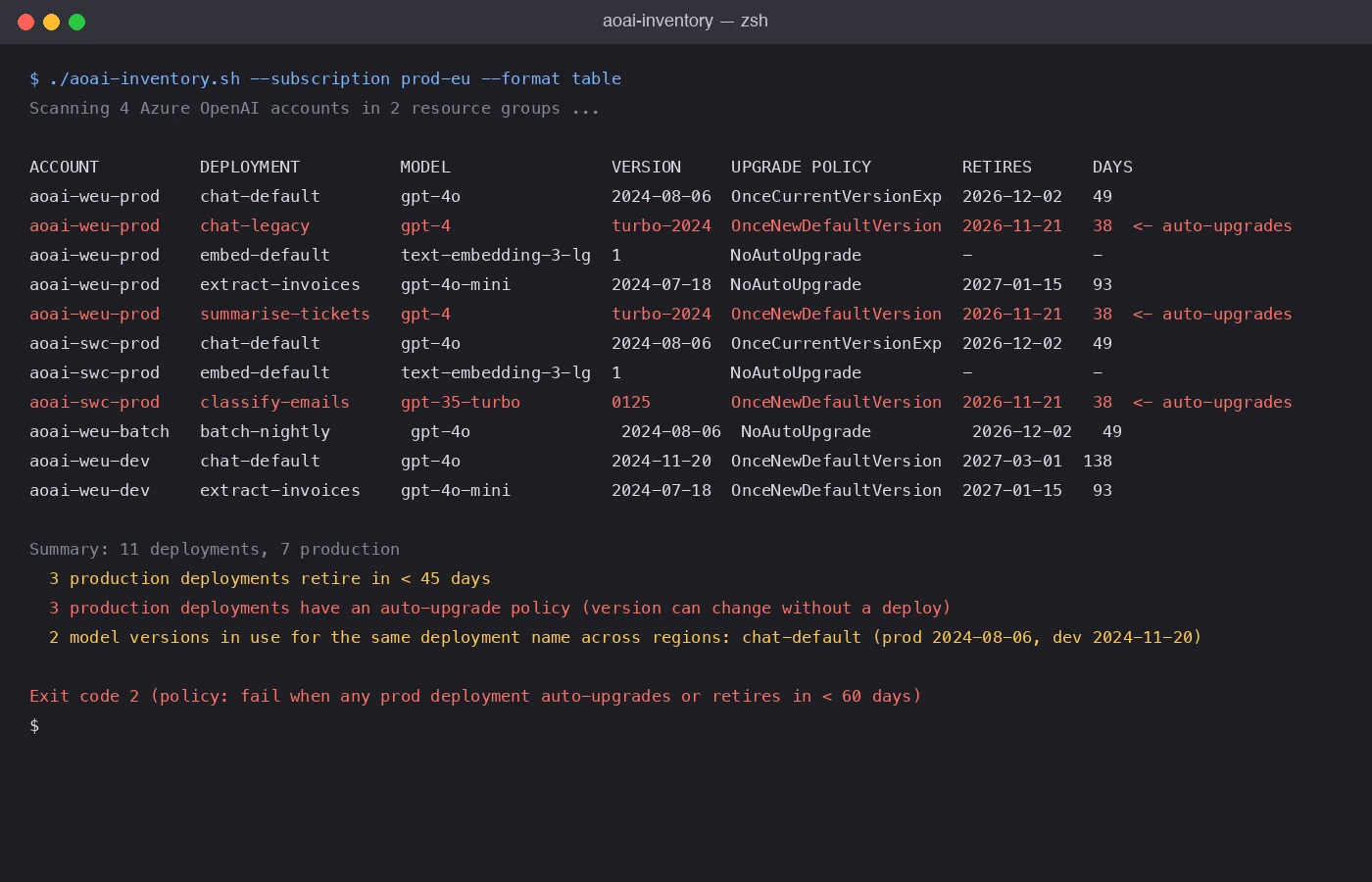
The first run was the uncomfortable one. Three production deployments were on OnceNewDefaultVersion, which means Azure would have moved them to whatever the new default was on the retirement date. One of them was the ticket summariser from the Tuesday incident; we had fixed the prompt but never the policy.
The other finding we did not expect: chat-default ran a different model version in dev than in prod. Every “works on my machine” prompt complaint for the previous month suddenly had an explanation.
Step 2: pin everything in production
The policy change itself is one line per deployment, and we put it in the Bicep so it cannot drift back:
1
2
3
4
5
6
7
8
9
resource chatDefault 'Microsoft.CognitiveServices/accounts/deployments@2024-10-01' = {
  parent: account
  name: 'chat-default'
  sku: { name: 'GlobalStandard', capacity: 150 }
  properties: {
    model: { format: 'OpenAI', name: 'gpt-4o', version: '2024-08-06' }
    versionUpgradeOption: 'NoAutoUpgrade'
  }
}
NoAutoUpgrade means the deployment stops working on the retirement date rather than silently changing behaviour. That sounds worse, and for a hobby project it is. For a system that produces invoices it is the right default: a loud failure with a known date beats a quiet one with no date. The inventory script’s sixty-day window exists precisely so the loud failure never actually happens.
We also added an Azure Policy audit rule for versionUpgradeOption != 'NoAutoUpgrade' on anything tagged env=prod, using the same pattern as our governance-as-code post. The Bicep stops it drifting from our side; the policy catches anyone clicking in the portal.
Step 3: gate the upgrade on your own data
Pinning only moves the problem: now somebody has to do the upgrade on purpose. The question is whether the new version behaves the same on our prompts, and the only honest answer comes from running both versions over the same cases and comparing.
ModelUpgradeGate is a small .NET console that takes a baseline version, a candidate version and a JSONL file of cases. Each case has a prompt, an expected result and a scorer: exact match for classification, JSON Schema validation for structured output, and an LLM judge with a rubric for summaries. It runs each case against both versions at temperature 0 with a fixed seed, in parallel, and prints a per-suite pass rate with the gate threshold.
1
2
3
4
5
6
7
8
9
10
11
12
13
14
15
16
var results = await Parallel.ForEachAsync(cases, new ParallelOptions { MaxDegreeOfParallelism = 8 },
    async (c, ct) =>
    {
        var baseline  = await Run(c, opts.Baseline, ct);
        var candidate = await Run(c, opts.Candidate, ct);
        return new CaseResult(c.Id, c.Suite,
            Score(c, baseline), Score(c, candidate),
            baseline.Usage, candidate.Usage, baseline.Latency, candidate.Latency);
    });

foreach (var suite in results.GroupBy(r => r.Suite))
{
    var passRate = suite.Average(r => r.CandidateScore);
    var verdict  = passRate >= opts.Gate ? "PASS" : "FAIL";
    Console.WriteLine($"{suite.Key,-22}{suite.Count(),5}  {passRate:P1}  {verdict}");
}
The gate is 98 % per suite, not overall. An overall number would let a big suite hide a small one, and it was the small one that mattered:
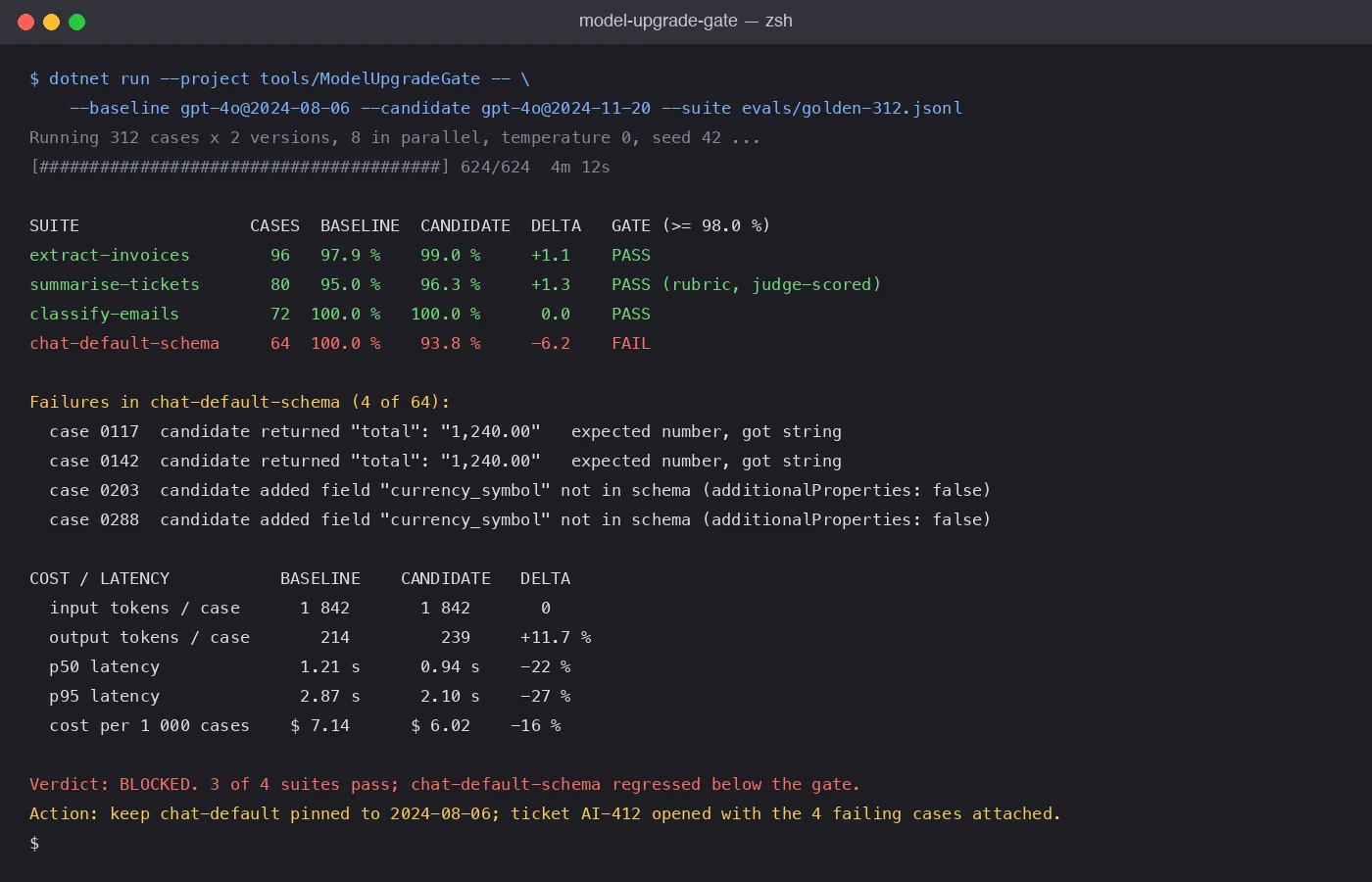
The candidate was faster and cheaper and three of four suites got better. It also started formatting currency totals as "1,240.00" strings in a schema that says number, and added a currency_symbol field the schema does not allow. In a chat window nobody would notice. In the pipeline that writes those totals into a ledger it would have been a rounding of exactly 100 % of every invoice over a thousand.
The fix was a sentence in the system prompt and switching that call to strict structured outputs, which makes the schema a constraint rather than a suggestion. With that change the suite went to 100 % and the upgrade went through a week later. The point is not that the new version was bad; it is that we found out, on our data, before customers did.
Step 4: canary behind the gateway
Passing the gate earns the candidate a canary, not a cutover. Because all traffic already goes through API Management (see the model routing post), the canary is a policy fragment that rewrites the deployment name for a percentage of calls and stamps the version it chose into a response header:
1
2
3
4
5
6
7
8
9
10
11
12
<choose>
  <when condition="@(new Random().Next(100) < int.Parse(context.Variables["canaryPercent"]))">
    <rewrite-uri template="/openai/deployments/chat-default-v2/chat/completions" />
    <set-variable name="servedVersion" value="2024-11-20" />
  </when>
  <otherwise>
    <set-variable name="servedVersion" value="2024-08-06" />
  </otherwise>
</choose>
<set-header name="x-model-version" exists-action="override">
  <value>@((string)context.Variables["servedVersion"])</value>
</set-header>
canaryPercent is a named value, so moving from 5 to 50 to 100 is a change in APIM with no deploy. The header lands in our OpenTelemetry spans, which means the dashboards from the observability post can split error rate, latency and schema-validation failures by model version for free. We hold each step for a working day.
What it costs and what it bought
The whole thing is about 400 lines: a shell script, a console app, a Bicep property and an APIM fragment. Running the 312-case gate costs a few dollars and four minutes. Per deployment, an upgrade now takes an engineer about 23 minutes of attention spread across a week, most of it reading the failure list.
Over two retirement cycles and eleven deployments: zero regressions reached production, one upgrade was blocked by the gate for a real schema defect, and the version mismatch between dev and prod is gone because the inventory script fails the build when it comes back. The Tuesday incident has not recurred, which is the only metric the ticket summariser’s users care about.
If you have one Azure OpenAI deployment, pin it and put the retirement date in your calendar. If you have more than three, write the inventory script this week; the first run will tell you something you did not know.