Enterprise AI: What JSON Costs in an LLM Prompt - ERP Records in Six Formats, Measured
The same 12-field ERP invoices in six prompt formats: pretty JSON cost 1.86x the tokens of CSV, XML 2.25x, and pretty JSON took 2.4x as long to prefill.
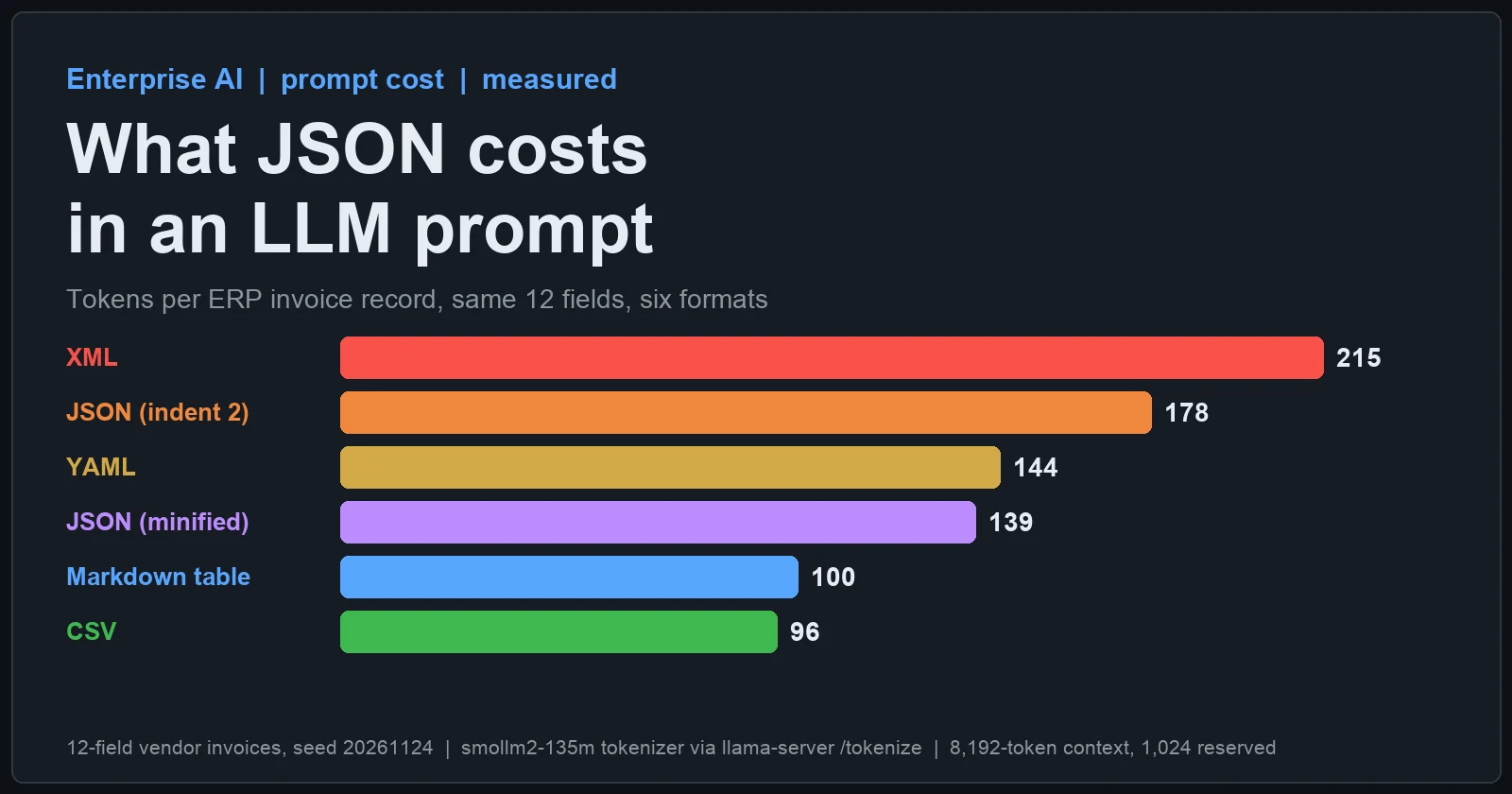
Most enterprise copilots I review put ERP data into the prompt the same way: the backend already has the records as objects, so it calls JSON.stringify(rows, null, 2) or JsonSerializer.Serialize(rows, new() { WriteIndented = true }), pastes the result under the instructions, and asks the question. It works, the model reads it, and nobody looks at the format again.
The format is not free, though. A model bills, rate-limits and fits its context window in tokens, and every quote, brace, repeated key and indent costs tokens. I wanted to know how much, so I wrote the same vendor invoices in six formats and counted the tokens with the model’s own tokenizer. I also timed how long the server took to read each prompt. Everything below comes from one script that is in the repo.
The setup
- Records: synthetic vendor invoices of the kind an accounts-payable assistant reads from Dynamics 365 Finance & Operations or any other ERP. There are 12 fields: invoice id, vendor account, vendor name, invoice date, due date, currency, amount, VAT, main account, cost centre, status and description. They come from a seeded generator (seed 20261124), so every format gets exactly the same values.
- Formats: pretty JSON (indent 2), minified JSON, YAML, XML (one element per field), a Markdown table and CSV with a header row.
- Tokenizer and server: SmolLM2-135M-Instruct converted to GGUF and served by
llama-server(llama.cpp b12359, Metal, Apple M2 Pro) with an 8,192-token context. Token counts come from the server’sPOST /tokenize. Prefill times come fromPOST /completionwithn_predict: 1andcache_prompt: false, read from the server’s owntimings.prompt_ms, median of 5 runs after one warm-up. - Context fit: how many records still fit after 1,024 tokens are kept free for the instructions and the answer. The script finds this by bisection with the real tokenizer, not by dividing.
A small model keeps the prefill runs short. It also means the absolute counts are for this one BPE tokenizer (49k vocabulary). GPT-4o, Claude or Llama 3 will give different numbers. The ranking comes from repeated keys, quotes and indentation, which every BPE tokenizer has to pay for, so it should carry over. You can check it against your own model in a minute (see “Run it yourself”).
The result
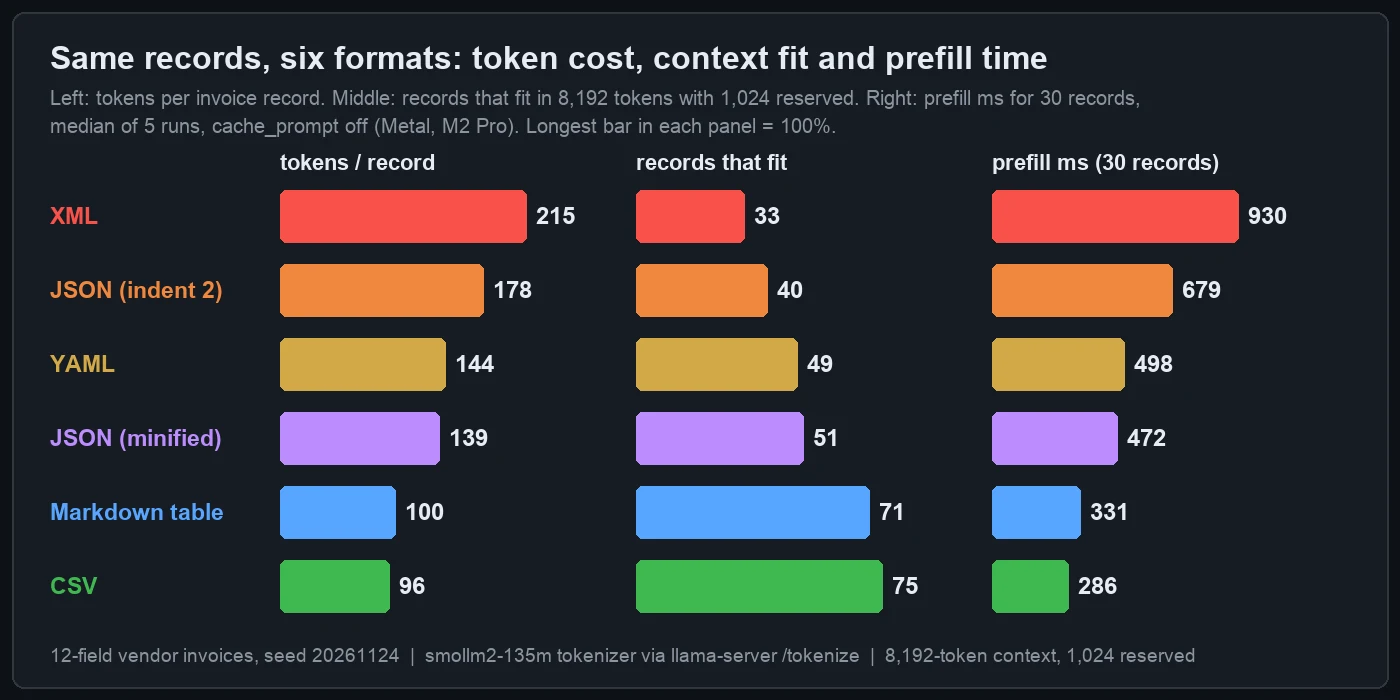
Same records in each format. Each panel is scaled on its own, so the longest bar is 100% of that panel.
| Format | Tokens per record | vs CSV | Records that fit in 8,192 (1,024 reserved) | Prefill, 30 records |
|---|---|---|---|---|
| XML | 215.3 | 2.25x | 33 | 930 ms |
| JSON, indent 2 | 177.7 | 1.86x | 40 | 679 ms |
| YAML | 144.4 | 1.51x | 49 | 498 ms |
| JSON, minified | 139.1 | 1.45x | 51 | 473 ms |
| Markdown table | 100.2 | 1.05x | 71 | 331 ms |
| CSV | 95.6 | 1.00x | 75 | 286 ms |
Three things stand out:
- Pretty JSON costs 1.86x the tokens of CSV for the same data. For a 30-invoice prompt that is 5,358 tokens against 2,936. At 100,000 such calls a month that is about 242 million extra input tokens a month, and they buy nothing.
- The format decides how many records you can show the model. With the same context window and reserve, CSV fits 75 invoices and pretty JSON 40. If your retrieval step returns “the top 60 open invoices”, pretty JSON silently truncates the list or makes you move to a bigger, more expensive context tier.
- Prefill time grows faster than the token count. Pretty JSON has 1.82x the tokens of CSV but took 2.37x as long to prefill (679 ms against 286 ms). XML had 2.21x the tokens and took 3.25x as long. Attention cost grows with prompt length, so longer prompts cost more per token. On a hosted API you see this as time to first token.
Minified JSON and YAML came out almost the same (139 and 144 tokens per record). Removing the indentation from JSON saves 22%. Switching to YAML saves about as much, but you then have to quote values like "2026-10-22" and "655000", or a YAML parser will read them as a date and a number.
Where the tokens go
The best way to see the difference is to look at where the tokenizer cuts one record. The page below comes from token_view.py. It sends one invoice in three formats to /tokenize with with_pieces: true and colours each token. Bold white tokens are part of a field value. Grey tokens are keys, quotes, indentation and separators.
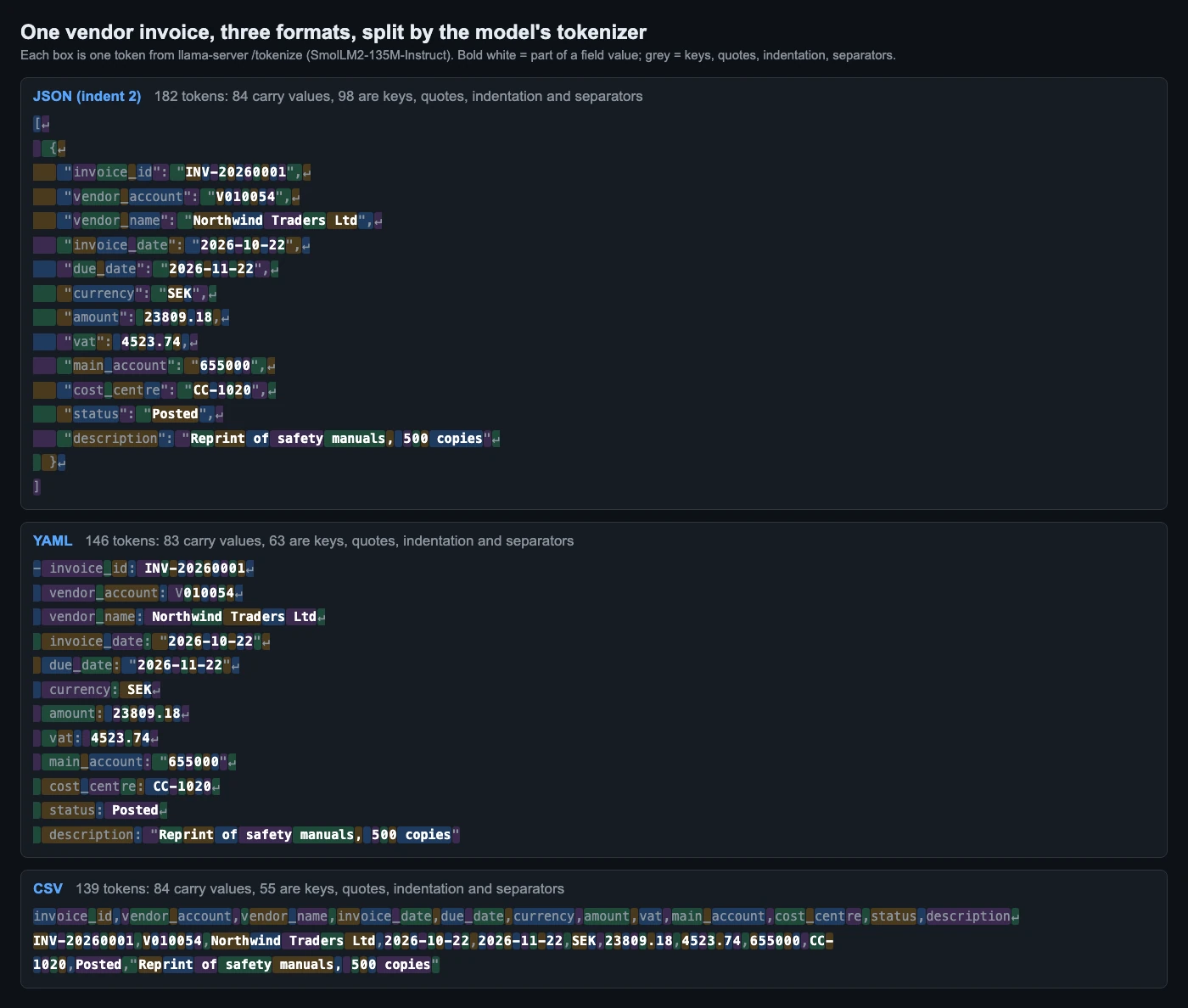
One invoice, split by the model’s tokenizer. The values cost about 84 tokens in every format. The format only changes what it adds around them.
The values, such as INV-20260001, Northwind Traders Ltd and 23809.18, cost the same 83 or 84 tokens in every format. The format decides only the overhead. Pretty JSON repeats all 12 keys in every record, each wrapped in quotes and followed by ": ", with a line break and indentation in front, which comes to 98 tokens of structure. CSV writes the keys once in the header row and then pays about one comma per field. That is also why the gap is small for a single record (139 tokens for CSV against 142 for minified JSON) and grows with every record after it. The Markdown table even loses at one record (170 tokens), because its header and |---| separator row cost about 70 tokens before any data. By ten records it is already ahead of every JSON and YAML variant.
Two details from this view are worth knowing:
- Field names cost tokens too.
vendor_accountis four tokens here (v,endor,_,account). The JSON and YAML formats pay for it in every record, so a short key such asvendorinstead ofvendor_accountsaves two tokens per record for that one field. Shorter keys are the cheapest change if you have to keep JSON. - Numbers and ids are expensive in every format. This tokenizer gives every digit its own token, so
23809.18is 8 tokens andINV-20260001is 11. Leave out the fields the question does not need. Removing two unused fields saves more than any change of format.
What I would do in an enterprise copilot
- Use a table for lists of records the model only reads. Use CSV or a Markdown table when you send the model invoice lines, ticket lists or stock levels to answer a question about. Both formats work equally well. Markdown is easier to read when you debug a prompt, and it cost only 5% more tokens here.
- Keep JSON for nested data and for the model’s output. Use JSON when the records are trees, such as an order with lines and each line with dimensions, because a table has to flatten them. Also keep structured output as JSON with a schema, as in the D365 F&O invoice coding workflow. The point is not to remove JSON everywhere. It is to stop sending pretty-printed JSON as input by default.
- Never send indented JSON to a model. If you change nothing else, minify it. Here that saved 22% of the tokens and 30% of the prefill time.
- Check answer quality before you switch. This post measures cost and prefill time, not accuracy. A model can read a wide table less reliably than labelled fields, especially with many columns. Put the format change through the same golden set you use for prompt changes, as in LLM eval harness CI gates, before it reaches users.
- Count the tokens in CI, not in your head. “About four characters per token” was wrong for all six formats here: they ranged from 1.53 characters per token (CSV) to 2.33 (XML). A test that counts the tokens of a real prompt and fails above a budget catches the day someone adds
WriteIndented = trueback. For the .NET side, see Azure OpenAI token counting.
Run it yourself
The scripts use only the standard library, plus Pillow for the charts. Any llama.cpp server works. Point it at the GGUF of the model you actually use, and the counts come from that model’s tokenizer.
1
2
3
4
5
python3 scripts/finetune-eval/hf_to_gguf.py <SmolLM2-135M-Instruct snapshot> .tmp/smollm2-135m.gguf
llama-server -m .tmp/smollm2-135m.gguf -c 8192 -np 1 -ngl 99 --port 8093 &
python3 scripts/enterprise-ai-prompt-formats/measure.py --port 8093 --prefill-records 30 \
    --out scripts/data/enterprise-ai-prompt-formats.json | tee .tmp/formats-term.txt     # ~30 s
python3 scripts/enterprise-ai-prompt-formats/token_view.py --port 8093 --out .tmp/token-view.html
The numbers are in scripts/data/enterprise-ai-prompt-formats.json. Here is the raw output of the run used in this post:
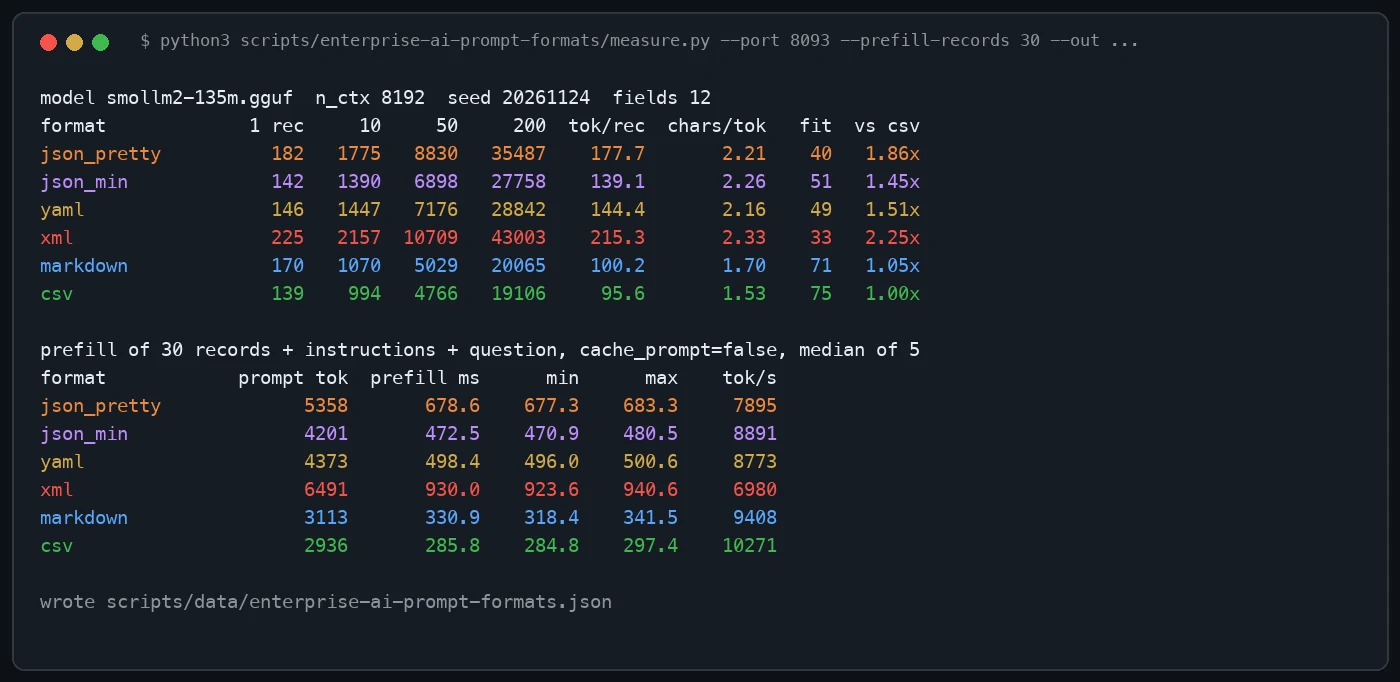
The raw output, one colour per format. Token counts are exact and do not change between runs. The five prefill runs per format stayed within 5% of their median.
To check the same thing on a prompt of your own without a server, paste it into the Lamplit Labs token counter, once as pretty JSON and once as a table. The AI pricing calculator walkthrough turns the difference into a monthly figure.
Changing one variable, measuring it against a baseline and keeping the change only when the numbers say so is how we tune the prompts behind Lamplit Labs’ products. It is also at the core of Pulse, Lamplit Labs’ self-improving automation product, coming soon.